Posts tagged: tech

All posts with the tag "tech"

186 posts latest post 2026-10-06
Publishing rhythm
May 2026 | 3 posts

ABCMeta #

I don’t do a lot of OOP currently, but I have been on a few heavy OOP projects and this ABCMeta and abstractmethod from abc would’ve been super nice to know about!

If you are creating a library with classes that you expect your users to extend, but you want to ensure that any extension has explicit methods defined then this is for you!.

from abc import ABCMeta, abstractmethod
class Family(metaclass=ABCMeta):
    @abstractmethod
    def get_dad(self):
        """Any extension of the Family class must implement a `get_dad` method"""

class MyFamily(Family):
    pass

If I try to instantiate MyFamily I will not be allowed:


❯ my_fam = MyFamily()
╭─────────────────────────────── Traceback (most recent call last) ────────────────────────────────╮
│ <ipython-input-8-ecb8e21ce815>:1 in <module>                                                     │
╰──────────────────────────────────────────────────────────────────────────────────────────────────╯
TypeError: Can't instantiate abstract class MyFamily with abstract methods get_dad

abcmetadata

In order for me to extend Family I have to implement the method get_dad

class MyFamily(Family):
    def get_dad(self):
        return "Me"

Now everything works as expected and I can sleep well knowing no one can extend my base class without creating methods I know they need.


my_fam = MyFamily()

my_fam.get_dad()
'Me'

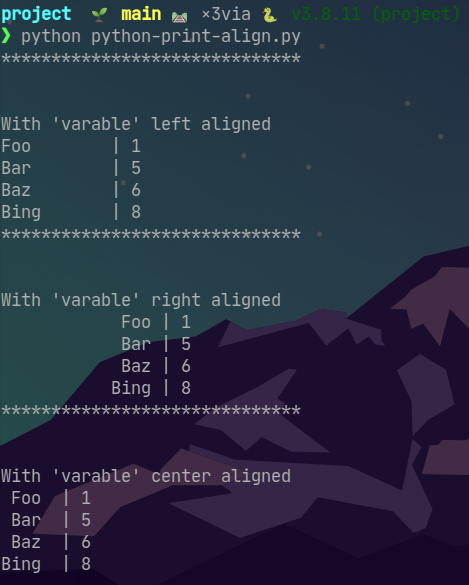
I am personally trying to use logger instead of print in all of my code, however I learned from [@Python-Hub] that you can align printouts using print with f-strings!.

This little python script shows how options in the f-string can format the printout.


import random

variables = "Foo Bar Baz Bing".split()
scores = random.sample(range(1, 11), len(variables))

print("*" * 30)
print("\n")
print("With 'varable' left aligned")
for varable, score in zip(variables, scores):
    print(f"{varable:<10} | {score}")

print("*" * 30)
print("\n")
print("With 'varable' right aligned")
for varable, score in zip(variables, scores):
    print(f"{varable:>15} | {score}")

print("*" * 30)
print("\n")
print("With 'varable' center aligned")
for varable, score in zip(variables, scores):
    print(f"{varable:^5} | {score}")

pyprintalign

Being lazy #

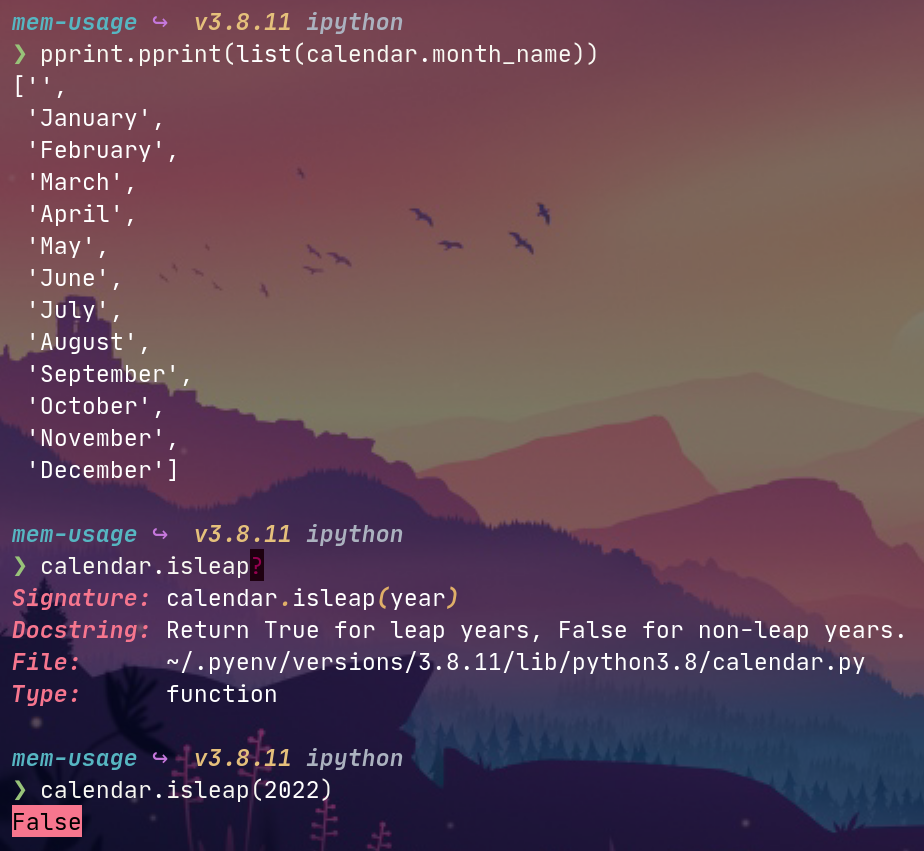
I almost exclusively use Python for my job and have been eye-balls deep in it for almost 5 years but I really lack in-depth knowledge of builtins. I recently learned of an awesome builtin called calendar that has way more than I know about for sure but I’m glad I know it’s here now!

I only needed it because I was too lazy to hard code the 7 weekdays into my module but it turns out there’s a lot of useful things like calendar.isleap()!

builtin ## Future use

I’m not exactly sure what will come my way where calendar will be super relevant but like anything, I’m just glad to know it exists for when the time arises!

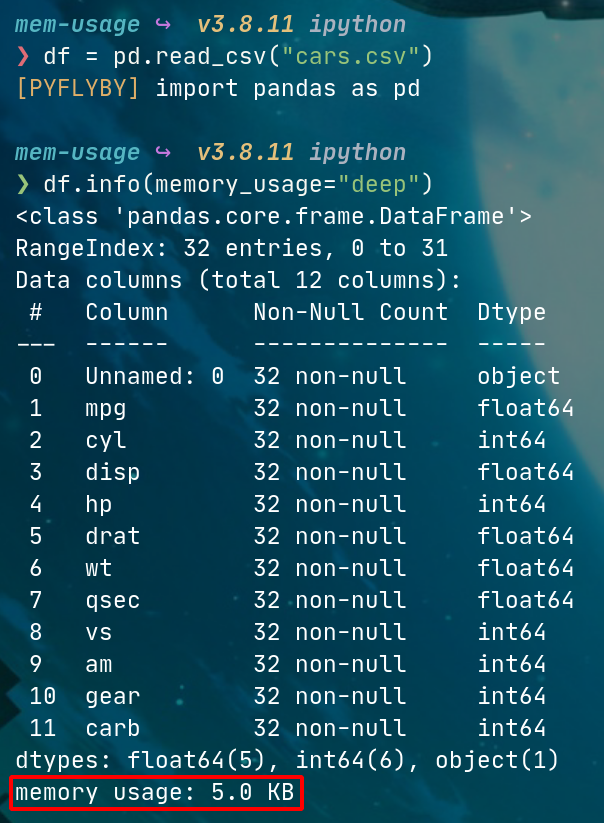
I have often wanted to dive into memory usage for pandas DataFrames when it comes to cloud deployment. If I have a python process running on a server at home I can use glances or a number of other tools to diagnose a memory issue… However at work I normally deploy dockerized processes on AWS Batch and it’s much more challenging to get info on the dockerized process without more AWS integration that my team isn’t quite ready for. So TIL that I can get some of the info I want from pandas directly!

DataFrame.info()

I didn’t realize that df.info() was able to give me more info than just dtypes and some summary stats… There is a kwarg memory_usage that can configure what you need to get back, so df.memory_usage="deep" will give you how much RAM any given DataFrame is using! Amazing tool for finding issues with joins or renegade source data files.

df = pd.read_csv("cars.csv")

df.info(memory_usage="deep")
DataFrame Memory Usage

I run pi-hole at home for ad blocking and some internal DNS/DHCP handling.

pi hole posts on the way

One thing I’ve never put too much thought in is asking “how well am I doing at blocking?” There’s lots of ways to measure that depending on what you care about but I just learned of adblock tester. It’s awesome and gave me a quick glimpse into how my pi-hole is performing on keeping my webpages clean and my DNS history private!

Credits to d3ward for the awesome tool!

I host a lot of services in my homelab, but they’re mostly dockerized applications so I have never had to care much about how content gets served up. Today I had several little concepts click into place regarding webservers, and it was a similar experience to when I started homelabing and didn’t know what a “server” was in the first place.

Servers

A “server” can have a lot of different meanings but specifically in my world it was a physical server, like my PowerEdge R610 which acts as my main “home server”. But then on my server, I have other servers… Jellyfin is my main media server - but that’s obviously not a hardware thing, that’s software. This is certainly not a groundbreaking thing but it was a tiny piece to the puzzle that I was missing… that “server” is highly contextual.

Webservers

Something that confused the heck out of me when I first started down the road of having a server was what a webserver even was… I always thought the “webserver” was just “a server that hosts a website”… and yes, that’s true, but also it wasn’t true in how I understood “server”. It turns out that across my 40-odd dockerized services I have at home that I must have about 40-odd web servers running, each docker container is spinning up its own!

So something I have wanted to do for a long time is put my theology notes online for my small group to access whenever they might want… it doesn’t need to be fancy or anything. My issue was not knowing what to even Google. I tried “How to serve up static html” but that kind of search is for people who know what a “static” site is - I am not one of those people. I kept running across nginx and apache things, wordpress and other website building tools, etc. In fact I only recently learned that JavaScript assets cann still be considered static so I am a complete baby in the web-dev space.

What I really wanted was just a simple landing page with a link to each of my “posts” which are in the form of a single html file each that I can easily export from my tiddlywiki (I have a post about tiddlywiki here)

The first win python -m http.server right in the directory I kept my html files in and that got me what I wanted functionally. But then I wanted just a hair more organization… I started looking for a way to dynamically generate an index for a directory of html files but again the verbiage of that Google search just wasn’t helping me - I didn’t want anything complicated and I knew that what I wanted had to be easy…

The Index

Luckily I randomly came across a SO that mentioned a Linux utility called tree which does exactly what I wanted!

See my TIL on tree here

So now it goes like this:

  • Take notes on X in my tiddlywiki
  • Export that tiddler to a html file
  • Put that html file into a notes folder in my github repo for small group notes
  • Use tree to generate an index.html of each of those files in the notes directory
  • Use python -m http.server to start a web server that lands me at the index.html and now I can click through to any post!

It’s not fancy but it’s functional… This site/blog is built with markdown and markata and I wanted way more functionality in my tech notes. But for this simple use case I learned a ton about how content gets served up on a webpage and my small group benefits from the easy access as well!

I wanted a quick way to generate an index.html for a directory of html files that grows by 1 or 2 files a week. I don’t know any html (the files are exports from my tiddlywiki)…

tree is just the answer.

Say I have a file structure like this:

./html-files
├── file1.html
└── file2.html

To generate a barebones simple index.html we can use tree as follows:

tree ./html-files -H "." -L 1 -P "*.html"

and get the following:


<!DOCTYPE html>
<html>
<head>
 <meta http-equiv="Content-Type" content="text/html; charset=UTF-8">
 <meta name="Author" content="Made by 'tree'">
 <meta name="GENERATOR" content="$Version: $ tree v1.8.0 (c) 1996 - 2018 by Steve Baker, Thomas Moore, Francesc Rocher, Florian Sesser, Kyosuke Tokoro $">
 <title>Directory Tree</title>
 <style type="text/css">
  <!--
  BODY { font-family : ariel, monospace, sans-serif; }
  P { font-weight: normal; font-family : ariel, monospace, sans-serif; color: black; background-color: transparent;}
  B { font-weight: normal; color: black; background-color: transparent;}
  A:visited { font-weight : normal; text-decoration : none; background-color : transparent; margin : 0px 0px 0px 0px; padding : 0px 0px 0px 0px; display: inline; }
  A:link    { font-weight : normal; text-decoration : none; margin : 0px 0px 0px 0px; padding : 0px 0px 0px 0px; display: inline; }
  A:hover   { color : #000000; font-weight : normal; text-decoration : underline; background-color : yellow; margin : 0px 0px 0px 0px; padding : 0px 0px 0px 0px; display: inline; }
  A:active  { color : #000000; font-weight: normal; background-color : transparent; margin : 0px 0px 0px 0px; padding : 0px 0px 0px 0px; display: inline; }
  .VERSION { font-size: small; font-family : arial, sans-serif; }
  .NORM  { color: black;  background-color: transparent;}
  .FIFO  { color: purple; background-color: transparent;}
  .CHAR  { color: yellow; background-color: transparent;}
  .DIR   { color: blue;   background-color: transparent;}
  .BLOCK { color: yellow; background-color: transparent;}
  .LINK  { color: aqua;   background-color: transparent;}
  .SOCK  { color: fuchsia;background-color: transparent;}
  .EXEC  { color: green;  background-color: transparent;}
  -->
 </style>
</head>
<body>
        <h1>Directory Tree</h1><p>
        <a href=".">.</a><br>
        ├── <a href="./file1.html">file1.html</a><br>
        └── <a href="./file2.html">file2.html</a><br>
        <br><br>
        </p>
        <p>

0 directories, 2 files
        <br><br>
        </p>
        <hr>
        <p class="VERSION">
                 tree v1.8.0 © 1996 - 2018 by Steve Baker and Thomas Moore <br>
                 HTML output hacked and copyleft © 1998 by Francesc Rocher <br>
                 JSON output hacked and copyleft © 2014 by Florian Sesser <br>
                 Charsets / OS/2 support © 2001 by Kyosuke Tokoro
        </p>
</body>
</html>

which looks like this when you serve it up with python -m http.server

Traefik

Traefik If you don’t know about traefik and you need a reverse-proxy then you might want to check it out. I used to use nginx for my reverse proxy but the config was over my head, and once it was working I was afraid to touch it. Traefik brings a lot to the table, my main uses are reverse proxy and ip whitelisting, but it’s doing even more under the hood that I don’t have a full-grasp of yet. I like Traefik a lot because once I get some basic config up it’s incredibly easy to add services into my homelab whether they run on my primary server or not. This will not be exhaustive but I’ll outline my simple setup process of traefik and how I add services whether they are in docker or not. Docker In 2022 I’m still a docker fan-boy and I run my traefik instance in a docker container. This isn’t necessary but I love the portability since my homelab is very dynamic at the moment. And even if it wasn’t I’d still want to keep traefik in docker because deployment and updating are just so flipping…

On my team we often have to change data types of columns in a pandas.DataFrame for a variety of reasons. The main one is it tends to be an artifact of EDA whereby a file is read in via pandas but the data types are somewhat wonky (ie. dates show up as strings, or a column that should be a integer comes in as float, etc.). The best solution I think is to leverage the dtypes keyword argument in which pd.read_X method is used. However there is another way which is to coerce the data types at runtime instead of loadtime.

A handy way to do this is by using pandas.DataFrame.select_dtypes…

Here is an example of finding columns read in as datetime64 and the developer would prefer to use pandas datetimes.

df = pd.read_csv("./file-with-confusing-dtypes.csv")
for c in df.columns:
    if df[c].dtype == "datetime64":
        df[c] = pd.to_datetime(df.c)

Here is the difference in code flow between select_dtypes and manually finding the datetype64 columns:

df = pd.read_csv("./file-with-confusing-dtypes.csv")
for c in df.select_dtypes('datetime64'):
    df[c] = pd.to_datetime(df.c)

The difference isn’t huge but it’s the little steps in leveling up that turn script-kitty scripts into clean looking functions.

Tiddly-Wiki

Tiddly Wiki is a great note taking utility for organizing non-linear notes. I used it to replace my OneNote workflow and my only complaint is I don’t have an easy way to access and edit my tiddlers (posts) if I’m not at home. The tiddlywiki is just an file with a ton of stuff above my head baked in. I have a barebones repo with some notes and a nice starter tiddly wiki init on my github. Usage is pretty basic… Just grab the and save it to anywhere convenient on your computer. I put mine on my NAS to have the security of backups since I don’t keep my tidldlywiki in a git repo (I don’t really want to look at the diff). Taking notes in the tidlywiki is nice because it supports a format similar to Markdown although it is specific to tidlywiki. Tiddlers (each post in the wiki) can be tagged and linked together and it’s really easy to send notes to someone by just exporting an html file and emailing it since it’ll open up by default in a broswer with all the nice formatting already apart of…
2 min read