I have a post on starship where I have some notes on how I use starship to make my zsh experience great with a sweet terminal prompt.
Now… I spend quite a bit of time in ipython every day and I got kind of sick of the vanilla experience and wanted something that more closely matched my starship prompt.
There’s more to customizing ipython I know for sure but here’s 2 things I have going for me…
-
I use
richauthored by @Will McGugan which makes much of my ipython experience great. I won’t write about that here but you can find myrichconfig here -
I used
pygmentsto customize the ipython prompt with myipython_config.pyand a startup script, next to myrichone, called99-prompt.py.
The scripts inside
~/.ipython/<profile>/startupare executed in lexigraphical order, so it’s nice to name things in the 10’s to give room for adding scripts in between others down the line.
My prompt #
My zsh prompt looks a little something like this:

And after my ipython customiztion it currently (subject to much change but this is as of my dotfiles commit #d22088f6be81a58b5f7dfb73b7a4088cbdd9fece on main).

Now in ipython I have an indicator of my working directory, git branch, python environment, and a note that I’m in ipython and not zsh.
I also configured my prompt to warn me if I’m not in a git directory!
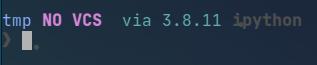
All in all the customization isn’t too bad with just 2 specific files.
ipython_config.py #
There’s several use cases for ipython_config.py files in several areas on a pc - sometimes you want a common config across users, so you’d drop one in /etc/ipython and othertimes you have your own which is probably at ~/.ipython
My ipython config mostly has colors defined on pygment tokens plus a few autorun commands and pyflyby (see my friend Waylon’s post on pyflyby here)
I wanted to match my ipython somewhat to my tmux and vim color schemes, which I model after the vim-airline theme night owl.
After picking some some colors and saving variables it’s a matter of setting colors per token and then referencing those tokens in your version of 99-prompt.py.
You can check out my ipython_config.py here
For example, I can set Token.Name.Function to black, and in ipython then a function’s definition will appear in black text. I set mine to cyan to match my theme.
For the prompt colors just match the keyword in c.TerminalInteractiveShell.highlighting_style_overrides with what is referenced inside 99-prompt.py
For example, Token.Prompt is set to bold grey which gives me the bold chevron symbol you see in the above image that looks like my zsh prompt
Then in 99-prompt.py I have this set for the prompt:
Token.Prompt "❯ "
99-prompt.py #
You don’t need to name your script 99-prompt.py, but I wanted to know that it was for my prompt and I wanted it executed last so it made sense.
Here I have MyPrompt class with the prompt symbol defined as above and several other things…
class MyPrompt(Prompts):
    def in_prompt_tokens(self, cli=None):
        return [
            (Token, ""),
            (Token.OutPrompt, Path().absolute().stem),
            (Token, " "),
            (Token.Generic.Subheading, get_branch()[0]),
            (Token, " "),
            (Token.Generic.Heading, get_branch()[1]),
            (Token, " "),
            (Token.Name.Class, "via " + get_venv()),
            (Token, " "),
            (Token.Name.Entity, "ipython"),
            (Token, "\n"),
            (
                Token.Prompt
                if self.shell.last_execution_succeeded
                else Token.Generic.Error,
                "❯ ",
            ),
        ]
Notice I have 2 custom functions here, get_branch and get_venv which grab some git info and python env info and return strings I can dump into my prompt as shown above.
To finish you drop ip = get_ipython() and ip.prompts = MyPrompt(ip) at the bottom of your prompt script and you should be in custom prompt city!
End #
This is more or less notes for myself on how this works - drop by my ipython config in my dotfiles repo to see my full configs for ipython!