The day after I leave for vacation I start getting SSL errors on every homelab service I host for myself and others. The culprit was my Cloudflare API token expiring. It was easy to find the 403s in the logs for Traefik (thank goodness for Tailscale getting me into the lab from afar). The solution was to rotate the API token, replace the value in Traefik’s.env file, and hit it with the “just deploy” button. Now I don’t know why this expired - the key looks like it has no expiration to me - and I’m too tired from the beach to dig in further. Until next time, I expect this error to come back March 16 2027 I suppose.
Steve Yegge is a pretty well-known individual in the tech field, having been around for a long time at some of the larger companies. He's making quite a...
Yesterday's reflection-contentment-and-work has a second-part this morning. As I was wrapping up a project I didn't realize the closed-off-ness of leaving......
I wanted to put a short demo together of using External Secrets Operator (ESO) to expose secrets from a vault (like Hashicorp Vault, AWS Secrets Manager,...
I wrote about my new role new-job-caterpillar-autonomy a bit a couple weeks ago during an insanely busy time - having just started the role and wrapping up...
I've been using AI tools for codegen for a few years now, but not super heavily. I either use the in-line copilot stuff, which is like LSP on seteroids, or I...
In im-back-from-the-dead I mentioned my new role that started this year - it's a return to Caterpillar Autonomy. I built some data pipelines and junior-grade...
Today I tripped over a CI failure that I had to think about for a while. I build zensical static sites in CI on my Forgejo instance. These builds had been working fine, then suddenly started failing with no code changes. Naturally, I assumed something upstream broke — maybe a new uv release, maybe zensical. I pinned versions. I tested older versions. Same failure every time. That ruled out regressions and pushed me toward the environment. I pulled the runner and worker images locally and built the sites just fine… But that doesn’t perfectly emulate the CI setup - my forgejo runner relies on docker-in-docker and so we aren’t just running a container on a host, we have this middle layer to consider… I wasn’t sure how to really test this out locally so I succomed to AI and here’s where Jipity got me in about 5 minutes… The failure # The builds blew up with: At first glance it means nothing to me but Jipity says this screams ulimit. So following the AI overlords I checked: was already very…
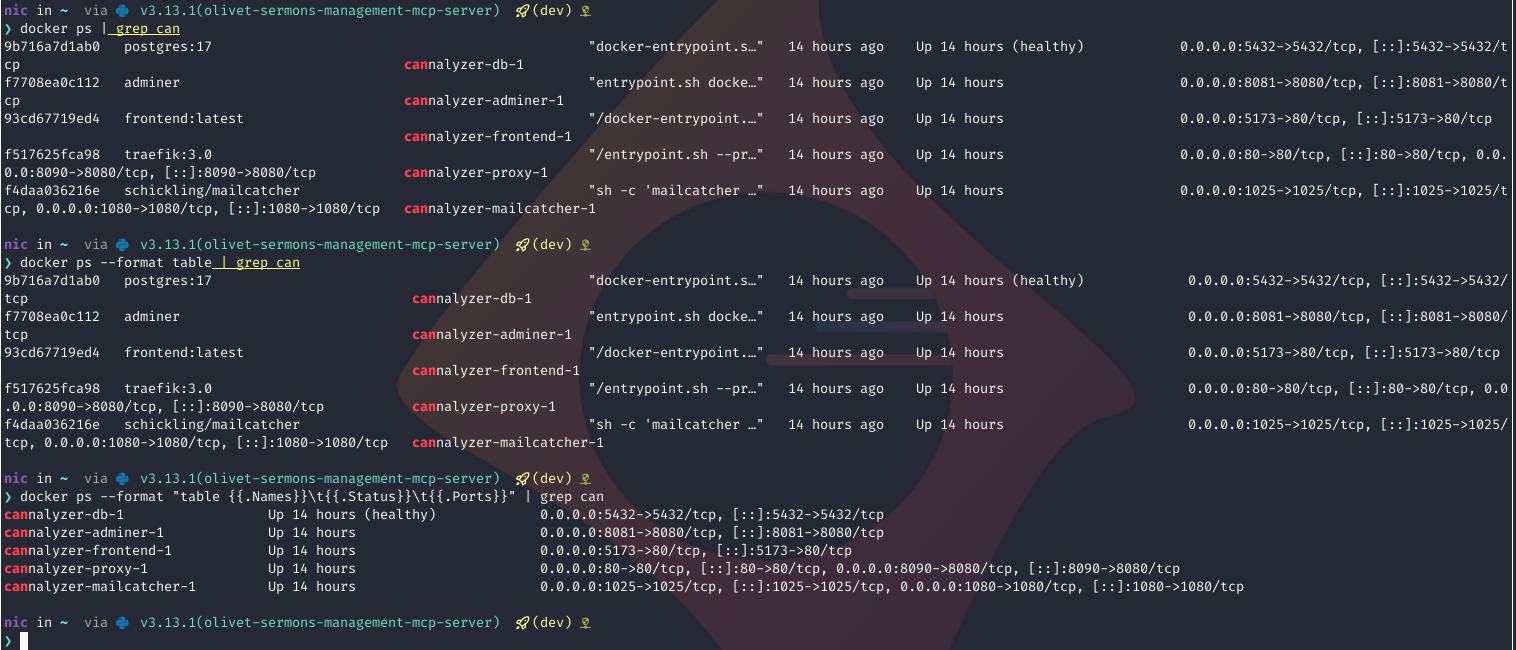
The docker ps command is very useful, but I hate reading the output. Turns
out, you can make it prettier:
docker ps
–format “table” is implied with the command.
❯ docker ps --format "table" | grep can
9b716a7d1ab0   postgres:17                                               "docker-entrypoint.s…"   13 hours ago    Up 13 hours (healthy)            0.0.0.0:5432->5432/tcp, [::]:5432->5432/tcp                                                cannalyzer-db-1
f7708ea0c112   adminer                                                   "entrypoint.sh docke…"   13 hours ago    Up 13 hours                      0.0.0.0:8081->8080/tcp, [::]:8081->8080/tcp                                                cannalyzer-adminer-1
93cd67719ed4   frontend:latest                                           "/docker-entrypoint.…"   13 hours ago    Up 13 hours                      0.0.0.0:5173->80/tcp, [::]:5173->80/tcp                                                    cannalyzer-frontend-1
f517625fca98   traefik:3.0                                               "/entrypoint.sh --pr…"   13 hours ago    Up 13 hours                      0.0.0.0:80->80/tcp, [::]:80->80/tcp, 0.0.0.0:8090->8080/tcp, [::]:8090->8080/tcp           cannalyzer-proxy-1
f4daa036216e   schickling/mailcatcher                                    "sh -c 'mailcatcher …"   13 hours ago    Up 13 hours                      0.0.0.0:1025->1025/tcp, [::]:1025->1025/tcp, 0.0.0.0:1080->1080/tcp, [::]:1080->1080/tcp   cannalyzer-mailcatcher-1
But you can pass a template string to the --format option, like so:
I am cooking up some stuff at home and want to put it on the interwebs, but I don’t want it on the same infra as my homelab. Now… I only have a server or 2, so to some degree it will be, but networking-wise I didn’t want to funnel extra traffic through my reverse proxy. So, I’d heard about Cloudflare Tunnels - they sound like P2P VPN to me, but I know there’s layers of the networking stack I’m blatantly ignoring. “What the tunnel is” isn’t much the point - I’m here to show you how to set one up and get yourself a fancy https://app.mydomain.com for your web app running kind of wherever you want Example Repo linked at the bottom Requirements # Terraform or open-tofu. I currently use open-tofu but either would be fine. is a simple way to get going Cloudflare account with a domain API token with permissions: (the example repo runs cloudflared in a docker compose stack) Tunnel # The module is simple and has just a few resources: We see there will be the a DNS record that tofu references by…