TIL: Monolith #
I needed to save a website earlier and this was just what I needed…
No themes match.
I needed to save a website earlier and this was just what I needed…
sudo apt-get install -y samba \ then set sharesmb=on \ chown the user \ smbpasswd
After generating a keypair on a nostr app (I started with primal) I copied my
public key to /.well-known/nostr.json and put that at the root of my site at
https://pype.dev.
The file looks like this:
{
  “names”: {
    “nic”: “npub1q3fsec2vcv99v80ga72dlv90qwkqmuxqcr6mdyumcmpkgudlhrespyurfj”
  }
}
So now I can use nic@pype.dev as on nostr because the client will verify the
pubkey associated with my profile with my domain!
big upgrade from
@primal.net
I was debugging some ArgoCD stuff earlier today and I love using k9s to explore my k8s resources.
The TLDR is that I put some bad env vars in the global values for my ArgoCD
pods, this caused the webUI to hang. An easy way to push things through is to
open k9s, view the Deployments, and edit the env vars there so the pods can be
in the right state to restart and pickup the changes (you’ve obviously fixed
the values file already right?)
Well the Notification Controller was the pod hanging, and I couldn’t find it in the Deployments view! This blew my mind… until I realized that it was a Stateful Set.
So, this is not a comparison of the 2 - this is just a note to say that all I had to do was find the StatefulSets in k9s and do the same workflow for editing what I needed to edit to get the pods into workable state while working on the values file…
docker contexts are great, would recommend putting them in your prompt though (via starship or something else)… here’s why
I like to manage my containers remotely - I have a nice development setup on my desktop and I try to keep my server as bare-bones as possible. For a while I’ve been using ansible which makes it easy to manage configuration etc on other machines. But I recently learned about docker contexts and I’m planning to scale down my homelab management to just docker-compose stacks rather than a bunch of super complicated ansible playbooks
So, setting up a context is easy - it’s basically an ssh connection to another machine!
docker context create koober --docker "host=ssh://nic@koober"
koober is one of my dev machines and my ~/.ssh/config is setup such that I can ssh nic@koober, this makes the context work really seamlessly.
So there’s the default context (the machine you’re on) and now I have koober
To use it you run docker context use koober
And then to check we can ls the contexts
docker context ls
NAME       DESCRIPTION                               DOCKER ENDPOINT               ERROR
default    Current DOCKER_HOST based configuration   unix:///var/run/docker.sock
koober *                                             ssh://nic@koober
Notice the * - that indicates that’s our current context.
Now here’s where things get hairy… you’ve gotta be super-aware of what context you’re using. I have an indicator in my starship prompt that shows the current context, but since I’m new to using them I kind of didn’t notice it until I ran into this issue…
I’m working on a python application in docker but was not able to execute the entrypoint even though I KNEW the file was there… let’s take a look
Here’s a minimal hello world applycation in docker to illustrate the issue
# main.py
print("hello world")
# Use an official Python runtime as a parent image
FROM python:3.11-slim

# Set the working directory in the container
WORKDIR /app

# Copy the current directory contents into the container at /app
COPY . /app

# Run the main.py script as the container's main process
CMD ["python", "main.py"]
services:
  hello-world:
    build: .
    volumes:
      - .:/app
Notice volume mounting in my project directory . to /app as a common practice to develop inside the container
Here’s where I started to question my sanity…
✗ docker compose up
[+] Running 1/0
 ✔ Container docker-context-example-hello-world-1  Created                                                                                                                                                                                                                                                              0.0s
Attaching to hello-world-1
hello-world-1  | python: can't open file '/app/main.py': [Errno 2] No such file or directory
hello-world-1 exited with code 2
python can't open file? hmm… Let’s take a look at the image
First let’s make sure we get the image name right
✗ docker container ls -a
CONTAINER ID   IMAGE                                           COMMAND                  CREATED          STATUS                       PORTS                                                                                  NAMES
3d7285fc39e2   docker-context-example-hello-world              "python main.py"         10 minutes ago   Exited (2) 44 seconds ago                                                                                           docker-context-example-hello-world-1
Now we can docker run --rm -it --entrypoint /bin/bash --name debug docker-context-example-hello-world
❯ docker run --rm -it --entrypoint /bin/bash --name debug docker-context-example-hello-world
root@ee46d0e22de8:/app# python main.py
Hello, World!
root@ee46d0e22de8:/app#
WHAT THE HECK??
What happened turns out to be pretty simple once we realize I’m using contexts…
koboer is a remote context, the docker run and docker compose up commands are interacting with the docker socket on that machine.
So if I compose up the stack notice that there’s a volume bind mount in there - well those do not work with contexts (or at least I’m not aware of hose to make it work) and so the /app directory was getting blown away essentially with an empty overlay…
But when running with just docker run with no volume mount, the code was copied in during the build and is right where we expect it…
❯ docker run --rm -it --entrypoint /bin/bash --name debug -v .:/app docker-context-example-hello-world
root@903f591c0384:/app# python main.py
python: can't open file '/app/main.py': [Errno 2] No such file or directory
root@903f591c0384:/app#
Adding a `-v .:/app` to match the compose file, we get the same error...
If we switch to the default context we are back up and running as expected
✗ docker context use default
default
Current context is now "default"
nic in /tmp/docker-context-example via v3.13.0 (dev) NO PYTHON ENVIORNMENT SET
❯ docker compose up
[+] Running 1/0
✔ Container docker-context-example-hello-world-1 Created 0.0s
Attaching to hello-world-1
hello-world-1 | Hello, World!
hello-world-1 exited with code 0
nic in /tmp/docker-context-example via v3.13.0 (dev) NO PYTHON ENVIORNMENT SET
❯ docker run --rm -it --entrypoint /bin/bash --name debug -v .:/app docker-context-example-hello-world
root@4045b6aa8883:/app# python main.py
Hello, World!
root@4045b6aa8883:/app#
Successful runs on both accounts with the volume mount
Context is king
I’m building a few FastAPI apps to throw in docker and run on my homelab… I wanted to add healthchecks and here’s a simple way to do it
Make sure to install curl in the dockerfile (near the top for effeciency)
# Install curl with minimal dependencies
RUN apt-get update && \
    apt-get install -y --no-install-recommends curl && \
    apt-get clean && \
    rm -rf /var/lib/apt/lists/*
Then I recommend making compose files even for single image deployments
services:
  app:
    build: .
    volumes:
      - type: bind
        source: .
        target: /app
    environment:
      - PYTHONPATH=/app
      - DOCKER_ENV=true
      - UV_VIRTUALENV=/opt/app-env
    user: "1000:1000"
    restart: unless-stopped
    healthcheck:
      test: ["CMD", "curl", "-f", "http://localhost:8000/health"]
      interval: 30s
      timeout: 10s
      retries: 3
      start_period: 10s
Then finally you’ll need a /health endpoint
@app.get("/health", response_class=HTMLResponse)
async def health_check():
    """
    A health check endpoint that returns a status message.
    """
    return "<html><body><h1>Service is healthy</h1></body></html>"
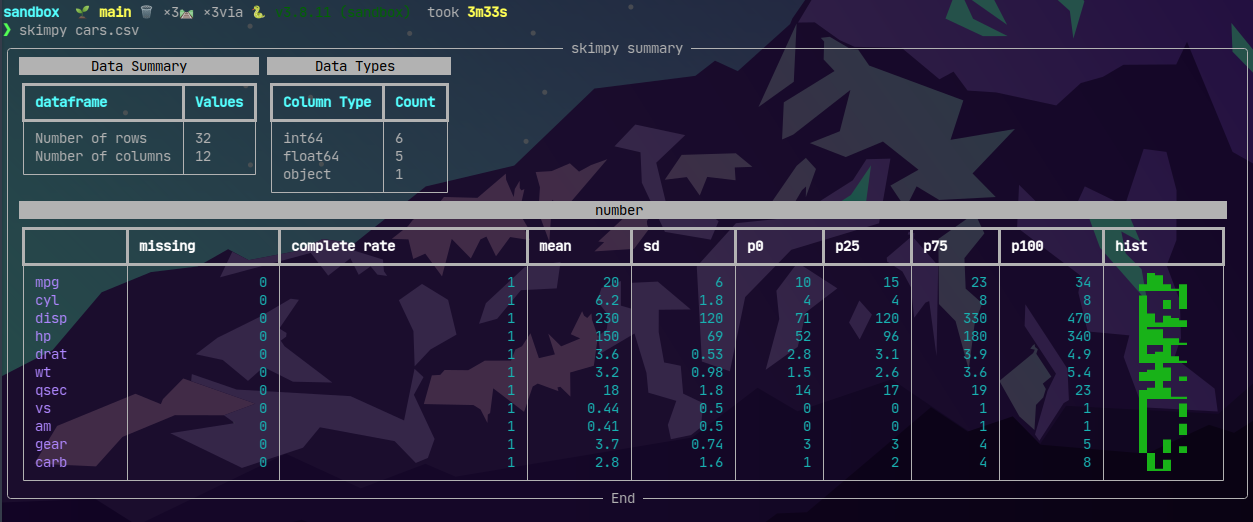
statically.io offers a CDN that I’m going to try to lean into for images in my blog. My hope is that the builds get and stay fast, and that page loads are fast too.
Example:
<img src="https://cdn.statically.io/gh/pypeaday/images.pype.dev/main/blog-media/skimpy-zsh.png" alt="Skimpy ZSH" title="A fancy data summary in the shell" />
I use LSIO Jelyfin container for the easy addon they provide for AMD GPUs but I couldn’t get trickplay to work with HWE…
There was almost NOTHING on the internet about the error, and all the threads were about BSD systems…
Thankfully someone posted on the formum here but the only answer was to literally upgrade stuff in the container…
Someday maybe I’ll build off of LSIO to add this, but until then I shell’d in and homelab’d the hell out of it
THIS IS INSIDE THE CONTAINER - I use Portianer to make it easy
apt update && apt install -y curl gpg

mkdir -p /etc/apt/keyrings

curl -fsSL https://repo.radeon.com/rocm/rocm.gpg.key | gpg --dearmor -o /etc/apt/keyrings/rocm.gpg

cat <<EOF | tee /etc/apt/sources.list.d/rocm.sources

Types: deb

URIs: https://repo.radeon.com/rocm/apt/latest

Suites: ubuntu

Components: main

Architectures: amd64

Signed-By: /etc/apt/keyrings/rocm.gpg

EOF

apt update && apt install -y rocm-opencl-runtime
I am moving a hefty amount of data to a new ZFS pool due to some corruption and I want to avoid using zfs send/recv for this just to make sure I don’t propagate any corrupted data to my new pool.
I’ve used rsync for simple things before but I needed this to be a little smarter and I wanted to see simple progress without flooding my terminal with a billion filenames.
TLDR:
rsync -aHAX --chmod=Da+s --info=progress2 --inplace --exclude='encrypted/docker/frigate-media' /tank/ /harbor/
-aHAX: Preserves attributes (archive mode, hard links, ACLs, extended attributes). –chmod=Da+s: Ensures the setgid bit is applied to directories. –info=progress2: Provides detailed progress information, including overall data transfer stats. –inplace: Writes directly to the destination file, avoiding temporary files (useful for large files). –exclude=‘encrypted/docker/frigate-media’: Excludes the specified path (relative to the /tank root). /tank/ /harbor/: Ensures the contents of /tank are copied directly into /harbor.
I recently have been having significant home server issues, and that’s not the point of this - today I learned what D state is when looking at htop.

Apparently this means “uninterruptable sleep” and it’s a dev’s nightmare…
The issue I was having was that some zfs rollback commands were hung - for hours… I wasn’t sure what was going on, rollbacks should be instant but I figured it was just an artifact of these issues.
Turns out I still don’t know what locked the disks up but I learned why <C>-c did nothing…
the more you know