Posts tagged: python

All posts with the tag "python"

36 posts latest post 2025-09-08
Publishing rhythm
Sep 2025 | 2 posts

I am working on a project to create a small system monitoring dashboard using the python psutil library.

The repo is here (if you want actual system monitoring please use netdata).

I’m using streamlit and plotly for the webserver, design, and plotting at the moment.

My Use Case #

I needed a way to refresh my plotly charts with a fixed window of time so that I’m able to just see relevant recent data instead of cramming all data for all time into one plot that’s 500 pixels wide…

Checking the length of arrays or lists every time I get a new piece of data feels kind of dumb and I thought “python must have a way to do this”…

“This” meaning, update values in a fixed length array without reallocating memory or recreating a copy of the list

Deques #

Enter the deque. It means “double ended queue” and is in general an Iterable that you can append values to either side or pop values from either side.

The init signature is straightforward enough and I’m sure there’s more to them than I know yet but here’s how I use it…

from collections import deque

my_deque = deque([1,2,3])

This gives us my_deque, created from an iterable, with several familiar methods like index, extend, append, etc. However there’s some new ones too such as appendleft and popleft.

my_deque.appendleft('a')
print(my_dequqe)
>>> deque(['a', 1, 2, 3])

my_deque.popleft()
>>> 'a'

<!--markata-attribution-->
print(my_deque)
>>> deque([1, 2, 3])

These are handy ways to manipulate the iterable that I needed for the arrays I plot with plotly!

See my follow-up to this on using Deques with plotly and streamlit to create a quick “dashboard” with live streaming data!

follow-up

Plotly-And-Streamlit

Streamlit # I use for any EDA I ever have to do at work. It’s super easy to spin up a small dashboard to filter and view dataframes in, live, without the fallbacks of Jupyter notebooks (kernels dying, memory bloat, a billion “Untitled N.ipynb” files, etc.) At the highest level, streamlit lets you write a python script and call which will open up a web server with your streamlit stuff. The dashboard refreshes whenever you change the script so you can add capabilities in real time, super fast! I’ll show an example of using and to make a live dashboard to monitor system memory usage with. This is apart of my posts on psutil and deques … example at the bottom! Plotly # I’m not going to make a big time intro to plotly here - there’s a billion resources on the interwebs and the docs are really good. Suffice it to say it’s my goto plotting library for basically any and all needs. I’m currently exploring it for live data streaming as I’m not sure it’s the best solution but it’s the one I’m fam…
self-hosted-media

self-hosted-media

Self-hosting 1 or several media servers is another common homelab use-case. Getting content for your media servers is up to you, but I’ll show a few ways here to get content somewhat easily! YouTube Disclaimer at Bottom you-get # is a nice cli for grabbing media content off the web. Installation # or use ad-hoc with Usage # For example if I wanted to catch up on ancient Chinese military tactics I may go for off the Internet Archive… the is showing me the info of what would be downloaded without the flag (it’s like a dry run) Now I can toss that mp3 onto my server and study for world domination while I do the dishes! pytube # is a python implementation of a youtube downloader that works at the command line or in python! Installation # docs Usage # has a lot of functionality, but a quick one would be the so you can see what qualities are available will download the specific from the list. Notice that some are videos and others audio - so you can download just the music of a YT video. als…

EDA #

I work with data a lot, but the nature of my job isn’t to dive super deep into a small amount of datasets, I’m often jumping between several projects every day and need to just get a super quick glance at some tables to get a high level view.

When I’m doing more interactive exploration I’ve graduated from Jupyter cells with df_N.head() to using an amazing tool called visidata

However, Visidata is a terminal based application and I’m often in an iPython console… so is there a way to move even faster for my super quick summary views?

yes!

Skimpy #

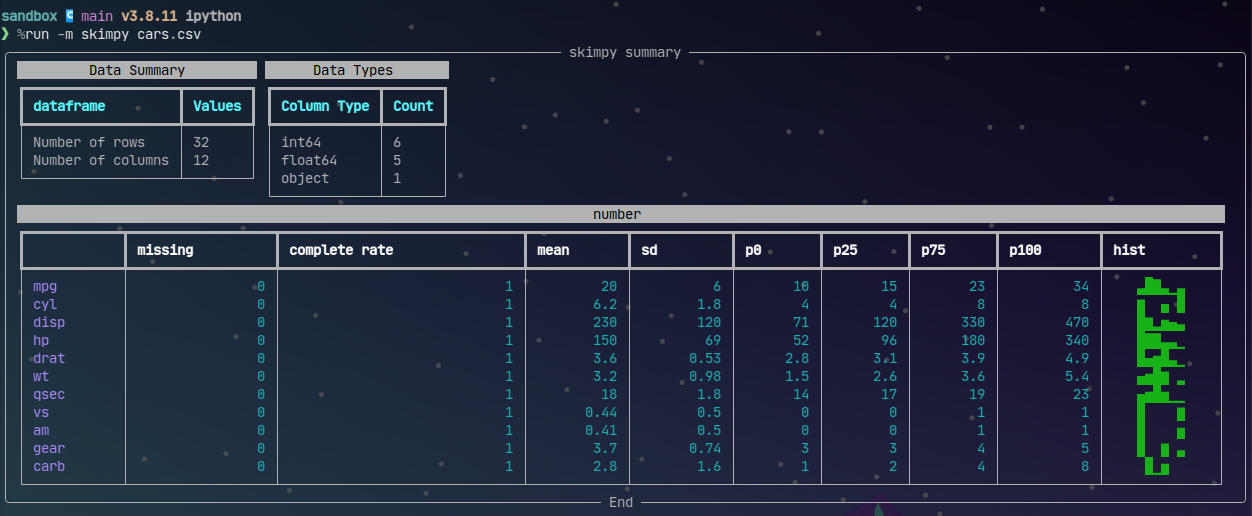
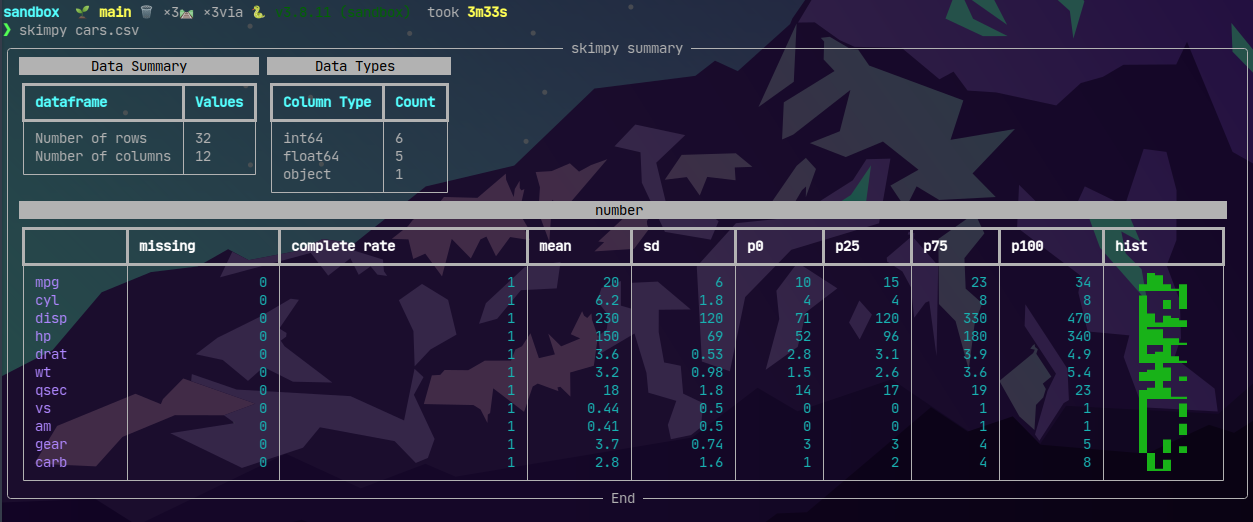
First thing to do is pip install skimpy and then it’s as easy to get some summary stats with skimpy <data>

Skimpy ZSH

This is super nice for seeing missing values in particular as well as the distribution shape of the data.

iPython #

But wait… I just said I’m normally in an iPython session but that was called from zsh.. If I’m hoping back into zsh I might as well use visidata to have more powerful exploration at my fingertips. So… can I see this table quickly without breaking my iPython workflow?

Of course you can with magic!

Skimpy iPython

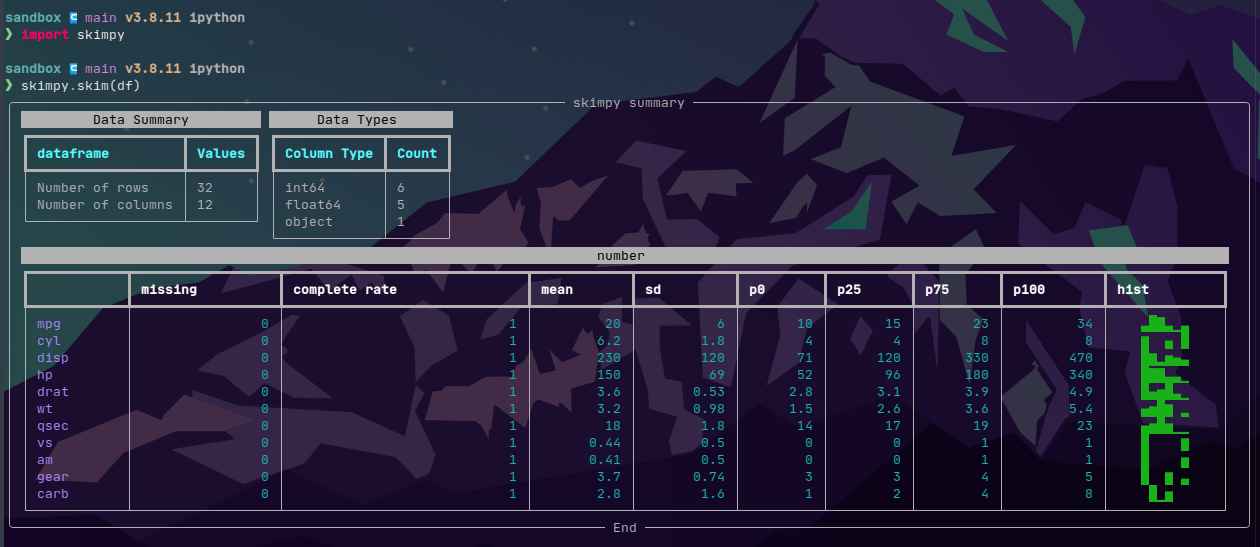
The above assumes you’re looking at a file, like you would in the terminal. skimpy works even better in iPython with from skimpy import skim then pass any DataFrame to skim!

Skimpy iPython2

I like to keep my workspace clean and one thing that I don’t personally love looking at is the __pycache__ directory that pops up after running some code. The *.pyc files that show up there are python bytecode and they are cached to make subsequent runs a tad faster. My stuff never really needs this bonus speed boost and so I came across a neat tool called pyclean!

Pyclean #

The easiest way (in my opinion) to run pyclean is to just use pipx run.

sandbox/src  🌱 main 🗑️  ×3🛤️  ×2via 🐍 v3.8.11 (sandbox)  took 9s
❯ ls
abcmeta.py  __pycache__  python-print-align.py  system-monitor-psutils.py

sandbox/src  🌱 main 🗑️  ×3🛤️  ×2via 🐍 v3.8.11 (sandbox)
❯ pipx run pyclean .
⚠️  pyclean is already on your PATH and installed at /usr/bin/pyclean. Downloading and running anyway.
Cleaning directory .
Total 1 files, 1 directories removed.

sandbox/src  🌱 main 🗑️  ×3🛤️  ×2via 🐍 v3.8.11 (sandbox)
❯ ls
abcmeta.py  python-print-align.py  system-monitor-psutils.py

Why not bash? #

You could accomplish something similar with rm **/*.pyc or find -n '*.py?' -delete but there’s a chance you’ll find something you don’t love gone. Also this won’t help our poor Windows friends out there! pyclean is fully python so it’s OS independent.

Credits! #

repo

Mike Driscoll has been posting some awesome posts about psutil lately. I’m interested in making my own system monitoring dashboard now using this library. I don’t expect it to compete with Netdata or Glances but it’ll just be for fun to see how Python can solve this problem!

Repo coming soon

Example code: #

Here’s a short snippit to get used/available/total RAM and disk space (on partitions that you probably care about)


import psutil
import socket

print(f"System Memory used: {psutil.virtual_memory().used // (1024 ** 3)} GB")
print(f"System Memory available: {psutil.virtual_memory().available // (1024 ** 3)} GB")
print(f"System Memory total: {psutil.virtual_memory().total // (1024 ** 3)} GB")


print(f"Hostname: {socket.gethostname()}")

partitions = psutil.disk_partitions()

for part in partitions:
    mnt = part.mountpoint
    if "snap" in mnt or "boot" in mnt:
        continue
    disk = psutil.disk_usage(mnt)
    print(f"Usage at {mnt} on {part.device}: {disk.used // (1024 ** 3)} GB")
    print(f"Free at {mnt} on {part.device}: {disk.free // (1024 ** 3)}GB")
    print(f"Total at {mnt} on {part.device}: {disk.total // (1024 ** 3)}GB")

Bonus Ipython tip! Save this to a script called my_script.py and in Ipython you can %run -m my_script to run it!

project ↪ main v3.8.11 ipython
❯ %run -m system-monitor-psutils
System Memory used: 25 GB
System Memory available: 5 GB
System Memory total: 31 GB
Hostname: ryzen-3600x
Usage at / on /dev/nvme1n1p2: 81 GB
Free at / on /dev/nvme1n1p2: 351 GB
Total at / on /dev/nvme1n1p2: 456 GB

If you work with a template for several projects then you might sometimes need to do the same action across all repos. A good example of this is updating a package in requirements.txt in every project, or refactoring a common module. If you have several repos to do this across then it can be time consuming… enter mu-repo

Mu #

mu-repo is an awesome cli tool for working with multiple git repositories at the same time. There are several things you can do:

  1. mu status will give you the git status of every registered repo (see below)
  2. mu sh will let you execute system level commands in every repo
  3. mu stash will stash all changes across all registered repos
  4. There’s literally a ton more but these are some handy ones

Registration #

mu tracks its own groups, and there is a default group when no particular one is active. It’s as simple as mu register proj1 prog2 ... to get repos registered


❯ mu register proj1 proj2
Repository: proj1 registered
Repository: proj2 registered

❯ mu status

  proj1 : git status
    On branch main

    No commits yet

    Untracked files:
    (use "git add <file>..." to include in what will be committed)
    requirements.txt

    nothing added to commit but untracked files present (use "git add" to track)

  proj2 : git status
    On branch main

    No commits yet

    Changes to be committed:
    (use "git rm --cached <file>..." to unstage)
    new file:   requirements.txt


Working with mu #

As you can see above I have two projects each with a requirements.txt added but not committed yet. Using mu I can stage this change across both repos at once.


❯ mu add requirements.txt

  proj1 : git add requirements.txt

  proj2 : git add requirements.txt

Then as you might imagine, I can make the commit in each repo


❯ mu commit -m "Add requirements.txts"

  proj1 : git commit -m Add requirements.txts
    [main (root-commit) 18376d7] Add requirements.txts
    1 file changed, 1 insertion(+)
    create mode 100644 requirements.txt

  proj2 : git commit -m Add requirements.txts
    [main (root-commit) 18376d7] Add requirements.txts
    1 file changed, 1 insertion(+)
    create mode 100644 requirements.txt

mu groups #

The other thing I got a lot of use out of recently was mu’s groups. At work I have about 40 repos cloned that are all based on the same kedro pipeline template. Some of these projects have been deprecated. I also have several more repos that are not kedro template - custom libraries or something. group let me utilize mu across different groups of repos.

Say proj2 is a deprecated project that I don’t need to worry about making changes to anymore. I don’t just have to unregister it, instead I can make a group called “active” and register proj1 in that group


❯ mu group add active --empty

~/personal
❯ mu group add deprecated --empty

~/personal
❯ mu group
  active
* deprecated

The * tells me which group is active. The --empty flag tells mu to not add all registered repos to that group. If I don’t want to use any groups then mu group reset will go back to the default group with all registered repos.

With groups I can register only the repos that I want to be working across in their own group and not worry about affecting other repos with my batch changes!

ABCMeta #

I don’t do a lot of OOP currently, but I have been on a few heavy OOP projects and this ABCMeta and abstractmethod from abc would’ve been super nice to know about!

If you are creating a library with classes that you expect your users to extend, but you want to ensure that any extension has explicit methods defined then this is for you!.

from abc import ABCMeta, abstractmethod
class Family(metaclass=ABCMeta):
    @abstractmethod
    def get_dad(self):
        """Any extension of the Family class must implement a `get_dad` method"""

class MyFamily(Family):
    pass

If I try to instantiate MyFamily I will not be allowed:


❯ my_fam = MyFamily()
╭─────────────────────────────── Traceback (most recent call last) ────────────────────────────────╮
│ <ipython-input-8-ecb8e21ce815>:1 in <module>                                                     │
╰──────────────────────────────────────────────────────────────────────────────────────────────────╯
TypeError: Can't instantiate abstract class MyFamily with abstract methods get_dad

abcmetadata

In order for me to extend Family I have to implement the method get_dad

class MyFamily(Family):
    def get_dad(self):
        return "Me"

Now everything works as expected and I can sleep well knowing no one can extend my base class without creating methods I know they need.


my_fam = MyFamily()

my_fam.get_dad()
'Me'

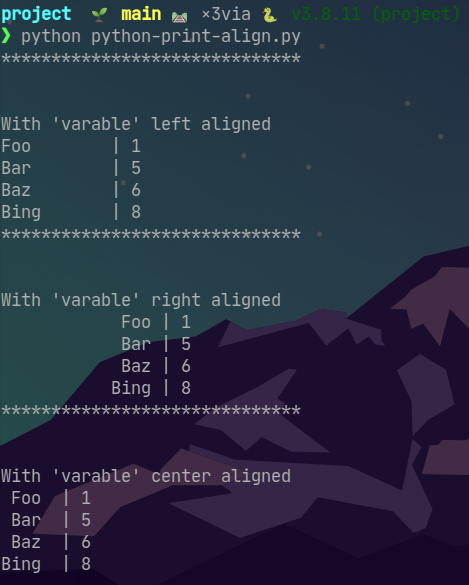
I am personally trying to use logger instead of print in all of my code, however I learned from [@Python-Hub] that you can align printouts using print with f-strings!.

This little python script shows how options in the f-string can format the printout.


import random

variables = "Foo Bar Baz Bing".split()
scores = random.sample(range(1, 11), len(variables))

print("*" * 30)
print("\n")
print("With 'varable' left aligned")
for varable, score in zip(variables, scores):
    print(f"{varable:<10} | {score}")

print("*" * 30)
print("\n")
print("With 'varable' right aligned")
for varable, score in zip(variables, scores):
    print(f"{varable:>15} | {score}")

print("*" * 30)
print("\n")
print("With 'varable' center aligned")
for varable, score in zip(variables, scores):
    print(f"{varable:^5} | {score}")

pyprintalign

Being lazy #

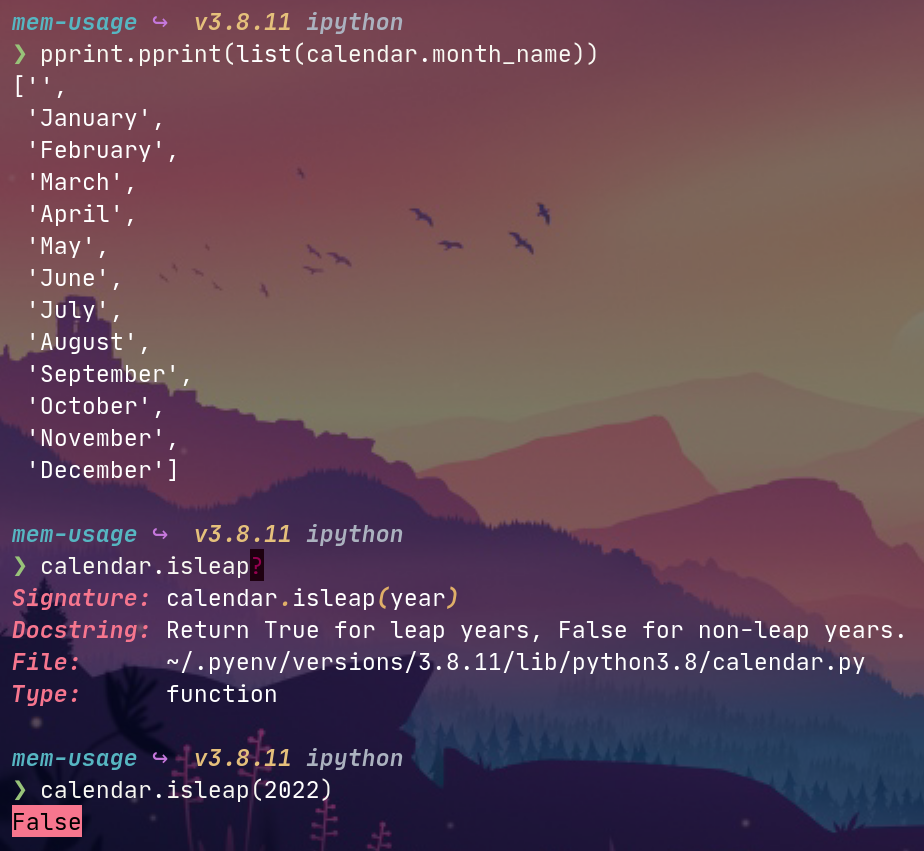
I almost exclusively use Python for my job and have been eye-balls deep in it for almost 5 years but I really lack in-depth knowledge of builtins. I recently learned of an awesome builtin called calendar that has way more than I know about for sure but I’m glad I know it’s here now!

I only needed it because I was too lazy to hard code the 7 weekdays into my module but it turns out there’s a lot of useful things like calendar.isleap()!

builtin ## Future use

I’m not exactly sure what will come my way where calendar will be super relevant but like anything, I’m just glad to know it exists for when the time arises!

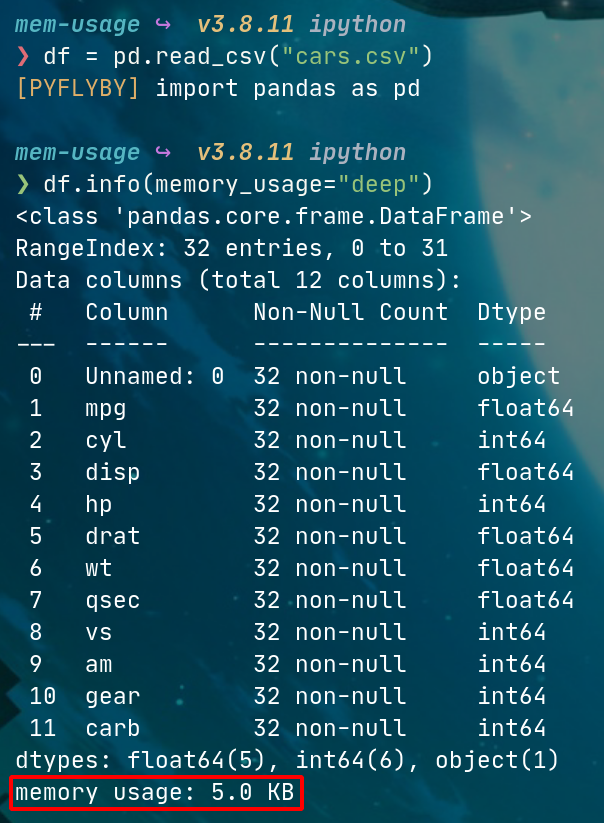
I have often wanted to dive into memory usage for pandas DataFrames when it comes to cloud deployment. If I have a python process running on a server at home I can use glances or a number of other tools to diagnose a memory issue… However at work I normally deploy dockerized processes on AWS Batch and it’s much more challenging to get info on the dockerized process without more AWS integration that my team isn’t quite ready for. So TIL that I can get some of the info I want from pandas directly!

DataFrame.info()

I didn’t realize that df.info() was able to give me more info than just dtypes and some summary stats… There is a kwarg memory_usage that can configure what you need to get back, so df.memory_usage="deep" will give you how much RAM any given DataFrame is using! Amazing tool for finding issues with joins or renegade source data files.

df = pd.read_csv("cars.csv")

df.info(memory_usage="deep")
DataFrame Memory Usage

On my team we often have to change data types of columns in a pandas.DataFrame for a variety of reasons. The main one is it tends to be an artifact of EDA whereby a file is read in via pandas but the data types are somewhat wonky (ie. dates show up as strings, or a column that should be a integer comes in as float, etc.). The best solution I think is to leverage the dtypes keyword argument in which pd.read_X method is used. However there is another way which is to coerce the data types at runtime instead of loadtime.

A handy way to do this is by using pandas.DataFrame.select_dtypes…

Here is an example of finding columns read in as datetime64 and the developer would prefer to use pandas datetimes.

df = pd.read_csv("./file-with-confusing-dtypes.csv")
for c in df.columns:
    if df[c].dtype == "datetime64":
        df[c] = pd.to_datetime(df.c)

Here is the difference in code flow between select_dtypes and manually finding the datetype64 columns:

df = pd.read_csv("./file-with-confusing-dtypes.csv")
for c in df.select_dtypes('datetime64'):
    df[c] = pd.to_datetime(df.c)

The difference isn’t huge but it’s the little steps in leveling up that turn script-kitty scripts into clean looking functions.