Posts tagged: docker

All posts with the tag "docker"

8 posts latest post 2025-12-29
Publishing rhythm
Dec 2025 | 1 posts

The docker ps command is very useful, but I hate reading the output. Turns out, you can make it prettier:

docker ps

–format “table” is implied with the command.


❯ docker ps --format "table" | grep can
9b716a7d1ab0   postgres:17                                               "docker-entrypoint.s…"   13 hours ago    Up 13 hours (healthy)            0.0.0.0:5432->5432/tcp, [::]:5432->5432/tcp                                                cannalyzer-db-1
f7708ea0c112   adminer                                                   "entrypoint.sh docke…"   13 hours ago    Up 13 hours                      0.0.0.0:8081->8080/tcp, [::]:8081->8080/tcp                                                cannalyzer-adminer-1
93cd67719ed4   frontend:latest                                           "/docker-entrypoint.…"   13 hours ago    Up 13 hours                      0.0.0.0:5173->80/tcp, [::]:5173->80/tcp                                                    cannalyzer-frontend-1
f517625fca98   traefik:3.0                                               "/entrypoint.sh --pr…"   13 hours ago    Up 13 hours                      0.0.0.0:80->80/tcp, [::]:80->80/tcp, 0.0.0.0:8090->8080/tcp, [::]:8090->8080/tcp           cannalyzer-proxy-1
f4daa036216e   schickling/mailcatcher                                    "sh -c 'mailcatcher …"   13 hours ago    Up 13 hours                      0.0.0.0:1025->1025/tcp, [::]:1025->1025/tcp, 0.0.0.0:1080->1080/tcp, [::]:1080->1080/tcp   cannalyzer-mailcatcher-1

But you can pass a template string to the --format option, like so:

docker ps --format "table {{.Names}}"


✗ docker ps --format "table {{.Names}}" | grep can
cannalyzer-db-1
cannalyzer-adminer-1
cannalyzer-frontend-1
cannalyzer-proxy-1
cannalyzer-mailcatcher-1

docker ps --format "table {{.Names}}\t{{.Status}}\t{{.Ports}}"


❯ docker ps --format "table {{.Names}}\t{{.Ports}}" | grep can
cannalyzer-db-1             0.0.0.0:5432->5432/tcp, [::]:5432->5432/tcp
cannalyzer-adminer-1        0.0.0.0:8081->8080/tcp, [::]:8081->8080/tcp
cannalyzer-frontend-1       0.0.0.0:5173->80/tcp, [::]:5173->80/tcp
cannalyzer-proxy-1          0.0.0.0:80->80/tcp, [::]:80->80/tcp, 0.0.0.0:8090->8080/tcp, [::]:8090->8080/tcp
cannalyzer-mailcatcher-1    0.0.0.0:1025->1025/tcp, [::]:1025->1025/tcp, 0.0.0.0:1080->1080/tcp, [::]:1080->1080/tcp

Picture #

I noticed my template isn’t folding the codeblocks in a way that actually makes this post look like I’m lying!
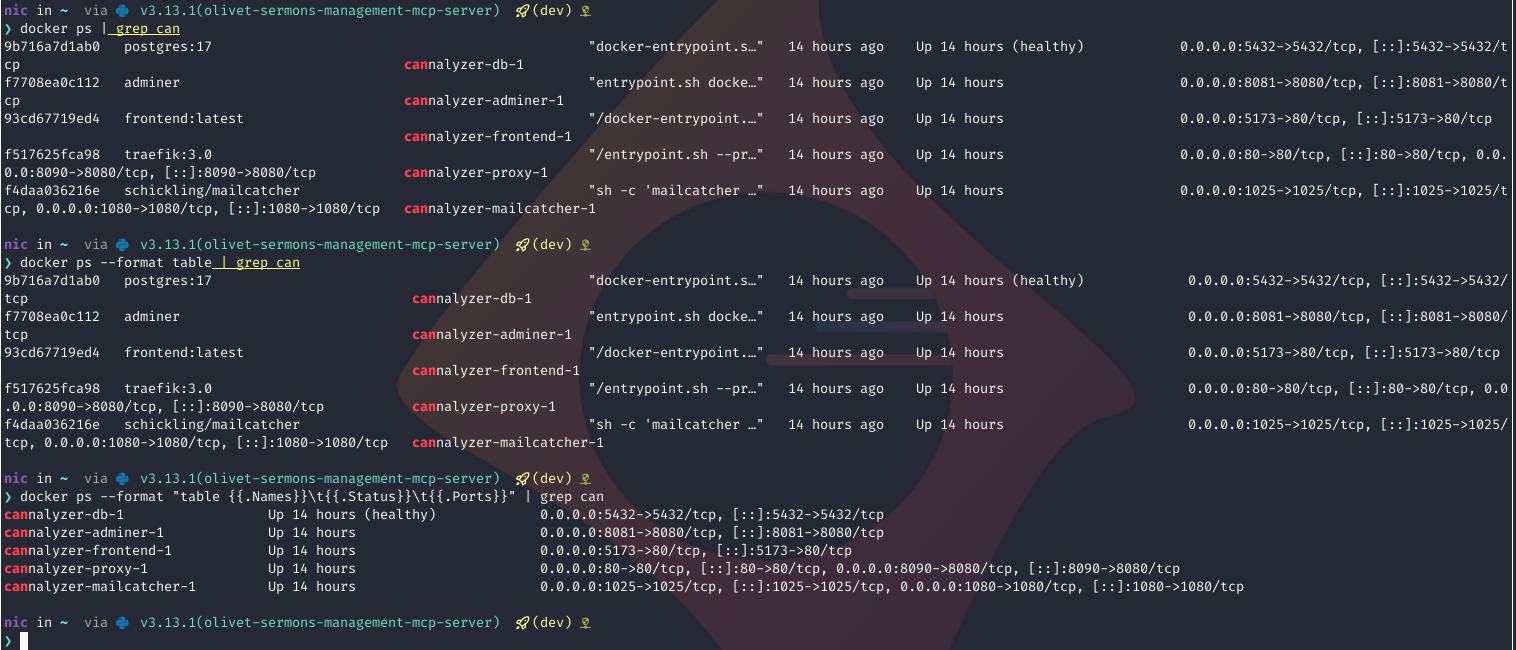

20251229122717_67e76a67.png

💭 Docker | Atuin Docs

A 2-fer... So I want to host atuin and share shell history across my machines on my tailnet I think... it's such a nice

1 min
Docker Volume Mounts Link to an Inode

Docker Volume Mounts Link to an Inode

docker bind mounts are specified as filepaths - this is very intuitive. I want /path/to/directory on my host to be shared with /another/path/foo in a container. But what if /path/to/directory on the host is moved? This is a situation I have found myself in at home and it turns out that I’m actually in almost zero trouble thankfully… TLDR - I have a bunch of compose stacks in /home/projects/homelab-compose/ / and I want to move them to /home/projects/homelap-mono/compose/ / I don’t want to take down all my stacks to do this because I don’t yet have a convenient way to do it - but can I just and be done with it? The issue is that some of my stacks use local volume mounts - ie. there is a data volume on the host in /home/projects/homelab-compose/ /docker-data for some of the applications… can I just move everything and docker is nonethewiser? Turns out the answer is mostly with some caveats to keep in mind.. Let’s start with why it works and then show an example… Why # This works because…

I use LSIO Jelyfin container for the easy addon they provide for AMD GPUs but I couldn’t get trickplay to work with HWE…

There was almost NOTHING on the internet about the error, and all the threads were about BSD systems…

Thankfully someone posted on the formum here but the only answer was to literally upgrade stuff in the container…

Someday maybe I’ll build off of LSIO to add this, but until then I shell’d in and homelab’d the hell out of it

THIS IS INSIDE THE CONTAINER - I use Portianer to make it easy


apt update && apt install -y curl gpg

mkdir -p /etc/apt/keyrings

curl -fsSL https://repo.radeon.com/rocm/rocm.gpg.key | gpg --dearmor -o /etc/apt/keyrings/rocm.gpg

cat <<EOF | tee /etc/apt/sources.list.d/rocm.sources

Types: deb

URIs: https://repo.radeon.com/rocm/apt/latest

Suites: ubuntu

Components: main

Architectures: amd64

Signed-By: /etc/apt/keyrings/rocm.gpg

EOF

apt update && apt install -y rocm-opencl-runtime

in /lib/systemd/system/docker.service there is an ExecStart command that got placed there when I setup Docker with Ansible - it threw the -H flag which told the daemon what hosts to setup. But I added the “hosts” key in my daemon.json and it broke - so removing the -H flag from the systemd unit fixed it

AJAX wasn’t cutting it, traditional crontab in containers doesn’t make much sense to me, webcron is recommended but I don’t want to register with anything outside my LAN… Turns out you can just spin up an identical container with a different entrypoint to /cron.sh that does what you need!

Note that this is a task in an Ansible playbook - but the docker-compose is straight forward

So the only thing you need to make sure of is that all the configuration options - data volumes, user permissions, etc. are identical between the containers running the cron job and the one actually hosting NextCloud. This ensures that the container running cron has proper access to the database and filesystem - or at least the same access as NextCloud proper.

- name: Nextcloud Cron Docker Container
  docker_container:
    name: nextcloud-cron
    image: "{{ nextcloud_image }}"
    pull: true
    links:
      - nextcloud-mysql:mysql
    entrypoint: /cron.sh
    volumes:
      - "{{ nextcloud_data_directory }}/nextcloud:/var/www/html:rw"
    env:
      MYSQL_HOST: "mysql"
      MYSQL_DATABASE: "nextcloud"
      MYSQL_USER: "{{ nextcloud_sql_user }}"
      MYSQL_PASSWORD: "{{ nextcloud_sql_password }}"
      NEXTCLOUD_TRUSTED_DOMAINS: "{{ nextcloud_hostname }}.{{ ansible_nas_domain }}"
      PUID: "{{ nextcloud_user_id }}"
      PGID: "{{ nextcloud_group_id }}"
      TZ: "{{ ansible_nas_timezone }}"
    restart_policy: unless-stopped
    memory: "{{ nextcloud_memory }}"