Posts tagged: homelab Archivehttps://pype.dev/tags/homelab/archive/atom.xml2026-10-06T21:30:00ZAll posts with the tag "homelab"Nic Paynemarkata-goThe Faulted Disk: harbor Replacement Writeuphttps://pype.dev/harbor-faulted-disk-replacement/2026-10-06T21:30:00Z2026-10-06T21:30:00ZThe sequel to panicking-led-to-losing-my-desktop — this time the monitoring actually caught the disk dying, and nothing was lost.<p>The sequel to <a href="/panicking-led-to-losing-my-desktop">panicking-led-to-losing-my-desktop</a> — this time the monitoring actually caught the disk dying, and nothing was lost.</p>
<h2 id="what-happened"><span class="heading-wear-glyph">What happened</span> <a href="#what-happened" class="heading-anchor">#</a></h2>
<p><code>harbor</code> is my replica pool — a 10.9T mirror (2x 12TB) that receives syncoid snapshots from <code>tank</code>. One side of the mirror, a Seagate Exos <code>ST12000NM0127</code> (serial <code>ZJV4QFLB</code>, <code>/dev/sdb</code>), went <strong>FAULTED</strong> with 14 read + 22 checksum errors.</p>
<pre class="chroma"><code><span class="line"><span class="cl">mirror-0 DEGRADED 0 0 0
</span></span><span class="line"><span class="cl"> ata-ST12000VN0008-2PH103_ZTM0NFDW ONLINE 0 0 0
</span></span><span class="line"><span class="cl"> ata-ST12000NM0127_ZJV4QFLB FAULTED 14 0 22 too many errors
</span></span></code></pre><p>The IronWolf mirror side carried the pool — <code>No known data errors</code>. ZFS redundancy did exactly its job.</p>
<h2 id="the-difference-from-last-time"><span class="heading-wear-glyph">The difference from last time</span> <a href="#the-difference-from-last-time" class="heading-anchor">#</a></h2>
<p>Last failure: no monitoring, found out by accident months later, desktop died.</p>
<p>This failure: SigNoz + node-exporter’s ZFS collector → <code>node_zfs_zpool_state{state="degraded"}</code> → alert rule → Gotify → my phone. The gotify notification fired <em>before</em> I knew anything was wrong.</p>
<h2 id="diagnosis"><span class="heading-wear-glyph">Diagnosis</span> <a href="#diagnosis" class="heading-anchor">#</a></h2>
<p>Before <code>zpool clear</code> or replace — check SMART. <code>smartctl-exporter</code> already scrapes all disks into SigNoz, so I didn’t even need sudo:</p>
<ul>
<li><code>Reallocated_Sector_Ct</code> raw = <strong>3024</strong> and counting</li>
<li><code>Offline_Uncorrectable</code> value/worst still 100 but raw errors climbing</li>
<li>SMART overall: still PASS (SMART’s overall bit is conservative until threshold)</li>
</ul>
<p>3k+ remapped sectors is a platter going bad — not a cable blip. Verdict: replace, don’t clear.</p>
<h2 id="the-swap-the-annoying-part"><span class="heading-wear-glyph">The swap (the annoying part)</span> <a href="#the-swap-the-annoying-part" class="heading-anchor">#</a></h2>
<p>Hot-plug is never as smooth as it should be:</p>
<ol>
<li><code>zpool offline harbor <old></code> to stop writes to the dead drive — actually skipped; drive fell off the bus on its own</li>
<li>New IronWolf <code>ZTN1CQ07</code> in hand → plugged into ghost’s SATA → <strong>didn’t enumerate</strong></li>
<li>Forced rescan (<code>echo "- - -" | sudo tee /sys/class/scsi_host/host*/scan</code>) → nothing</li>
<li>Moved it to the <em>old drive’s port</em> → nothing</li>
<li>Sabrent USB dock on aurora → dock enumerated as <code>0B</code> device, no disk behind it → reseated + replugged → <strong>drive spun up and appeared</strong>: <code>/dev/sdd</code>, 10.9T, old ZFS partition table on it (used drive — <code>part1</code>/<code>part9</code> layout)</li>
<li>Back to ghost, direct SATA → enumerated as <code>sdb</code></li>
</ol>
<p>Lesson: “spins up but doesn’t enumerate” on direct SATA + dock-shows-0B = seating/power problem, not DOA. The drive was fine all along.</p>
<h2 id="the-replace"><span class="heading-wear-glyph">The replace</span> <a href="#the-replace" class="heading-anchor">#</a></h2>
<pre class="chroma"><code><span class="line"><span class="cl">sudo zpool replace harbor <span class="se">\
</span></span></span><span class="line"><span class="cl"> ata-ST12000NM0127_ZJV4QFLB <span class="se">\
</span></span></span><span class="line"><span class="cl"> ata-ST12000VN0008-2PH103_ZTN1CQ07
</span></span></code></pre><p>Resilver: <strong>8.80T in 18h38m, 0 errors</strong> (~154M/s). Pool stayed online and usable the whole time.</p>
<p>One gotcha: after resilver, <code>zpool status</code> showed <code>errors: 1 data errors</code> — but <code>zpool status -v</code> showed an <strong>empty error list</strong>. The corrupted data was already repaired; the counter was just stale. <code>sudo zpool clear harbor</code> → clean.</p>
<h2 id="the-monitoring-that-made-this-possible"><span class="heading-wear-glyph">The monitoring that made this possible</span> <a href="#the-monitoring-that-made-this-possible" class="heading-anchor">#</a></h2>
<p>Wired during this session (all now in SigNoz):</p>
<ul>
<li><code>node_zfs_zpool_state</code> — pool health (node-exporter zfs collector)</li>
<li><code>smartctl-exporter</code> — SMART attributes incl. reallocated sectors (the early-death signal)</li>
<li><code>zfs-metrics.sh</code> textfile bridge — sanoid <code>--monitor-*</code> exit codes, zpool error counters, scrub ages, resilver %, syncoid last-success</li>
<li>Alert rules → Gotify → phone</li>
</ul>
<p>The replication alerting even proved itself live: syncoid failed twice during the resilver window and I got paged on both. Turned out to be send-time contention — self-healed once resilver finished — but the notification path works end to end.</p>
<h2 id="remaining-homework"><span class="heading-wear-glyph">Remaining homework</span> <a href="#remaining-homework" class="heading-anchor">#</a></h2>
<ul>
<li>Buy the replacement spare (the shelf’s empty now)</li>
<li><code>10Fold</code> datasets are garbage + have zero snapshots — destroy</li>
<li>Every scheduled job emits <code>cron_last_success_epoch</code> now — if a job dies silently again, I’ll know</li>
</ul>
<p>Same failure as April, opposite outcome. Redundancy did the protection; monitoring did the <em>detection</em>. You need both.</p>
<hr>
<p><em>Co-authored with Devin, who ran the monitoring stack, the SMART diagnosis, and the alerting loop.</em></p>
Nic Paynehttps://pype.dev💭 Docker | Atuin Docshttps://pype.dev/thoughts-871/2025-11-22T20:58:59Z2025-11-22T20:58:59ZA 2-fer... So I want to host atuin and share shell history across my machines on my tailnet I think... it's such a nice
<a href="https://docs.atuin.sh/self-hosting/docker/#using-systemd-to-manage-your-atuin-server">
<img
src="https://shots.wayl.one/shot/?url=https://docs.atuin.sh/self-hosting/docker/#using-systemd-to-manage-your-atuin-server&height=450&width=800&scaled_width=800&scaled_height=450&selectors="
alt="shot of post - Docker | Atuin Docs"
height=450
width=800
>
</a>
Here's my thought on <a href="https://docs.atuin.sh/self-hosting/docker/#using-systemd-to-manage-your-atuin-server">Docker | Atuin Docs</a>
---
A 2-fer... So I want to host atuin and share shell history across my machines on my tailnet I think... it's such a nice interface but I barely use it so I'm sure the features will improve some aspects of my life. And secondly, this section on using systemd is interesting... I hadn't thought to use systemd to schedule container upgrades - sounds incredibly trivial and probably a widely practiced thing now that I say it out loud... Saving here for implementing something... sometime...
---
!!! note
This is one of [[ my-thoughts ]]. I picked this up from [Waylon Walker](https://waylonwalker.com)(https://thoughts.waylonwalker.com). It's a short note that I make about someone else's content online. Learn more about the process [[ thoughts ]]
Nic Paynehttps://pype.devHomelabbing Realization - Configs and Githttps://pype.dev/homelabbing-realization-configs-and-git/2025-11-13T05:48:15Z2025-11-13T05:48:15ZI'm back to brainstorming migrations away from Docker Compose to something that solves multi-node networking and secrets but I don't want to go to k8s... so...<h2 id="realization"><span class="heading-wear-glyph">Realization</span> <a href="#realization" class="heading-anchor">#</a></h2>
<p>I’m back to brainstorming migrations away from Docker Compose to something that
solves multi-node networking and secrets but I don’t want to go to k8s… so my
options are probably Docker Swarm or Nomad. As I wrestle mentally here I was
thinking about one of my issues with multi-node setup is that I still keep
everything out of one git repo, so if something gets managed remotely then I
get out of sync. Best example is dashy, Due to some constraint of wanting to be
as close to zero-day deployment-ready as possible, I think I overcomplicate
some of the simple stuff - like it’s ok to just have to put a file on a server
for a container to start the first time… That doesn’t mean ansible is a
requirement, in fact lately I’ve just leaned into just recipes. But even then,
I cornered myself into tracking my dashy config in git, so I’m hesitant to ever
update it in the browser cause I’ll have to redownload the config, reconcile
the formatting differences in my repo (there’s a reason for this that a linter
doesn’t ssolve…), etc…. but in all of my brainstorming I just decided that
my dashy config doesn’t have to live in git… it can just be on the zfs
storage, which is backed up, and configured via the app itself… the config
can simply be apart of the data and container lifecycle, it doesn’t have to be
apart of the infra lifecycle.</p>
Nic Paynehttps://pype.devRepoFlow Robot Userhttps://pype.dev/repoflow-robot-user/2025-11-10T09:24:25Z2025-11-10T09:24:25ZI'm trying to lean into repoFlow at home, and model some slightly better patterns than open borders to artifacts across all my services. As I'm getting...<p>I’m trying to lean into <a href="https://repoflow.io">repoFlow</a> at home, and model some slightly better
patterns than open borders to artifacts across all my services. As I’m getting repoflow
going I see that I can make users in the console, but then I do have to invite
users to workspaces with a manually generate invite link.</p>
<p>The workspaces an abstraction layer, and in each workspace can be many kinds of
repositories. For my purposes I’ll probably have 2 workspaces, even though 1
would almost certainly suffice.</p>
<p>There doesn’t seem to be a way to add a user to a workspace from the admin
setting so for a while I was pretty confused why I couldn’t add my robot user
to a docker repository in my main workspace…</p>
<p>After generating the invite link and accepting though then I see in the workspace settings a
simple click to give the robot user access to all repos (if you want)</p>
<figure>
<img src="https://cdn.statically.io/gh/pypeaday/images.pype.dev/main/blog-media/20251111122419_580b2ad4.png" alt="20251111122419_580b2ad4.png">
</figure>
<figure>
<img src="https://cdn.statically.io/gh/pypeaday/images.pype.dev/main/blog-media/20251110162252_6c7b2fe9.png" alt="20251110162252_6c7b2fe9.png">
</figure>
<p><code>Can manage</code> allows the user to mutate tags (ie. push <code>latest</code> docker tags). If
the user only has <code>Can deploy</code> then they can only create new artifacts (ie. not
mutate any tags)</p>
Nic Paynehttps://pype.devProxy Pull Docker Images From Self-Hosted Container Registry Through Self-Hosted Repoflowhttps://pype.dev/proxy-pull-docker-images-from-self-hosted-container-registry-through-self-hosted-repoflow/2025-08-12T06:59:02Z2025-08-12T06:59:02ZThis post is a short write-up of an issue I had while exploring Reploflow - a super solid artifactory-esq replacement for the homelab (and enterprise!). I've...<p>This post is a short write-up of an issue I had while exploring <a href="https://repoflow.io">Reploflow</a> - a
super solid artifactory-esq replacement for the homelab (and enterprise!). I’ve been playing with
it and have tried to setup a few artifact repos that I’m familiar with - docker
and pypi.</p>
<h2 id="pypi"><span class="heading-wear-glyph">PyPi</span> <a href="#pypi" class="heading-anchor">#</a></h2>
<p>This isn’t a post about repoflow, but I had an issue with pypi and Tomer was
EXTREMELY responsive in helping to fix my issue and patch repoflow within a day
of me reporting the issue via email!</p>
<h2 id="docker"><span class="heading-wear-glyph">Docker</span> <a href="#docker" class="heading-anchor">#</a></h2>
<p>For docker I have a few options I just wanted to see work - obviously
proxy pull from Dockerhub for ease, but also in the interim I’d like to proxy
pull from my original container registry to avoid having to update any homelab config just yet.
Now, obviously I’ll have to update all my build pipelines to start using
repoflow, and my homelab configuration to reference the repoflow docker
repository rather than my existing registry.</p>
<p>But there’s something to bear in mind if maintaining that middle registry -
turns out a there’s a default namespace in dockerhub <code>/library/</code> and repoflow
expects this standard across any docker registry, so it’s pull paths fully
resolve to an incorrect tag if you don’t take this into account in your
existing infrastructure.</p>
<p>TLDR: if you tag an image <code>myregistry/ubuntu:latest</code> and push it
then try to pull it back through repoflow then repoflow expects the image to be
<code>myregistry/library/ubuntu:latest</code>. I think repoflow should support
configurating the namespace/org for the images - but in the meantime I can
go find all my images and update my build scripts to add /library/ to my
tags… or while I’m doing that I can just push to repoflow directly… All in
all, nice little lesson on namespaces in docker repos and third-party tooling.</p>
Nic Paynehttps://pype.dev💭 My Ultimate Self-hosting Setuphttps://pype.dev/thoughts-764/2025-07-25T19:56:38Z2025-07-25T19:56:38Zgreat post on self-hosting. I think in a lot of similar ways and had a siar journey. There's things I want to accomplish
<a href="https://codecaptured.com/blog/my-ultimate-self-hosting-setup/">
<img
src="https://shots.wayl.one/shot/?url=https://codecaptured.com/blog/my-ultimate-self-hosting-setup/&height=450&width=800&scaled_width=800&scaled_height=450&selectors="
alt="shot of post - My Ultimate Self-hosting Setup"
height=450
width=800
>
</a>
Here's my thought on <a href="https://codecaptured.com/blog/my-ultimate-self-hosting-setup/">My Ultimate Self-hosting Setup</a>
---
great post on self-hosting. I think in a lot of similar ways and had a siar journey. There's things I want to accomplish as time goes on, looking for motivation to get a post like this going myself
---
!!! note
This is one of [[ my-thoughts ]]. I picked this up from [Waylon Walker](https://waylonwalker.com)(https://thoughts.waylonwalker.com). It's a short note that I make about someone else's content online. Learn more about the process [[ thoughts ]]
Nic Paynehttps://pype.devUsing restic to backup my home directoryhttps://pype.dev/using-restic-to-backup-my-home-directory/2025-07-16T09:12:26Z2025-07-16T09:12:26ZI need to backup my personal $HOME to my NAS cause there's a lot in there, and mostly my git projects with .env files all over. Plus some docker data
# Intro
I need to backup my personal $HOME to my NAS cause there's a lot in there, and
mostly my git projects with .env files all over. Plus some docker data
## Why Not ZFS?
GREAT QUESTION! It's because I struggled getting all the syncoid/sanoid
requirements installed on my Aurora OS.... I like the immutable desktop trend,
but I don't understand rpm-ostree enough to properly get all the lower level
kernel stuff setup in a way I trust. So because I don't have ZFS at $HOME
what's a boy to do?
`rsync` would probably work fine especially if I [[rsync-like-a-pro]] but I figured I could cobble together some other tech and broaden my horizons...
## Enter restic
Apparently [restic](https://restic.net/) has been around for a while, and you can run it in a container... awesome that's all I needed to hear...
## How?
I'll use a docker compose stack for this... typically I think running `restic`
right on the host is the way to go, but on my desktop I float between my host
and distroboxes and to keep things as simple as possible, even though less
efficient, I want to manage everything through containers as my homelab gets
built out and eventually I'll have a more full-featured ecosystem.
## The Value
You can find code below and an example repo that more or less is what I use for my desktop backup but that's primarily what I was after.... backing up the data on my desktop to my NAS in a way that:
1. I wouldn't have to "remember" how I was doing it
- I accomplish this by having good git repo organization and README files that explain my own usage patterns
2. Tracked snapshots
- I need some kind of snapshotting - `zfs` has spoiled me, and turns out `restic` has some amount of support for it
3. Running in docker would be ideal for now so that I don't need to worry about installing specific binaries across machine while I build out my patterns
With this setup I get to backup my $HOME to my NAS which contains 1. docker
volume info for all the AI workloads I run on my desktop and 2. all my
sensitive info in my git repos is at least backed up in a way that I can
recover `.env` files with relative ease...
# Code
Check out the [Example GH
Repo](https://github.com/pypeaday/docker-compose-restic) but I'll drop key file
contents here for a quick read if you're interested in some of the setup... but
the blog post mostly ends here
## The Files
We have a `docker-compose.yml` of course
```yaml
services:
backup:
image: restic/restic:latest
network_mode: host
container_name: restic_backup
hostname: restic-backup-runner
env_file:
- .env
environment:
# The location of the backup repository inside the container
- RESTIC_REPOSITORY=/target
# The location of the password file inside the container
- RESTIC_PASSWORD_FILE=/password
volumes:
# --- Source and Config Mounts ---
- "${BACKUP_SOURCE}:/source:ro"
- "${RESTIC_PASSWORD_FILE}:/password:ro"
- "./backup-and-prune.sh:/usr/local/bin/backup-and-prune:ro"
# --- Persistent Data Mounts ---
- "./.ssh:/root/.ssh:rw"
- "./.cache:/root/.cache:rw"
# Set the default entrypoint to our new script. This will be executed when
# the container starts, unless overridden.
entrypoint: ["/usr/local/bin/backup-and-prune"]
```
Your `.env` file will need to look like this
```bash
``# HOST related variables
# The source directory to back up (absolute path)
BACKUP_SOURCE=/home/nic
# --- Restic Configuration ---
# The file containing the restic repository password (absolute path on host)
HOST_RESTIC_PASSWORD_FILE=/home/nic/projects/personal/homelab-mono/dataops/docker/.restic-password
# The SSH private key to use for connecting to the NAS (absolute path on host)
# It's recommended to use a dedicated key for this purpose.
SSH_PRIVATE_KEY_FILE=/home/nic/.skm/ghost/id_rsa
# Container Env Vars
# the container makes the sftp connection using my credentials, but nonetheless the container needs them, so this isn't envrc stuff
# --- SFTP/SSH Connection Details for the NAS ---
SFTP_USER=nic
SFTP_HOST=ghost
# The path on the NAS where the restic repository will be stored
SFTP_PATH=/tank/encrypted/nas/nic-home/
# --- Restic Configuration ---
RESTIC_REPOSITORY=/target
RESTIC_PASSWORD_FILE=/password
```
And then the backup script that the container will execute is something like this:
```bash
#!/bin/sh
set -e # Exit immediately if a command exits with a non-zero status.
# Construct the repository path from environment variables passed by docker-compose
REPO="sftp:${SFTP_USER}@${SFTP_HOST}:${SFTP_PATH}"
# 1. Run the backup
# -----------------
echo "--- Starting backup for ${BACKUP_SOURCE} ---"
restic backup /source --verbose -r "${REPO}"
echo "--- Backup complete ---"
# 2. Clean up old snapshots according to the policy
# --------------------------------------------------
echo "--- Pruning old snapshots ---
(Policy: keep last 7 daily, 4 weekly, 6 monthly)"
restic forget \
--prune \
--keep-daily 7 \
--keep-weekly 4 \
--keep-monthly 6 \
-r "${REPO}"
echo "--- Backup and prune process finished successfully ---"
```
## Systemd
Finally there's a systemd unit and timer file in there so you can setup a systemd service for the backup
### service
```bash
[Unit]
Description=Run Restic backup to NAS using Docker Compose
# We are running this as a user service, so we assume that the system-level
# docker.service is already running.
After=network-online.target
[Service]
Type=oneshot
# Set the working directory to where your docker-compose.yml and .env file are located
WorkingDirectory=/home/user/nas-backup/docker
# The command to execute. We use the full path to docker-compose for reliability.
# You may need to adjust this path if 'docker compose' is installed elsewhere.
ExecStart=/usr/bin/docker compose run --rm backup
[Install]
WantedBy=default.target
```
### timer
```bash
[Unit]
Description=Run Restic backup job daily
[Timer]
# Run daily at 2:00 AM
OnCalendar=daily
# Or uncomment for a specific time:
# OnCalendar=*-*-* 02:00:00
# Run the backup immediately if the last scheduled run was missed (e.g., if the computer was off)
Persistent=true
[Install]
WantedBy=timers.target
```
Nic Paynehttps://pype.devJellyfinhttps://pype.dev/jellyfin/2025-07-11T20:39:00Z2025-07-11T20:39:00ZJellyfin is the media server software I run at home<p>Jellyfin is the media server software I run at home</p>
Nic Paynehttps://pype.devGhosthttps://pype.dev/ghost/2025-07-11T20:23:35Z2025-07-11T20:23:35ZGhost is my primary application server. These are the specs...
# Intro
Ghost is my primary application server. These are the specs...
> I wrote about some of the specs in [[homelab-journey-part-1#current-homelab-setup]] but here is where I will keep up to date information
## Why
Why `ghost`? I don't know... I was going for a theme at one point it time, or
several points rather... and after giving up on the theatrics of a fully
consistent harry potter naming scheme across all my homelab entities, I decided
to just come up with some short aliases that were easy to type. So `ghost` was
born, and the backup server is `ghost-vault`.
## CPU
I have a `AMD Ryzen 7 5700G with Radeon Graphics @ 16x 4.426GHz` in this bad
boy... why this chip? Well I knew I wanted many cores, and I was previously on
a Ryzn 5 3600, which was fine but I noticed that as I started to develop with
containers more that I was going to want to take advnaatage of more cores...
I also was pretty sure that the built-in graphics would be enough for the
acceleration requirements I had in mind - which was primarily [[jellyfin]].
At this point in time, I think AMD was still beating Intel on most of the
benchmarks I tended to care about (I was watching channels like Bitwit and LTT
at the time of building this machine)
So because of the moderate amount of cores and built-in GPU, I paid $229 for it
according to my Amazon history, and it's currently priced at $174, so that's a
pretty sweet deal if you're on AM4 and looking to upgrade in July of 2025
## Memory
I maxxed her out at 128 Gee Beez. I snagged that kit of Crucial that's all
black that we've all seen on Amazon. I paid aboaut $90 for it, it's currently
priced way high for some reason, which is unfortunate. It's been totally fine
for me as far as memory performance goes - in that it's stable and I don't
think about it...
## Boot
I have a 1 TB NVMe in here to boot from. I think it's a Crucial P3
## Storage
Storage is the interesting bit, it's supposed to be the most rock solid but
it's also been the most fluid for me from a hardware perspective, and as of my
most recent case migration I think I'm in a good spot..
> The case is a Sagitatius 8-bay NAS Chassis from aliexpress
I use
[zfs](https://openzfs.github.io/openzfs-docs/Getting%20Started/index.html)
and recommend you do to.... but this isn't a post about that
My primary zpool is a 12TB ZFS Mirror, and I have another 12TB ZFS Mirror as an
on-prem replica plugged into this same box.
There is a 4TB drive that serves as frigate's media directory - I wanted a
dedicated drive due to the write-intensive nature of the NVR.
> I backup to an offsite box using syncoid
## OS
I am currently running Ubuntu Server 24.04
I am eager for Ubuntu to get zfs in their release that contains the zfs data
corruption with encrypted datasets but I don't expect to see it until 26.04 at
the earliest _fingers crossed_.
## KVM
I recently purchased a [jetkvm](https://www.jetkvm.com/) and it's exactly what
I need for both my main server and my backup off-site... An amazingly simple
and elegant solution to remote KVM.
## Applications
Currently I use `docker compose` to manage practically everything. Stay tuned
for more about those things
I also have a few ansible playbooks for setting up my shell and some utilities
on my computers, including the server. They're in
[github](https://github.com/pypeaday/ansible-playbooks)
Find more at [[the-homelab]]
Nic Paynehttps://pype.devThe Homelabhttps://pype.dev/the-homelab/2025-07-11T20:22:51Z2025-07-11T20:22:51ZThis is the landing page for my homelab posts. It isn't a feed because I will write things here and link out to relevant parts of the homelab.
# The Lab
This is the landing page for my homelab posts. It isn't a feed because I will
write things here and link out to relevant parts of the homelab.
I'll probably have notes about the hardware mostly here.
## Primary Application Server
My main server is called [[ghost]]
## Current Homelab Setup
> I copied this our of [[homelab-journey-part-1#current-homelab-setup]] for now to stub out what this page will link to
## Ad blocking | Pi-Hole
Hardware: pi-3
I have a Raspberry Pi 3 hardwired in that is running pi-hole so that's been a
part of my infrastructure now for a long time.
## Router | OPNSense
!!! note "stats"
CPU: i5-8700
Memory: 8GB of whatever was in the box
Storage: 1TB SSD
My router is an old Optiplex SFF 5060 I got from Amazon for less than $100.
So I'm running a x86 system for my router with
OpenSense on it. Just seemed it to be another home lab standard and I'd like to
someday bring pi-hole over there or use AdGuard or integrate those two things
maybe a little bit more completely but right now they are mostly separate.
## Networking | VLANs
There's a
managed switch in there for some VLAN tomfoolery for my cameras and an IOT
network type of a thing.
## Networking | VPN | Tailscale
They're on tailscale as well so my DNS happens over tailscale.
## My Desktop
!!! note "stats"
CPU: Ryzen 7 5700X
GPU: Nvidia 3090
Memory: 64 GB
Storage: 4TB SSD + 2 TB HDD for zfs backup
OS: Universal Blue Aurora
My daily-driver desktop is somewhat apart of my homelab now as I have a 3090 in
there with 20 GB of VRAM so I can run some heavier LLMs for self-hosted AI
workloads. Everything in that space runs in a container and then I manage
docker containers with compose stacks and portainer for visibility.
### Applications
Some of the apps I run here are ollama, open-webui, automatic1111's stable diffusion webui, whisper-webui
Nic Paynehttps://pype.dev💭 Docker Brings Compose to the AI Agent Era | Dockerhttps://pype.dev/thoughts-746/2025-07-11T11:49:41Z2025-07-11T11:49:41ZSeems like docker is leaning harder into compose - which is great for me as a heavy compose user. I had heard about some
<a href="https://www.docker.com/blog/build-ai-agents-with-docker-compose/">
<img
src="https://shots.wayl.one/shot/?url=https://www.docker.com/blog/build-ai-agents-with-docker-compose/&height=450&width=800&scaled_width=800&scaled_height=450&selectors="
alt="shot of post - Docker Brings Compose to the AI Agent Era | Docker"
height=450
width=800
>
</a>
Here's my thought on <a href="https://www.docker.com/blog/build-ai-agents-with-docker-compose/">Docker Brings Compose to the AI Agent Era | Docker</a>
---
Seems like docker is leaning harder into compose - which is great for me as a heavy compose user. I had heard about some of the LLM enablements directly through docker desktop - for example taking fuller advantage of the host's compute power without paying the penalty of the nvidia runtime or something... I can't claim to have followed it all but I heard "run LLMs in docker directly for a bigger boost" and I'm in.
---
!!! note
This is one of [[ my-thoughts ]]. I picked this up from [Waylon Walker](https://waylonwalker.com)(https://thoughts.waylonwalker.com). It's a short note that I make about someone else's content online. Learn more about the process [[ thoughts ]]
Nic Paynehttps://pype.dev💭 restic · Backups done right!https://pype.dev/thoughts-740/2025-07-08T11:53:41Z2025-07-08T11:53:41ZWelp, I need to be backing up my desktop home directory, specifically a directory of docker volume data... I thought dup
<a href="https://restic.net/">
<img
src="https://shots.wayl.one/shot/?url=https://restic.net/&height=450&width=800&scaled_width=800&scaled_height=450&selectors="
alt="shot of post - restic · Backups done right!"
height=450
width=800
>
</a>
Here's my thought on <a href="https://restic.net/">restic · Backups done right!</a>
---
Welp, I need to be backing up my desktop home directory, specifically a directory of docker volume data... I thought duplicati made sense, but that mostly targets cloud-based backends, and rsync is great but I wasn't sure how i wanted to manage the job.
Through a little AI chat I learned about restic and am working on a compose stack to run restic in a container to regularly backup my home directory via sftp to my NAS to then be swept up in my NAS backup workflow
---
!!! note
This is one of [[ my-thoughts ]]. I picked this up from [Waylon Walker](https://waylonwalker.com)(https://thoughts.waylonwalker.com). It's a short note that I make about someone else's content online. Learn more about the process [[ thoughts ]]
Nic Paynehttps://pype.devThoughts To Nostrhttps://pype.dev/thoughts-to-nostr/2025-07-08T08:30:35Z2025-07-08T08:30:35ZI am trying to use temporal at home for running automated pipelines. It's definitely overkill for my use case but this is America...
I am trying to use [[temporal]] at home for running automated pipelines. It's
definitely overkill for my use case but this is America...
So my first project is a system that takes my [[thoughts]] and posts them to
[[nostr]] as I briefly discussed in [[testing-a-postiz-change-locally]].
I have temporal infrastructure setup in homelab-compose and then
homelab-temporal should probably be homelab-temporal-pipelines or something,
but it's the app code. I also have a repo homelab-social-media-pipelines -
which has been consolidated down into homelab-temporal. once that all works I
can destroy the homelab-social-media-pipelines repo
NOTE: everything is moving to homelab-mono
## Issue 01
I am currently hitting a stupid python issue:
```
nic in homelab-temporal main ×2 ×4 ×7 via v3.12.8(homelab-temporal) (dev)
⬢ [devbox] ❯ python -c "from homelab_temporal.postiz.postiz_client import PostizClient"
(homelab-temporal)
nic in homelab-temporal main ×2 ×4 ×7 via v3.12.8(homelab-temporal) (dev)
⬢ [devbox] ❯ python scripts/postiz/simple_post.py
Traceback (most recent call last):
File "/home/nic/projects/personal/homelab-temporal/scripts/postiz/simple_post.py", line 3, in <module>
from homelab_temporal.postiz.postiz_client import PostizClient, process_for_nostr, process_for_x
ModuleNotFoundError: No module named 'homelab_temporal'
```
very dumb venv problem...
## Resolution
need to use `python -m` because the script is outside the project root? see [[2025-07-08-notes]] and the chatgpt notes for more on this but it works now
## Thoughts Order
as of [[2025-07-11-notes]] I have the thoughts ordering correct - we post the oldest thoughts up to the newest ones. Now I want more intros for the notes so they don't get too repetitive
## TODOs
[x] - destroy the homelab-social-media-pipelines repo
[] - think about how to structure things more... monorepo in homelab-temporal might be hard to manage with AI tools due to context management... unsure though
[] - create workflow and activities for thoughts to nostr... revisit diagram to see what you need to build out in the temporal repo
[] - do something like this for github stars and then blog posts
---
I need to update my templates for nostr og images using this as fodder
```html
<!-- HTML Meta Tags -->
<title>Nostr Design</title>
<meta
name="description"
content="A comprehensive resource for designers and developers to build successful nostr products"
/>
<!-- Facebook Meta Tags -->
<meta property="og:url" content="https://nostrdesign.org" />
<meta property="og:type" content="website" />
<meta property="og:title" content="Nostr Design" />
<meta
property="og:description"
content="A comprehensive resource for designers and developers to build successful nostr products"
/>
<meta
property="og:image"
content="https://nostrdesign.org/img/nostr-cover.jpg"
/>
<!-- Twitter Meta Tags -->
<meta name="twitter:card" content="summary_large_image" />
<meta property="twitter:domain" content="nostrdesign.org" />
<meta property="twitter:url" content="https://nostrdesign.org" />
<meta name="twitter:title" content="Nostr Design" />
<meta
name="twitter:description"
content="A comprehensive resource for designers and developers to build successful nostr products"
/>
<meta
name="twitter:image"
content="https://nostrdesign.org/img/nostr-cover.jpg"
/>
```
## Dockerizing
I think I wnt to dockerize my workers and workflows... build them out of the `homelab-temporal` repo but then run them in compose stacks... that can get stitched together better but for now that'll probably be a good target.
I have things to think about though... for example the blog builder needs my ssh keys, or an ssh key for a user... also git is a little mess up anyways
- temporal [link](https://temporal-ui.paynepride.com/namespaces/default/workflows/blog-build-ee488b69-6cdf-4819-bccd-df183cf8ec13/01981101-e48b-712a-96db-328ce720c13c/history)
## Temporal
I haev temporal workflows and stuff that all seem to work
on [[ 2025-08-08-notes ]] I had issues with my nostr relay being too public, so I shut it down, reconfigured postiz and stuff and got it workign again, more restricted and in-memory database
Nic Paynehttps://pype.dev💭 HomeBoxhttps://pype.dev/thoughts-737/2025-07-07T10:48:12Z2025-07-07T10:48:12ZI stumbled onto homebox this morning scrolling a newsletter and it looks like something I've been lightly thinking about
<a href="https://homebox.software/en/">
<img
src="https://shots.wayl.one/shot/?url=https://homebox.software/en/&height=450&width=800&scaled_width=800&scaled_height=450&selectors="
alt="shot of post - HomeBox"
height=450
width=800
>
</a>
Here's my thought on <a href="https://homebox.software/en/">HomeBox</a>
---
I stumbled onto homebox this morning scrolling a newsletter and it looks like something I've been lightly thinking about for a while. I have wanted a way to track all the things in my house, but I haven't given it enough thought to come up with the specific manner in which to do it. I've seen other asset trackers but today this one excited me.
I spun it up at home quick and it looks great - It'll take quite a lot of time to fill it out but here's a few features I love out of the gate:
1. the default setup seems very useful - pre-populated locations and tags for cataloging assets reduces the barrier to entry for me
2. it's pretty nice lookin
3. there's a label generator including qr codes that take you to the record in your homebox... I had an idea for something like this a while ago - qr codes to link to instructions for things around the house (like cleaning the oven or something). So it's neat to see that similar idea played out in another more useful way!
---
!!! note
This is one of [[ my-thoughts ]]. I picked this up from [Waylon Walker](https://waylonwalker.com)(https://thoughts.waylonwalker.com). It's a short note that I make about someone else's content online. Learn more about the process [[ thoughts ]]
Nic Paynehttps://pype.dev💭 Self-Hosting A Cluster On Old Phones | Hackadayhttps://pype.dev/thoughts-735/2025-07-06T11:30:17Z2025-07-06T11:30:17ZCame across a blog and article on using a mobile OS to self-host a cluster on old phones... I happen to keep several old
<a href="https://hackaday.com/2025/04/09/self-hosting-a-cluster-on-old-phones/?ref=dailydev">
<img
src="https://shots.wayl.one/shot/?url=https://hackaday.com/2025/04/09/self-hosting-a-cluster-on-old-phones/?ref=dailydev&height=450&width=800&scaled_width=800&scaled_height=450&selectors="
alt="shot of post - Self-Hosting A Cluster On Old Phones | Hackaday"
height=450
width=800
>
</a>
Here's my thought on <a href="https://hackaday.com/2025/04/09/self-hosting-a-cluster-on-old-phones/?ref=dailydev">Self-Hosting A Cluster On Old Phones | Hackaday</a>
---
Came across a blog and article on using a mobile OS to self-host a cluster on old phones... I happen to keep several old android phones lying around and although I'm not presently super interested in figuring out an android/arm based homelab, I am excited for the next coming years when I'm sure it'll only get easier, phones will only be more powerful, and perhaps we'll be running full blown CV pipeline in k8s clusters running on Pixel devices!
---
!!! note
This is one of [[ my-thoughts ]]. I picked this up from [Waylon Walker](https://waylonwalker.com)(https://thoughts.waylonwalker.com). It's a short note that I make about someone else's content online. Learn more about the process [[ thoughts ]]
Nic Paynehttps://pype.devGithub Star Sorterhttps://pype.dev/github-star-sorter/2025-07-01T08:01:31Z2025-07-01T08:01:31ZI wrote a simple app to sort, tag, and create tickets at home for my github stars... As of right now I have 1.3k stars and no convenient way to view them or...<p>I wrote a simple app to sort, tag, and create tickets at home for my github
stars… As of right now I have 1.3k stars and no convenient way to view them
or remember which ones were ones I actually wanted to do something with. This
simple UI makes scrolling the stars list easy, updates is easy, and the kicker
for me is Kanboard integration so I can click a button from the stars UI and
get a ticket made in my kanboard instance so that the work I want to do is in
front of me and not hidden by Github’s shockingly HORRIBLE UI.</p>
<figure>
<img src="https://cdn.statically.io/gh/pypeaday/images.pype.dev/main/blog-media/20250701125804_c41ec692.png" alt="20250701125804_c41ec692.png">
</figure>
<p><a href="https://github.com/pypeaday/gh-star-sorter">GH Link</a></p>
Nic Paynehttps://pype.devtemporalhttps://pype.dev/temporal/2025-06-24T21:21:43Z2025-06-24T21:21:43ZTemporal is a workflow orchestrator that I'm interested in<p><a href="https://temporal.io/">Temporal</a> is a workflow orchestrator that I’m interested in</p>
Nic Paynehttps://pype.devTraefik and gRPC for Temporal at homehttps://pype.dev/traefik-and-grpc-for-temporal-at-home/2025-06-24T20:55:42Z2025-06-24T20:55:42ZSomeday I will potentially write up some stuff about temporal but for now it's a workflow orchestrator that I'm interested in and I wanted to PoC it in my...
# Temporal Networking Woes
Someday I will potentially write up some stuff about [[temporal]] but for now
it's a workflow orchestrator that I'm interested in and I wanted to PoC it in
my homelab by replacing a simple cron job to build my blog with a temporal
workflow and activity. I was IMMEDIATELY thwarted by a networking error that
feels crazy to me but maybe won't be to others... so enjoy the problem and if
you're here from a Google search, I hope it's helpful.
Getting started with Temporal I wanted to have the server and associated
components on my server, but I expected to be running workflows and workers
on another computer.
For most of my apps I slap some [[traefik]] labels on
and we're good to go. But I got a wild set of errors trying to run a worker on
my desktop and connect it to the temporal server on my server over https.... it
ended up being because I needed to setup a special protocol in traefik for the
reverse proxy to appropriately proxy the grpc call.
So I had a normal set of labels on my temporal container, went to run a worker
and got this nasty work of art
```
RuntimeError: Failed client connect: `get_system_info` call error after connection: Status { code: Internal, message: "protocol error: received message with invalid compression flag: 73 (valid flags are 0 and 1) while receiving response with status: 500 Internal Server Error", metadata: MetadataMap { headers: {"content-type": "text/plain; charset=utf-8", "content-length": "21", "date": "Wed, 25 Jun 2025 02:12:44 GMT"} }, source: None }
```
Thank God I had kind of seen this at work one other time in my life, and we
never fixed the issue there but I knew what it was... we had traefik acting as
a load balancer (as do I at home) and the traefik load balancer was "balancing
traffic using https"... no, I do not really know what I'm saying. But what I do
know is that in order for the Temporal Server and Worker to communicate,
traefik has to properly route the traffic for gRPC instead of https.
!!! warning ""
I can't stress enough how little I know about the difference between https and grpc or why the load balancer cares... there's clearly something in the networking stack that is extremely relevant here
But the fix is NOT hard thankfully, and it's even on [traefik's website](https://doc.traefik.io/traefik/user-guides/grpc/#traefik-configuration) - the warning annotation there tells you what you need - which is one more traefik label...
```yaml
traefik.http.services.<my-service-name>.loadbalancer.server.scheme=h2c
```
So after setting the loadbalancer.server.scheme to `h2c` I could run my worker just fine!
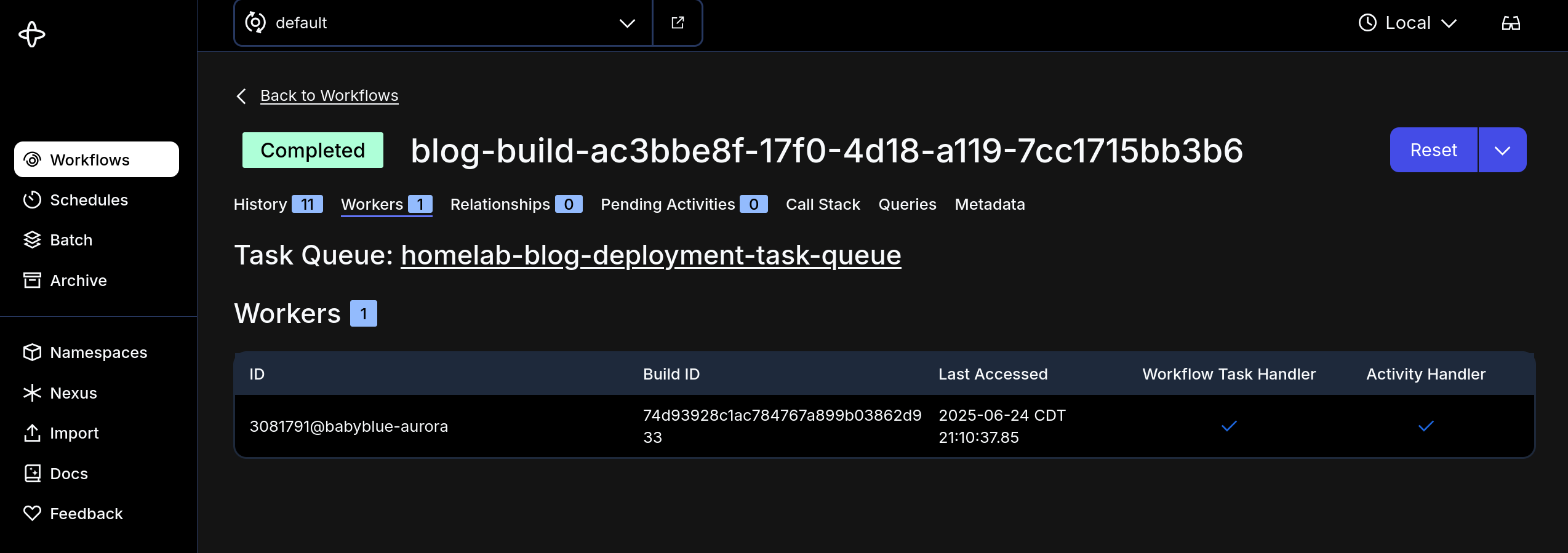
Nic Paynehttps://pype.devNextcloud PHP Opache Memory Consumptionhttps://pype.dev/nextcloud-php-opache-memory-consumption/2025-06-23T08:46:20Z2025-06-23T08:46:20ZToday I was combing through Nextcloud, just taking a gander at the apps, updates, etc.<h1 id="intro"><span class="heading-wear-glyph">Intro</span></h1>
<p>Today I was combing through Nextcloud, just taking a gander at the apps, updates, etc.</p>
<blockquote>
<p>The OPcache buffer is nearly full. To assure that all scripts can be hold in
cache, it is recommended to apply “opcache.memory_consumption” to your PHP
configuration with a value higher than “128”</p>
</blockquote>
<p>So I know <em>nothing</em> about <code>php</code> and I had no idea where to set this… Also I’m
running Nextcloud in a container so any updates will be blown away when the
container is removed (say next time I update Nextcloud)…</p>
<p>After a little duckduckgoing I came across <a href="https://www.reddit.com/r/NextCloud/comments/1gpxl5b/need_help_with_php_opcache_module_warning/">this reddit
post</a>
where a guy had the same issue…</p>
<p>The long and short of it is that on <em>single instance nextcloud deployments</em>
this php memory consumption value can be too low for Nextcloud to keep up with
the demand… You can see in the message they just recommend upping the value.</p>
<p>So I had to think about how to persist the change and have it take effect now
ideally without affecting any users too much… So here’s what I did - made the
change in 2 places:</p>
<h2 id="in-the-container"><span class="heading-wear-glyph">In the container</span> <a href="#in-the-container" class="heading-anchor">#</a></h2>
<p>I exec’d into the container and used this handy <code>sed</code> command <code>sed -i 's/^opcache\.memory_consumption\s*=\s*128$/opcache.memory_consumption=256/' /usr/local/etc/php/conf.d/opcache-recommended.ini</code> to update the value in the
running container - and I guess <code>php</code> maybe is loaded up dynamically or
something? but the warning did go away….</p>
<p>So how to persist this change when the filesystem is blown away when the
container is updated?</p>
<h2 id="in-the-config"><span class="heading-wear-glyph">In the config</span> <a href="#in-the-config" class="heading-anchor">#</a></h2>
<p>I set the env var <code>PHP_OPCACHE_MEMORY_CONSUMPTION</code> in the <code>docker-compose.yml</code>
file to 256 and voila… the change should persist…</p>
Nic Paynehttps://pype.devQuit issueing 200s for 500shttps://pype.dev/quit-issueing-200s-for-500s/2025-06-22T06:55:21Z2025-06-22T06:55:21Z<h1 id="stop-this-nonsense"><span class="heading-wear-glyph">Stop this nonsense</span></h1>
<figure>
<img src="https://cdn.statically.io/gh/pypeaday/images.pype.dev/main/blog-media/20250622115500_5bd3bc21.png" alt="20250622115500_5bd3bc21.png">
</figure>
Nic Paynehttps://pype.dev💭 Control Your n8n Instance Remotely with Telegram Bot Commands …https://pype.dev/thoughts-711/2025-06-22T00:38:53Z2025-06-22T00:38:53ZI'm doing a lot of thinking and brainstorming about how I want to run some pipelines I have in my head, at home... thing
<a href="https://n8n.io/workflows/4928-control-your-n8n-instance-remotely-with-telegram-bot-commands/">
<img
src="https://shots.wayl.one/shot/?url=https://n8n.io/workflows/4928-control-your-n8n-instance-remotely-with-telegram-bot-commands/&height=450&width=800&scaled_width=800&scaled_height=450&selectors="
alt="shot of post - Control Your n8n Instance Remotely with Telegram Bot Commands | n8n workflow template"
height=450
width=800
>
</a>
Here's my thought on <a href="https://n8n.io/workflows/4928-control-your-n8n-instance-remotely-with-telegram-bot-commands/">Control Your n8n Instance Remotely with Telegram Bot Commands | n8n workflow template</a>
---
I'm doing a lot of thinking and brainstorming about how I want to run some pipelines I have in my head, at home... things like image gen for blog posts, posting to various social media, click to generate qr codes and send emails, etc... things that require a lot of integration.
I tried n8n a while ago with 1 use case, it didn't work but times have changed and whatever was wrong for that use case is now just fixed with a few updates... so I'm strongly considering n8n as a platform I build my workflows on, and using telegram as a simple entry-point into workflow execution is kind of intriguing... imagine sending a message to telegram to generate an image with SD based on a picture you took with our phone, maybe do something else with that image (turn it into a qr code or something), and then email it? all with a text message and pic? that sounds pretty cool... not sure what I"ll have spun up but I am excited to be making some progress on the automation ideas
---
!!! note
This is one of [[ my-thoughts ]]. I picked this up from [Waylon Walker](https://waylonwalker.com)(https://thoughts.waylonwalker.com). It's a short note that I make about someone else's content online. Learn more about the process [[ thoughts ]]
Nic Paynehttps://pype.devThinking In Diagramshttps://pype.dev/thinking-in-diagrams/2025-06-20T06:55:31Z2025-06-20T06:55:31ZSomething I didn't appreciate earlier on in my career (and I'm only 8 as far as the age of that career goes anyways) was thinking through problems with...
# Intro
Something I didn't appreciate earlier on in my career (and I'm only 8 as far as
the age of that career goes anyways) was thinking through problems with
diagrams... I've often approached a problem with code first, and immediately
started implementing a solution. There's nothing actually wrong with that especially when considering:
1. people think differently
2. some people think with their fingers
3. recognizing that the first thing you build should be thrown away should give you freedom to "just start"
Now with that said, let's chat about how awesome diagrams are though...
1. they put context in front of you without details
2. you can express many more components of a system in a consumable way when compared to code
3. diagrams help prioritize work and bubble up maybe unforseen dependencies
4. they force you to wireframe before getting lost in the details
## Wireframing
One of my biggest issue when I "just start coding" is not having a direction...
I can put a few place holders `def this:` `def that:` in a few python modules,
but without having every place holder in front of me it is hard to keep them
straight, know the order or dependencies, etc.
Diagrams aren't beholden to a text file or series of them, and you can fit much
more on your screen because you have all the X-Y available to you instead of
the height of your monitor times your formatted lined length (usually 120 for
me).
Diagrams also make it easy to spew out onto a page the different components you
need for a solution, without committing to an order (something that I cannot
express well in scripts)
## A Plan
Diagramming with purpose can get you to the place of having almost a
paint-by-number experience building your app/system/etc. Beecause you separate
the implemetation from the design and when you implement BASED on a design
rather than implement to DISCOVER a design you will be more efficient and in my
experience I've improved my ability to forsee issues that I wouldn't have seen,
or have historically missed, by putting the design down in front of me, the
details of any integrations, etc. before starting to "just code".
## Good Enough
A final note about diagrams for right now is that they're easy to leave as
"good enough". The point was to get a guide for solving a problem.
Diagrams don't have to be picture perfect, even for documentation's sake. They
can even remain somewhat unfinished (permitted you don't get yourself into a
bind of treating diagrams as docs that you didn't clean up)
Here's an example of what I mean - I'm working on a simple workflow to take [my-thoughts](/my-thoughts) and post them to [[nostr]]. I started with a diagram like this...
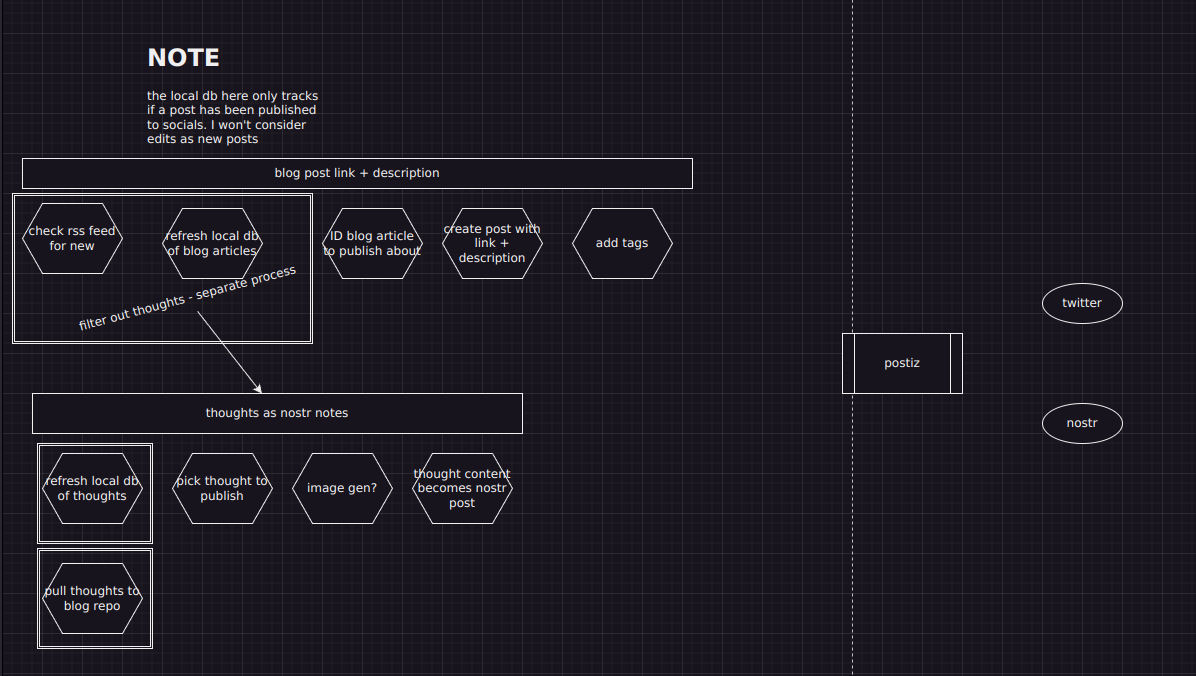
> In parallel I'm working on posting my blog to other social media - this small
> workflow is apart of a larger initiative I'm working on at home
AS you can see this diagram isn't super detailed or pretty. But what it does it
help me see the high level points of bringing my published thoughts to nostr as
posts.
After I have the simple steps, I've started diagramming out more details of each step:
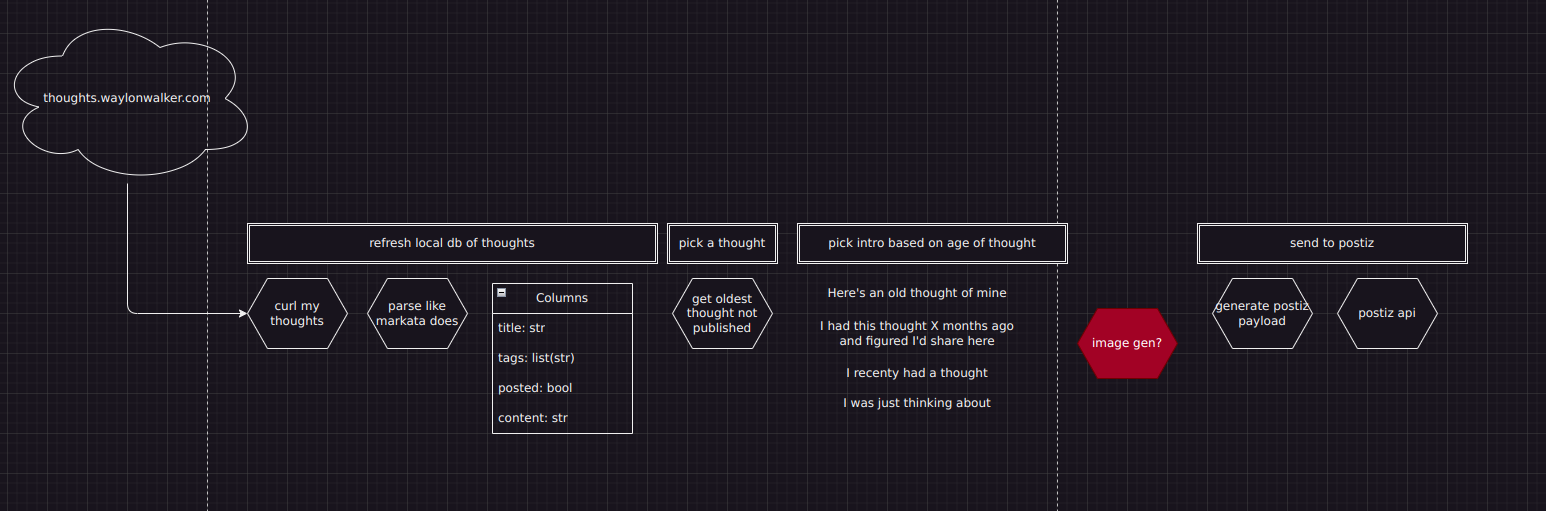
The diagram is easy to put notes on, add some color to for problems not yet solved, etc.
And then with this diagram in front of me, it's easy to begin building
small-scoped components that will be assembled to my larger system, but without
the pressure of constructing every part of the system at once
# Fin
Diagrams help me break up a problem into manageable chunks so that I can put
the things I need later on the back-burner and can focus on one achievable
thing at a time.
Nic Paynehttps://pype.dev💭 pypeaday/whose-turn-is-it: Simple uv webapp to determine order…https://pype.dev/thoughts-709/2025-06-20T01:23:26Z2025-06-20T01:23:26ZWe pray together as a family every night, but every single flipping night my daughter's fight about the order we go in..
<a href="https://github.com/pypeaday/whose-turn-is-it">
<img
src="https://shots.wayl.one/shot/?url=https://github.com/pypeaday/whose-turn-is-it&height=450&width=800&scaled_width=800&scaled_height=450&selectors="
alt="shot of post - pypeaday/whose-turn-is-it: Simple uv webapp to determine order fo players for an event"
height=450
width=800
>
</a>
Here's my thought on <a href="https://github.com/pypeaday/whose-turn-is-it">pypeaday/whose-turn-is-it: Simple uv webapp to determine order fo players for an event</a>
---
We pray together as a family every night, but every single flipping night my daughter's fight about the order we go in... well, NO MORE!
I built a simple uv fastapi app that randomly sorts a list from an environment var `PLAYERS` and presents it in the web page at `/generate`.
Super easy `uv run` at home...
I love that with enough knowledge, or the right kind of knowledge, you can build like anything you want!
---
!!! note
This is one of [[ my-thoughts ]]. I picked this up from [Waylon Walker](https://waylonwalker.com)(https://thoughts.waylonwalker.com). It's a short note that I make about someone else's content online. Learn more about the process [[ thoughts ]]
Nic Paynehttps://pype.devHomelab Youtube Podcasts to AudioBookShelf Pipelinehttps://pype.dev/homelab-youtube-podcasts-to-audiobookshelf-pipeline/2025-06-18T13:53:12Z2025-06-18T13:53:12ZI wrote about using homelab-pinchflat for at-home mashup creation and a song flow for church. But I use it for more than, that and here's another prime use case
I wrote about using [[homelab-pinchflat]] for at-home mashup creation and a song flow
for church. But I use it for more than, that and here's another prime use case
There are podcasts on YouTube I want to follow - The Standup with Prime, or
Shawn Ryan's show. Basically I use pinchflat to download the audio and serve up
those files in ABS (audiobookshelf)
Nic Paynehttps://pype.devsource_up for nested .envrchttps://pype.dev/source-up-for-nested-envrc/2025-06-17T09:52:17Z2025-06-17T09:52:17ZI have a use case for nesting directories with cascading .envrc files. and ran into an issue where the parent environment was being reset by the child...<h1 id="tldr"><span class="heading-wear-glyph">TLDR</span></h1>
<p>I have a use case for nesting directories with cascading .envrc files. and ran
into an issue where the parent environment was being reset by the child
environment. The fix is <code>source_up</code></p>
<h1 id="context"><span class="heading-wear-glyph">Context</span></h1>
<p>I manage some infrastructure at home with a folder like this:</p>
<pre class="chroma"><code><span class="line"><span class="cl">.
</span></span><span class="line"><span class="cl">├── homelab
</span></span><span class="line"><span class="cl">│ ├── .envrc
</span></span><span class="line"><span class="cl">│ └── stack1
</span></span><span class="line"><span class="cl">│ ├── .envrc
</span></span></code></pre><p>I do this so that the “homelab-wide” terraform variables can be exported with
<code>TF_VAR_the_variable</code> in the <code>homelab/.envrc</code> and then the stack specific
variables in <code>stack1/.envrc</code> get exported like <code>TF_VAR_stack_specific_var</code>.</p>
<p>For example, my cloudflare account id is needed in every stack, but the
cloudflare zone id is different per stack - so instead of copying the account
id var to every stack (however the vars are managed), I can set it in a parent
.envrc and share it in nested stack directories</p>
<h2 id="problem"><span class="heading-wear-glyph">Problem</span> <a href="#problem" class="heading-anchor">#</a></h2>
<pre><code># homelab/.envrc
#!/bin/bash
export VAR_FOO=BAR
</code></pre>
<p>So when I <code>cd homelab</code> I get</p>
<pre><code>nic in /tmp/homelab (dev) NO PYTHON ENVIORNMENT SET
⬢ [devbox] ❯ direnv allow
direnv: loading /tmp/homelab/.envrc
direnv: export +VAR_FOO
nic in /tmp/homelab (dev) NO PYTHON ENVIORNMENT SET
⬢ [devbox] ❯ env | grep VAR
VAR_FOO=BAR
</code></pre>
<p>You can see <code>VAR_FOO</code> is set… but now I’ll <code>cd stack1</code></p>
<pre><code>nic in /tmp/homelab (dev) NO PYTHON ENVIORNMENT SET
⬢ [devbox] ❯ cd stack1
direnv: error /tmp/homelab/stack1/.envrc is blocked. Run `direnv allow` to approve its content
nic in /tmp/homelab/stack1 (dev) NO PYTHON ENVIORNMENT SET
⬢ [devbox] ❯ direnv allow
direnv: loading /tmp/homelab/stack1/.envrc
direnv: export +VAR_BAZ
nic in /tmp/homelab/stack1 (dev) NO PYTHON ENVIORNMENT SET
⬢ [devbox] ❯ env | grep VAR
VAR_BAZ=BAM
</code></pre>
<p>As you can see <code>VAR_FOO</code> was unset, and <code>VAR_BAZ</code> is set… so <code>homelab/.envrc</code> was blown away!</p>
<h2 id="fix"><span class="heading-wear-glyph">Fix</span> <a href="#fix" class="heading-anchor">#</a></h2>
<p>Edit <code>stack1/.envrc</code> with a <code>source_up</code> command</p>
<pre><code># stack1/.envrc # NEW
#!/bin/bash
source_up # source the parent environment
export VAR_BAZ=BAM
</code></pre>
<p>After the edit</p>
<pre><code>nic in /tmp/homelab/stack1 (dev) NO PYTHON ENVIORNMENT SET
⬢ [devbox] ❯ vim .envrc
direnv: error /tmp/homelab/stack1/.envrc is blocked. Run `direnv allow` to approve its content
nic in /tmp/homelab/stack1 (dev) NO PYTHON ENVIORNMENT SET took 5s
⬢ [devbox] ❯ direnv allow
direnv: loading /tmp/homelab/stack1/.envrc
direnv: loading /tmp/homelab/.envrc
direnv: export +VAR_BAZ +VAR_FOO
nic in /tmp/homelab/stack1 (dev) NO PYTHON ENVIORNMENT SET
⬢ [devbox] ❯ env | grep VAR
VAR_FOO=BAR
VAR_BAZ=BAM
</code></pre>
<p>Both vars are set!</p>
Nic Paynehttps://pype.devStable Diffusion QR Codes for Joshhttps://pype.dev/stable-diffusion-qr-codes-for-josh/2025-06-17T06:27:28Z2025-06-17T06:27:28Z(fjords of Finland:1.3), (steep cliffs:1.1), (crystal-clear water:1.2), (reflection of sky on water:1.1), (early morning light:1.2), (golden hour glow:1.1),...<h1 id="after-my-blunder"><span class="heading-wear-glyph">After my blunder</span></h1>
<figure>
<img src="https://cdn.statically.io/gh/pypeaday/images.pype.dev/main/blog-media/20250627111955_e86d5db2.png" alt="20250627111955_e86d5db2.png">
</figure>
<p>(fjords of Finland:1.3), (steep cliffs:1.1), (crystal-clear water:1.2), (reflection of sky on water:1.1), (early morning light:1.2), (golden hour glow:1.1), (pine trees:1.1),(serene nature:1.2), (8K landscape photography:1.3), (gaming concept art:1.2), (ultra realistic: 1.2)</p>
<p>Negative prompt: (blurry:1.3), (low resolution:1.3), (overexposed:1.2), (cartoonish:1.3), (unrealistic colors:1.3), (people:1.1),y
Steps: 30, Sampler: Euler a, Schedule type: Automatic, CFG scale: 7, Seed: 784129766, Size: 1536x1536, Model hash: 4199bcdd14, Model: revAnimated_v122EOL, ControlNet 0: “Module: none, Model: control_v1p_sd15_brightness [5f6aa6ed], Weight: 0.25, Resize Mode: Crop and Resize, Processor Res: 512, Threshold A: 0.5, Threshold B: 0.5, Guidance Start: 0.25, Guidance End: 0.8, Pixel Perfect: True, Control Mode: Balanced”, ControlNet 1: “Module: none, Model: control_v1p_sd15_brightness [5f6aa6ed], Weight: 0.25, Resize Mode: Crop and Resize, Processor Res: 512, Threshold A: 0.5, Threshold B: 0.5, Guidance Start: 0.25, Guidance End: 0.75, Pixel Perfect: True, Control Mode: Balanced”, Version: v1.9.4</p>
<h1 id="final-candidates"><span class="heading-wear-glyph">Final Candidates</span></h1>
<p>Turns out upscaling can mess up the design… so I generated new ones at the high res instead of using AI to upscale</p>
<figure>
<img src="https://cdn.statically.io/gh/pypeaday/images.pype.dev/main/blog-media/20250621122040_2dfef68f.png" alt="20250621122040_2dfef68f.png">
</figure>
<p>(fjords of Finland:1.3), (steep cliffs:1.1), (crystal-clear water:1.2), (reflection of sky on water:1.1), (early morning light:1.2), (golden hour glow:1.1), (pine trees:1.1),(serene nature:1.2), (8K landscape photography:1.3), (gaming concept art:1.2), (ultra realistic: 1.2)</p>
<p>Negative prompt: (blurry:1.3), (low resolution:1.3), (overexposed:1.2), (cartoonish:1.3), (unrealistic colors:1.3), (people:1.1), (city buildings:1.2), (vehicles:1.2), (text:1.3), (distortion:1.2)</p>
<p>Steps: 30, Sampler: Euler a, Schedule type: Automatic, CFG scale: 7, Seed: 1827707865, Size: 1536x1536, Model hash: 4199bcdd14, Model: revAnimated_v122EOL, ControlNet 0: “Module: none, Model: control_v1p_sd15_brightness [5f6aa6ed], Weight: 0.25, Resize Mode: Crop and Resize, Processor Res: 1536, Threshold A: 0.5, Threshold B: 0.5, Guidance Start: 0.25, Guidance End: 1.0, Pixel Perfect: False, Control Mode: Balanced”, ControlNet 1: “Module: none, Model: control_v1p_sd15_brightness [5f6aa6ed], Weight: 0.25, Resize Mode: Crop and Resize, Processor Res: 512, Threshold A: 0.5, Threshold B: 0.5, Guidance Start: 0.25, Guidance End: 0.88, Pixel Perfect: False, Control Mode: Balanced”, Version: v1.9.4</p>
<hr>
<p>I turned the brightness down on the above one a little and got a better result</p>
<figure>
<img src="https://cdn.statically.io/gh/pypeaday/images.pype.dev/main/blog-media/20250621122629_1058a54f.png" alt="20250621122629_1058a54f.png">
</figure>
<p>(fjords of Finland:1.3), (steep cliffs:1.1), (crystal-clear water:1.2), (reflection of sky on water:1.1), (early morning light:1.2), (golden hour glow:1.1), (pine trees:1.1),(serene nature:1.2), (8K landscape photography:1.3), (gaming concept art:1.2), (ultra realistic: 1.2)</p>
<p>Negative prompt: (blurry:1.3), (low resolution:1.3), (overexposed:1.2), (cartoonish:1.3), (unrealistic colors:1.3), (people:1.1), (city buildings:1.2), (vehicles:1.2), (text:1.3), (distortion:1.2)</p>
<p>Steps: 30, Sampler: Euler a, Schedule type: Automatic, CFG scale: 7, Seed: 1827707865, Size: 1536x1536, Model hash: 4199bcdd14, Model: revAnimated_v122EOL, ControlNet 0: “Module: none, Model: control_v1p_sd15_brightness [5f6aa6ed], Weight: 0.25, Resize Mode: Crop and Resize, Processor Res: 1536, Threshold A: 0.5, Threshold B: 0.5, Guidance Start: 0.25, Guidance End: 0.85, Pixel Perfect: False, Control Mode: Balanced”, ControlNet 1: “Module: none, Model: control_v1p_sd15_brightness [5f6aa6ed], Weight: 0.25, Resize Mode: Crop and Resize, Processor Res: 512, Threshold A: 0.5, Threshold B: 0.5, Guidance Start: 0.25, Guidance End: 0.75, Pixel Perfect: False, Control Mode: Balanced”, Version: v1.9.4</p>
<h1 id="some-favorites"><span class="heading-wear-glyph">Some favorites</span></h1>
<figure>
<img src="https://cdn.statically.io/gh/pypeaday/images.pype.dev/main/blog-media/20250621020431_d6c69cd2.png" alt="20250621020431_d6c69cd2.png">
</figure>
<p>(fjords of Finland:1.3), (steep cliffs:1.1), (crystal-clear water:1.2), (reflection of sky on water:1.1), (early morning light:1.2), (golden hour glow:1.1), (pine trees:1.1), (green orange:1.0), (serene nature:1.2), (8K landscape photography:1.3), (gaming concept art:1.2), (ultra realistic: 1.1)</p>
<p>Negative prompt: (blurry:1.3), (low resolution:1.3), (overexposed:1.2), (cartoonish:1.3), (unrealistic colors:1.3), (people:1.1), (city buildings:1.2), (vehicles:1.2), (text:1.3), (distortion:1.2)</p>
<p>Steps: 30, Sampler: Euler a, Schedule type: Automatic, CFG scale: 7, Seed: 2926433856, Size: 768x768, Model hash: 4199bcdd14, Model: revAnimated_v122EOL, ControlNet 0: “Module: none, Model: control_v1p_sd15_brightness [5f6aa6ed], Weight: 0.25, Resize Mode: Crop and Resize, Processor Res: 512, Threshold A: 0.5, Threshold B: 0.5, Guidance Start: 0.25, Guidance End: 1.0, Pixel Perfect: False, Control Mode: Balanced”, ControlNet 1: “Module: none, Model: control_v1p_sd15_brightness [5f6aa6ed], Weight: 0.25, Resize Mode: Crop and Resize, Processor Res: 512, Threshold A: 0.5, Threshold B: 0.5, Guidance Start: 0.25, Guidance End: 0.85, Pixel Perfect: False, Control Mode: Balanced”, Version: v1.9.4</p>
<hr>
<figure>
<img src="https://cdn.statically.io/gh/pypeaday/images.pype.dev/main/blog-media/20250621020700_37cf8c79.png" alt="20250621020700_37cf8c79.png">
</figure>
<p>(fjords of Finland:1.3), (steep cliffs:1.1), (crystal-clear water:1.2), (reflection of sky on water:1.1), (early morning light:1.2), (golden hour glow:1.1), (pine trees:1.1),(serene nature:1.2), (8K landscape photography:1.3), (gaming concept art:1.2), (ultra realistic: 1.2)</p>
<p>Negative prompt: (blurry:1.3), (low resolution:1.3), (overexposed:1.2), (cartoonish:1.3), (unrealistic colors:1.3), (people:1.1), (city buildings:1.2), (vehicles:1.2), (text:1.3), (distortion:1.2)</p>
<p>Steps: 30, Sampler: Euler a, Schedule type: Automatic, CFG scale: 7, Seed: 1827707865, Size: 768x768, Model hash: 4199bcdd14, Model: revAnimated_v122EOL, ControlNet 0: “Module: none, Model: control_v1p_sd15_brightness [5f6aa6ed], Weight: 0.25, Resize Mode: Crop and Resize, Processor Res: 512, Threshold A: 0.5, Threshold B: 0.5, Guidance Start: 0.25, Guidance End: 1.0, Pixel Perfect: False, Control Mode: Balanced”, ControlNet 1: “Module: none, Model: control_v1p_sd15_brightness [5f6aa6ed], Weight: 0.25, Resize Mode: Crop and Resize, Processor Res: 512, Threshold A: 0.5, Threshold B: 0.5, Guidance Start: 0.25, Guidance End: 0.88, Pixel Perfect: False, Control Mode: Balanced”, Version: v1.9.4</p>
<h1 id="codes-and-prompts"><span class="heading-wear-glyph">Codes and prompts</span></h1>
<hr>
<figure>
<img src="https://cdn.statically.io/gh/pypeaday/images.pype.dev/main/blog-media/20250617112815_b986db88.png" alt="20250617112815_b986db88.png">
</figure>
<p>prompt: (breathtaking scenic view:1.2), (fjords of Finland:1.3), (steep forested cliffs:1.1), (crystal-clear blue water:1.2), (reflection of sky on water:1.1), , (early morning light:1.2), (golden hour glow:1.1), (pine trees:1.1), (birch trees:1.0), (serene nature:1.2), (ultra-realistic:1.3), (8K landscape photography:1.3), (photorealistic:1.2), (atmospheric lighting:1.2)</p>
<p>Negative prompt: (blurry:1.3), (low resolution:1.3), (overexposed:1.2), (cartoonish:1.3), (unrealistic colors:1.3), (people:1.1), (city buildings:1.2), (vehicles:1.2), (text:1.3), (distortion:1.2)</p>
<p>Steps: 30, Sampler: DPM++ 2M SDE, Schedule type: Karras, CFG scale: 7, Seed: 2206746812, Size: 768x768, Model hash: 4199bcdd14, Model: revAnimated_v122EOL, ControlNet 0: “Module: none, Model: controlnetQRPatternQR_v2Sd15 [2d8d5750], Weight: 1.15, Resize Mode: Crop and Resize, Processor Res: 512, Threshold A: 0.5, Threshold B: 0.5, Guidance Start: 0.0, Guidance End: 0.85, Pixel Perfect: True, Control Mode: Balanced”, Version: v1.9.4</p>
<hr>
<figure>
<img src="https://cdn.statically.io/gh/pypeaday/images.pype.dev/main/blog-media/20250617113111_d9075159.png" alt="20250617113111_d9075159.png">
</figure>
<p>(breathtaking scenic view:1.2), (fjords of Finland:1.3), (steep forested cliffs:1.1), (crystal-clear water:1.2), (reflection of sky on water:1.1), , (early morning light:1.2), (golden hour glow:1.1), (pine trees:1.1), (birch trees:1.0), (serene nature:1.2), (ultra-realistic:1.3), (8K landscape photography:1.3), (photorealistic:1.2), (greens and blues:1.2)</p>
<p>Negative prompt: (blurry:1.3), (low resolution:1.3), (overexposed:1.2), (cartoonish:1.3), (unrealistic colors:1.3), (people:1.1), (city buildings:1.2), (vehicles:1.2), (text:1.3), (distortion:1.2)
Steps: 30, Sampler: DPM++ 2M SDE, Schedule type: Karras, CFG scale: 7, Seed: 2485699904, Size: 768x768, Model hash: 4199bcdd14, Model: revAnimated_v122EOL, ControlNet 0: “Module: none, Model: controlnetQRPatternQR_v2Sd15 [2d8d5750], Weight: 1.1, Resize Mode: Crop and Resize, Processor Res: 512, Threshold A: 0.5, Threshold B: 0.5, Guidance Start: 0.0, Guidance End: 0.8, Pixel Perfect: True, Control Mode: Balanced”, Version: v1.9.4</p>
<hr>
<figure>
<img src="https://cdn.statically.io/gh/pypeaday/images.pype.dev/main/blog-media/20250617113250_839c12e2.png" alt="20250617113250_839c12e2.png">
</figure>
<p>(breathtaking scenic view:1.2), (fjord:1.3), (steep forested cliffs:1.1), (crystal-clear water:1.2), (reflection of sky on water:1.1), , (early morning light:1.2), (golden hour glow:1.1), (pine trees:1.1), (birch trees:1.0), (serene nature:1.2), (ultra-realistic:1.3), (8K landscape photography:1.3), (photorealistic:1.2), (green:1.2)</p>
<p>Negative prompt: (blurry:1.3), (low resolution:1.3), (overexposed:1.2), (cartoonish:1.3), (unrealistic colors:1.3), (people:1.1), (city buildings:1.2), (vehicles:1.2), (text:1.3), (distortion:1.2)
Steps: 30, Sampler: DPM++ 2M SDE, Schedule type: Karras, CFG scale: 8, Seed: 1055874558, Size: 768x768, Model hash: 4199bcdd14, Model: revAnimated_v122EOL, ControlNet 0: “Module: none, Model: controlnetQRPatternQR_v2Sd15 [2d8d5750], Weight: 1.1, Resize Mode: Crop and Resize, Processor Res: 512, Threshold A: 0.5, Threshold B: 0.5, Guidance Start: 0.0, Guidance End: 0.8, Pixel Perfect: True, Control Mode: Balanced”, Version: v1.9.4</p>
<hr>
<h2 id="top-contendor"><span class="heading-wear-glyph">Top Contendor</span> <a href="#top-contendor" class="heading-anchor">#</a></h2>
<figure>
<img src="https://cdn.statically.io/gh/pypeaday/images.pype.dev/main/blog-media/20250618005414_d77ff449.png" alt="20250618005414_d77ff449.png">
</figure>
<p>(breathtaking scenic view:1.2), (fjords of Finland:1.3), (steep forested cliffs:1.1), (crystal-clear water:1.2), (reflection of sky on water:1.1), , (early morning light:1.2), (golden hour glow:1.1), (pine trees:1.1), (green orange:1.0), (serene nature:1.2), (ultra-realistic:1.3), (8K landscape photography:1.3), (gaming concept art:1.2),</p>
<p>Negative prompt: (blurry:1.3), (low resolution:1.3), (overexposed:1.2), (cartoonish:1.3), (unrealistic colors:1.3), (people:1.1), (city buildings:1.2), (vehicles:1.2), (text:1.3), (distortion:1.2)</p>
<p>Steps: 30, Sampler: DPM++ 2M SDE, Schedule type: Karras, CFG scale: 8.5, Seed: 1240242415, Size: 768x768, Model hash: 4199bcdd14, Model: revAnimated_v122EOL, ControlNet 0: “Module: none, Model: controlnetQRPatternQR_v2Sd15 [2d8d5750], Weight: 1.1, Resize Mode: Crop and Resize, Processor Res: 512, Threshold A: 0.5, Threshold B: 0.5, Guidance Start: 0.0, Guidance End: 0.8, Pixel Perfect: False, Control Mode: Balanced”, Version: v1.9.4</p>
<hr>
<figure>
<img src="https://cdn.statically.io/gh/pypeaday/images.pype.dev/main/blog-media/20250618005451_84cd9350.png" alt="20250618005451_84cd9350.png">
</figure>
<p>(breathtaking scenic view:1.2), (fjords of Finland:1.3), (steep forested cliffs:1.1), (crystal-clear water:1.2), (reflection of sky on water:1.1), , (early morning light:1.2), (golden hour glow:1.1), (pine trees:1.1), (green orange:1.0), (serene nature:1.2), (ultra-realistic:1.3), (8K landscape photography:1.3), (gaming concept art:1.2),</p>
<p>Negative prompt: (blurry:1.3), (low resolution:1.3), (overexposed:1.2), (cartoonish:1.3), (unrealistic colors:1.3), (people:1.1), (city buildings:1.2), (vehicles:1.2), (text:1.3), (distortion:1.2)</p>
<p>Steps: 30, Sampler: DPM++ 2M SDE, Schedule type: Karras, CFG scale: 8.5, Seed: 1240242416, Size: 768x768, Model hash: 4199bcdd14, Model: revAnimated_v122EOL, ControlNet 0: “Module: none, Model: controlnetQRPatternQR_v2Sd15 [2d8d5750], Weight: 1.1, Resize Mode: Crop and Resize, Processor Res: 512, Threshold A: 0.5, Threshold B: 0.5, Guidance Start: 0.0, Guidance End: 0.8, Pixel Perfect: False, Control Mode: Balanced”, Version: v1.9.4</p>
<hr>
<p>Scans!</p>
<figure>
<img src="https://cdn.statically.io/gh/pypeaday/images.pype.dev/main/blog-media/20250621004622_6c9a66df.png" alt="20250621004622_6c9a66df.png">
</figure>
<p>(fjords of Finland:1.3), (steep forested cliffs:1.1), (crystal-clear water:1.2), (reflection of sky on water:1.1), , (early morning light:1.2), (golden hour glow:1.1), (pine trees:1.1), (green orange:1.0), (serene nature:1.2), (8K landscape photography:1.3), (gaming concept art:1.2),</p>
<p>(blurry:1.3), (low resolution:1.3), (overexposed:1.2), (cartoonish:1.3), (unrealistic colors:1.3), (people:1.1), (city buildings:1.2), (vehicles:1.2), (text:1.3), (distortion:1.2)</p>
<p>Steps: 30, Sampler: DPM++ 2M SDE, Schedule type: Exponential, CFG scale: 7, Seed: 4060643233, Size: 768x768, Model hash: 4199bcdd14, Model: revAnimated_v122EOL, ControlNet 0: “Module: none, Model: controlnetQRPatternQR_v2Sd15 [2d8d5750], Weight: 1.4, Resize Mode: Crop and Resize, Processor Res: 512, Threshold A: 0.5, Threshold B: 0.5, Guidance Start: 0.0, Guidance End: 0.8, Pixel Perfect: True, Control Mode: Balanced”, Version: v1.9.4</p>
<hr>
<figure>
<img src="https://cdn.statically.io/gh/pypeaday/images.pype.dev/main/blog-media/20250621004844_64e6b94b.png" alt="20250621004844_64e6b94b.png">
</figure>
<p>(fjords of Finland:1.3), (steep forested cliffs:1.1), (crystal-clear water:1.2), (reflection of sky on water:1.1), , (early morning light:1.2), (golden hour glow:1.1), (pine trees:1.1), (green blue:1.0), (serene nature:1.2), (8K landscape photography:1.3), (gaming concept art:1.2),</p>
<p>Negative prompt: (blurry:1.3), (low resolution:1.3), (overexposed:1.2), (cartoonish:1.3), (unrealistic colors:1.3), (people:1.1), (city buildings:1.2), (vehicles:1.2), (text:1.3), (distortion:1.2)</p>
<p>Steps: 30, Sampler: DPM++ 2M SDE, Schedule type: Exponential, CFG scale: 7, Seed: 3713594572, Size: 768x768, Model hash: 4199bcdd14, Model: revAnimated_v122EOL, ControlNet 0: “Module: none, Model: controlnetQRPatternQR_v2Sd15 [2d8d5750], Weight: 1.4, Resize Mode: Crop and Resize, Processor Res: 512, Threshold A: 0.5, Threshold B: 0.5, Guidance Start: 0.0, Guidance End: 0.8, Pixel Perfect: True, Control Mode: Balanced”, Version: v1.9.4</p>
Nic Paynehttps://pype.devU-Blue Aurora Upgrade Broke HWA Dockerhttps://pype.dev/u-blue-aurora-upgrade-broke-hwa-docker/2025-06-15T08:42:09Z2025-06-15T08:42:09ZI use Universal Blue's Aurora distribution on my daily driver desktop, and I rebooted today which led what I imagine is a kernel update. This broke all of my...<p>I use Universal Blue’s <a href="https://getaurora.dev/en">Aurora</a> distribution on my daily driver desktop, and
I rebooted today which led what I imagine is a kernel update. This broke all of
my docker containers using a GPU.</p>
<pre><code>nvidia-container-cli: detection error: open failed: /usr/lib/libnvidia-tls.so.570.153.02: no such file or directory: unknown
</code></pre>
<p>Thankfully a reboot and booting into the older environment fixes everything…
Linux and immutability FTW</p>
<h2 id="related"><span class="heading-wear-glyph">Related</span> <a href="#related" class="heading-anchor">#</a></h2>
<ul>
<li><a href="https://universal-blue.discourse.group/t/cannot-use-nvidia-runtime-in-docker-since-update-to-fedora-42/8812/3">Discorse Thread</a></li>
</ul>
Nic Paynehttps://pype.devHomelab Pinchflathttps://pype.dev/homelab-pinchflat/2025-06-14T08:51:21Z2025-06-14T08:51:21ZI've written about self-hosted-media before and addressed some thoughts with YouTube.
# Why?
I've written about [[self-hosted-media]] before and addressed some thoughts with YouTube.
Lately though I've had 2 use cases for offline YouTube media and I'm now
solving this problem by using [pinchflat](https://pinchflat.com/) as my `ytdl`
solution + file system organization for use throughout my homelab.
## Use Case 1
At church we use pre-recorded music to sing along to, or at least we used to,
thankfully as of June 2025 we're doing live-music every week. But in the before
times I would strip the audio out of song files we had purchased and then made
lyric videos with the instrumental tracks. As we wanted to try new songs out we
didn't want to purchase them in case they didn't work out for us to use and
that ends up being a waste (church budget is very tight). So using songs
available on YouTube is an easy solution, but the only way to strip the vocals
and see if the song sounded right with our singers and equipment was to make
the lyric video and rehearse it... Chicken or Egg problem unless we can freely
try it before purchasing... So using Pinchflat we can download songs in that
playlist, I can edit the files, the team can try it out, and if we like it we
can use it without hitting the budget any harder than necessary.
> Pinchflat syncs that playlist to a folder on my NAS that another process
> watches and performs the audio stripping workflow
## Use Case 2
I just wrote about [[if-you-want-something-make-it-so-song-style]] which is the
second use case - cutting mashups of my favorite songs on youtube and then
hosting them myself for easy listening
# The Setup
I run it in docker compose like practically all my other services
```yml
services:
pinchflat:
container_name: "pinchflat"
image: "ghcr.io/kieraneglin/pinchflat:latest"
ports:
- "8945:8945"
volumes:
- "/tank/encrypted/docker/the-pit-zfs/pinchflat/config:/config:rw"
- "/tank/encrypted/nas/media/downloads/pinchflat/downloads:/downloads:rw"
environment:
TZ: "America/Chicago"
PUID: "1000"
PGID: "1000"
restart: unless-stopped
deploy:
resources:
limits:
memory: "4g"
```
# The GUI
The WebUI is easy to navigate - you organize your downloads however you want with "sources", and here's how I setup the source for these mashups that I want to edit... I add them to my playlist and Pinchflat grabs them for me automatically
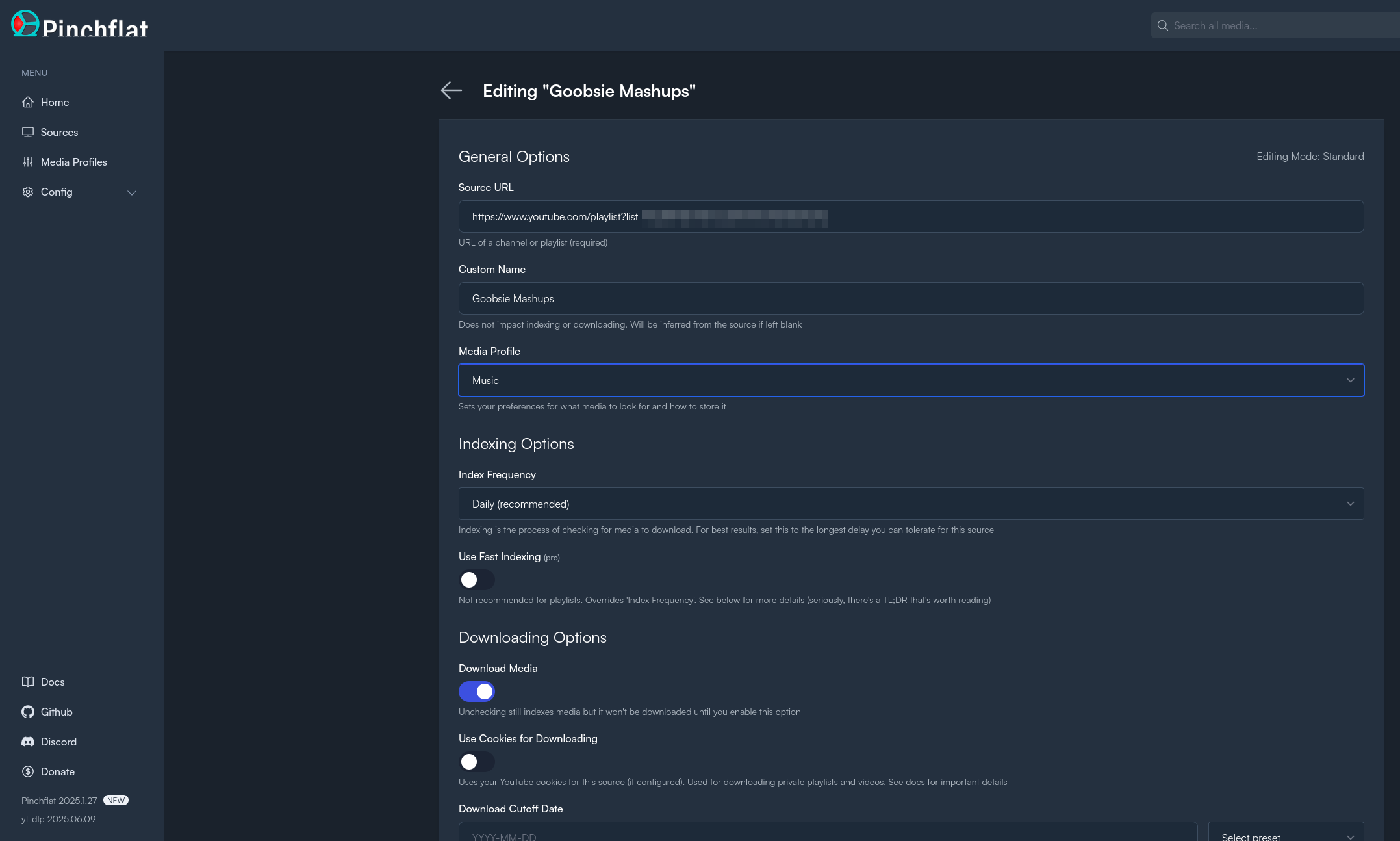
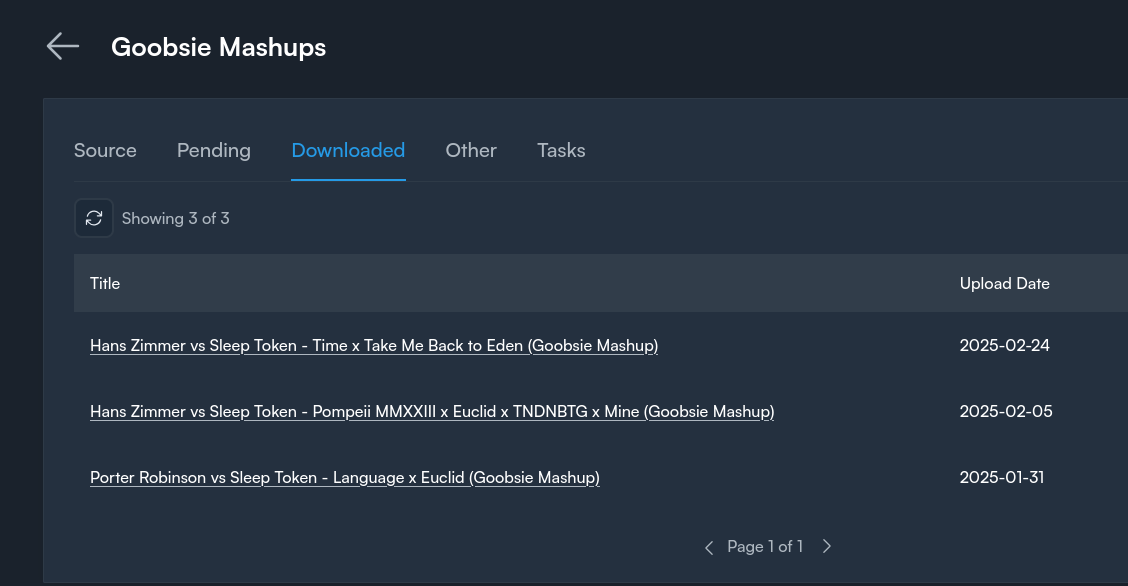
That's basically it - then as you can see in the compose file, I get the files in a folder on my NAS and from there I can edit them as I need.
## Example
The church app that does the audio processing is in a compose stack with the
pinchflat download directory on the host mounted in - this is how containers in
different stacks can share data, by sharing a filesystem bind mount
```yml
services:
olivet_watcher_app:
image: pypeaday/vocal-remover-watcher
container_name: olivet-youtube-watcher
volumes:
- /tank/encrypted/nas/media/downloads/pinchflat/downloads:/input:ro
- /tank/encrypted/docker/vocal_remover_app/watcher-app/processed_mp3s:/output
- /tank/encrypted/docker/vocal_remover_app/watcher-app/db:/data
working_dir: /app
```
Nic Paynehttps://pype.devIf You Want Something Make It So - Song Stylehttps://pype.dev/if-you-want-something-make-it-so-song-style/2025-06-14T08:44:14Z2025-06-14T08:44:14ZIn grad school a professor of mine, Mark Hunacek, said one of the most profound things I've ever heard to the tune "if you want it, then make it so"... It's...
In grad school a professor of mine, Mark Hunacek, said one of the most profound
things I've ever heard to the tune "if you want it, then make it so"... It's a
great benefit to mathematicians at the bar to start a conversation with "hey
let's assume X because we can"...
This phrase has affected my work greatly to the work I do and how I go about it-
it's literally changed how I design some of my code. But I also want this
mantra to flow into other parts of my life...
> So here's a post about how I use Pinchflat and Davinci Resolve to tickle my
> brain with bespoke versions of beautifully crafted mashups
In this example I took a Goobsie mashup, cut the part I didn't like quite as
much (though admittedly it's still beautiful) and spliced it with itself to
give me a longer running version of a musical piece that takes me to another
world...
[OG Youtube Mashup](https://www.youtube.com/watch?v=7v7nreDnmDg)
## Acquiring the Media
Pinchflat isn't really necessary here, anyone can use `youtubedl` or another
tool to download from YouTube. I do use Pinchflat to subscribe to Youtube
playlists to automate this process for me. See more about that in
[[homelab-pinchflat]]
## Creating the Mashup
So Goobsie makes actually good mashups, and I'm not anything even remotely close to an audio engineer or whatever, but there's a segment of this song that just strikes my whole body in a unique way and I want to sometimes just listen to it conveniently... So enter Davinci Resolve... Basically I took the downloaded file, added it twice to a timeline, and then faded in and out until it sounded ok to me.
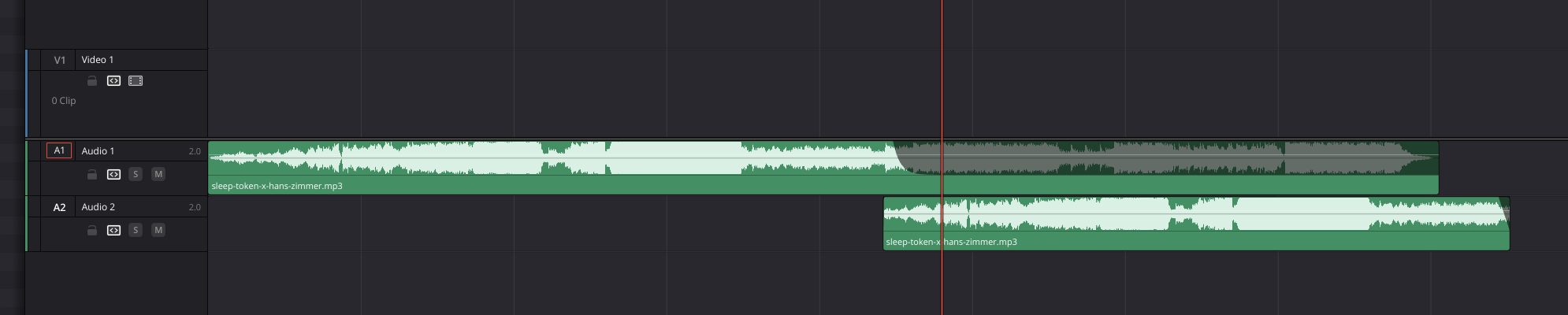
## Listening to the Mashup
So now how do I listen to this?
For the moment, it's a favorite in my Jellyfin library and I listen through
that client. It's a TODO item for me to set-up a more music-centric streaming
service
!!! info "Go Forth"
So Go Forth - and if you want something, make it soNic Paynehttps://pype.devZSA typing challenge issuehttps://pype.dev/zsa-typing-challenge-issue/2025-06-13T08:07:41Z2025-06-13T08:07:41ZI love zsa and have been using a moonlander for a few years now.<h1 id="zsa"><span class="heading-wear-glyph">ZSA</span></h1>
<p>I love <a href="https://zsa.io">zsa</a> and have been using a moonlander for a few years now.</p>
<p>They recently launched <a href="https://typ.ing">typ.ing</a> as a way to train your typing skills - it’s a lot like <a href="https://monkeytype.com">monkeytype</a>.</p>
<p>I have a thought about it <a href="https://thoughts.waylonwalker.com/post/682">here</a></p>
<h2 id="today-s-challenge"><span class="heading-wear-glyph">Today’s Challenge</span> <a href="#today-s-challenge" class="heading-anchor">#</a></h2>
<p>I went to do today’s daily challenge and have ran into an issue where part of
the challenge is to type <code>/</code> the forward slash character but it’s actually a
keybind on the website for navigation (well done btw!)</p>
<figure>
<img src="https://cdn.statically.io/gh/pypeaday/images.pype.dev/main/blog-media/20250613130724_06b0f9ef.png" alt="20250613130724_06b0f9ef.png">
</figure>
<p>So when I try to type the challenge I actually bring up the nav menu</p>
<figure>
<img src="https://cdn.statically.io/gh/pypeaday/images.pype.dev/main/blog-media/20250613131031_ce06cf48.png" alt="20250613131031_ce06cf48.png">
</figure>
<p>So for today I’ll take the error on the character to complete it and maybe ZSA
can look into this?</p>
Nic Paynehttps://pype.devDouble Check Your DNS Recordshttps://pype.dev/double-check-your-dns-records/2025-06-13T06:53:50Z2025-06-13T06:53:50ZI host my blog on cloudflare and manage my infra with terraform. I got a 522 when I went to recently and I wondered why since worked fine...<h1 id="my-blog"><span class="heading-wear-glyph">My Blog</span></h1>
<p>I host <a href="https://pype.dev">my blog</a> on cloudflare and manage my infra with
terraform. I got a 522 when I went to <code>https://www.pype.dev</code> recently and I
wondered why since <code>https://pype.dev</code> worked fine…</p>
<h2 id="terraform"><span class="heading-wear-glyph">Terraform</span> <a href="#terraform" class="heading-anchor">#</a></h2>
<p>I had this right in the terraform:</p>
<pre class="chroma"><code><span class="line"><span class="cl"><span class="k">resource</span> <span class="s2">"cloudflare_pages_domain" "cf_domain"</span> {
</span></span><span class="line"><span class="cl"><span class="n"> account_id</span> <span class="o">=</span> <span class="k">local</span><span class="p">.</span><span class="k">account_id</span>
</span></span><span class="line"><span class="cl"><span class="n"> project_name</span> <span class="o">=</span> <span class="k">cloudflare_pages_project</span><span class="p">.</span><span class="k">build_config</span><span class="p">.</span><span class="k">name</span>
</span></span><span class="line"><span class="cl"><span class="n"> domain</span> <span class="o">=</span> <span class="s2">"pype.dev"</span>
</span></span><span class="line"><span class="cl">}
</span></span></code></pre><p>But turns out the <code>www</code> record was commented out for some reason in my terraform code:</p>
<pre class="chroma"><code><span class="line"><span class="cl"><span class="k">resource</span> <span class="s2">"cloudflare_pages_domain" "cf_domain_www"</span> {
</span></span><span class="line"><span class="cl"><span class="n"> account_id</span> <span class="o">=</span> <span class="k">local</span><span class="p">.</span><span class="k">account_id</span>
</span></span><span class="line"><span class="cl"><span class="n"> project_name</span> <span class="o">=</span> <span class="k">cloudflare_pages_project</span><span class="p">.</span><span class="k">build_config</span><span class="p">.</span><span class="k">name</span>
</span></span><span class="line"><span class="cl"><span class="n"> domain</span> <span class="o">=</span> <span class="s2">"www.pype.dev"</span>
</span></span><span class="line"><span class="cl">}
</span></span></code></pre><p>A quick <code>terraform apply -auto-approve</code> (careful with this) and we’re up and
running with the <code>www</code> record now</p>
Nic Paynehttps://pype.dev💭 qwen3https://pype.dev/thoughts-685/2025-06-11T02:23:23Z2025-06-11T02:23:23ZI really don't know much about every self-hostable LLM out there... so much as happened. I am blessed at home with a pre
<a href="https://ollama.com/library/qwen3">
<img
src="https://shots.wayl.one/shot/?url=https://ollama.com/library/qwen3&height=450&width=800&scaled_width=800&scaled_height=450&selectors="
alt="shot of post - qwen3"
height=450
width=800
>
</a>
Here's my thought on <a href="https://ollama.com/library/qwen3">qwen3</a>
---
I really don't know much about every self-hostable LLM out there... so much as happened. I am blessed at home with a pretty beefy GPU and so although I don't know all the deets, I can run a lot of the reasonably large "open source" models. The one I've been playing with lately is qwen3. The conversational flow has felt more natural with it compared to llama3.2 or dolphin3. Granted I might need to update something and my experience is limited. I've also had good experience with gemma3 as a noteworthy contender for my go-to LLM right now in open-webui
---
!!! note
This is one of [[ my-thoughts ]]. I picked this up from [Waylon Walker](https://waylonwalker.com)(https://thoughts.waylonwalker.com). It's a short note that I make about someone else's content online. Learn more about the process [[ thoughts ]]
Nic Paynehttps://pype.dev💭 News - Apps - App Store - Nextcloudhttps://pype.dev/thoughts-680/2025-06-09T11:37:39Z2025-06-09T11:37:39ZI just started using FreshRSS to get familiar with subscribing to RSS feeds and leaning into that as opposed to social m
<a href="https://apps.nextcloud.com/apps/news">
<img
src="https://shots.wayl.one/shot/?url=https://apps.nextcloud.com/apps/news&height=450&width=800&scaled_width=800&scaled_height=450&selectors="
alt="shot of post - News - Apps - App Store - Nextcloud"
height=450
width=800
>
</a>
Here's my thought on <a href="https://apps.nextcloud.com/apps/news">News - Apps - App Store - Nextcloud</a>
---
I just started using FreshRSS to get familiar with subscribing to RSS feeds and leaning into that as opposed to social media... Twitter has become basically just a news outlet for me, not a place to connect with devs (except for 2 or 3 who are active). RSS seems like such cool and ancient technology that is protected from the corporate tentacles that hold up every social media outlet save for nostr...
So as I look for an RSS reader and/or feed aggregator this Nextcloud plugin seems like a good choice to look at since I'm already hosting NC.. although do I really want to lean into it for more and more?
---
!!! note
This is one of [[ my-thoughts ]]. I picked this up from [Waylon Walker](https://waylonwalker.com)(https://thoughts.waylonwalker.com). It's a short note that I make about someone else's content online. Learn more about the process [[ thoughts ]]
Nic Paynehttps://pype.devExample For Andrewhttps://pype.dev/example-for-andrew/2025-06-08T14:48:53Z2025-06-08T14:48:53Z<figure>
<img src="https://cdn.statically.io/gh/pypeaday/images.pype.dev/main/blog-media/20250608194801_809d5306.png" alt="20250608194801_809d5306.png">
</figure>
Nic Paynehttps://pype.devI built a simple app for adding images to my bloghttps://pype.dev/i-built-a-simple-app-for-adding-images-to-my-blog/2025-06-07T13:30:28Z2025-06-07T13:30:28ZI built a simple fastAPI app called "shotput" that I run locally inside a git repo where I save images for my blog. The app is simple:
# Quick Deets
I built a simple fastAPI app called "shotput" that I run locally inside a git repo where I save images for my blog. The app is simple:
1. upload image from clipboard
2. app commits image to repo (path is configurable)
3. app pushes the commit (auto-push configurable)
4. app returns a markdown link I can paste in my blog that uses statically.io (see [[statically-io-to-help-me-out]]) to serve the image from the repo to my blog
See the image repo with app details at [images.pype.dev](https://github.com/pypeaday/images.pype.dev)
# Usage
Anyone could copy the script and config to their own git repo to put images in
and run this at home - instructions are in the readme but for simple running on localhost it's just `uv run`
# Example
pasting an image let's you copy the markdown link for easy pasting
```markdown

```
Nic Paynehttps://pype.devDouble check your CIDR blocks!https://pype.dev/double-check-your-cidr-blocks/2025-06-07T07:27:31Z2025-06-07T07:27:31ZCopy paste - don't rely on typing correctly...<h1 id="tl-dr"><span class="heading-wear-glyph">tl;dr</span></h1>
<p>Copy paste - don’t rely on typing correctly…</p>
<h1 id="the-issue"><span class="heading-wear-glyph">The Issue</span></h1>
<p>I use tailscale at home and generally love it. One thing I use it for is
whitelisting - so I have some apps publically available and my homelab ones
have DNS with SSL certs by LE but I whitelist to only my private IPs so that I
can use https at home basically. However I have had a few issues
with a couple apps, and I kind of chaulked it up to “network protocol this”
“need to figure out that header that” but ultimately I was being lazy and the
issues weren’t catastrophic… it was things like:</p>
<ol>
<li>couldn’t get to my NVR by DNS, so I’d have to use tailscale_ip:port</li>
<li>couldn’t login with my user in jellyfin cause I lock me down to LAN only
since I dont’ use a password</li>
<li>gotify wouldn’t connect using DNS</li>
</ol>
<blockquote>
<p>These things aren’t huge but they are annoying and today I decided to figure it out.</p>
</blockquote>
<h2 id="typo"><span class="heading-wear-glyph">Typo!</span> <a href="#typo" class="heading-anchor">#</a></h2>
<p>I’m not an expert yet but I think the main problem was the CIDR block I was
using in my traefik config.</p>
<p>This’ll shock some of you but <code>10.64.0.0/10</code> and <code>100.64.0.0/10</code> are not the
same blocks!</p>
<div class="admonition warning">
<p class="admonition-title">Check your CIDRs</p>
<p>It’s always DNS, and even when it’s not, it’s still probably networking</p>
</div>
Nic Paynehttps://pype.devhomelab-journey-part-1https://pype.dev/homelab-journey-part-1/2025-06-05T08:19:57Z2025-06-05T08:19:57ZI want to start writing about my homelab and this first post can be a short introduction to how I got into homelabbing and a review of my current hardware....
# Introduction
I want to start writing about my homelab and this first post can be a short
introduction to how I got into homelabbing and a review of my current hardware.
I'll hopefully write about the evolution of my homelab to get to this
current point and then start writing about updates as new things hit the lab.
# The Journey
## Applications | Pi-Hole
I started with a pi-hole appliance running on a pi-0 I
had lying around. So, a little introduction into SSH and foreign operating
systems (I was loosely familiar with Linux and so Raspbian wasn't a huge deal
to start with) and then you could just [install pi-hole](https://docs.pi-hole.net/main/basic-install/).
After installing it I got to learn a little bit about networking, DNS, DHCP,
etc. all from just exploring and trying out the features of pi-hole.
## Hardware
From there I happened to come into a few computers kind of for free that a church was
recycling and so now with new-to-me x86 hardware and armed with a tiny bit of
docker experience at work - I thought "well I wonder if I could run pi-hole in
docker on a Linux machine?" and that opened the door to running other things in docker.
# Applications | Free-NAS
I quickly decided I wanted a NAS after talking with a friend at work, and one
of those computers that I inherited was the perfect target for Freenas by iX
systems (Freenas has since morphed into a few things - primarily TrueNAS Core
for the homelabber). That got me somewhat familiar with jails (which is a BSD
concept as FreeNAS was based on FreeBSD, not Linux) and running
containers in different ways and then I decided I wanted Linux so I rebuilt with
Ubuntu.
!!! note ""
there's been several hardware changes and such in there but that
does more or less get me to arrive at where I'm at today which is I have a
few different boxes running pretty standard operating systems for their
purposes and they are as follows.
# Current Homelab Setup
!!! note "Find updated information at [[the-homelab]]"
## Ad blocking | Pi-Hole
Hardware: pi-3
I have a Raspberry Pi 3 hardwired in that is running pi-hole so that's been a
part of my infrastructure now for a long time.
## Router | OPNSense
!!! note "stats"
CPU: i5-8700
Memory: 8GB of whatever was in the box
Storage: 1TB SSD
My router is an old Optiplex SFF 5060 I got from Amazon for less than $100.
So I'm running a x86 system for my router with
OpenSense on it. Just seemed it to be another home lab standard and I'd like to
someday bring pi-hole over there or use AdGuard or integrate those two things
maybe a little bit more completely but right now they are mostly separate.
## Networking | VLANs
There's a
managed switch in there for some VLAN tomfoolery for my cameras and an IOT
network type of a thing.
## Networking | VPN | Tailscale
They're on tailscale as well so my DNS happens over tailscale.
## My Desktop
!!! note "stats"
CPU: Ryzen 7 5700X
GPU: Nvidia 3090
Memory: 64 GB
Storage: 4TB SSD + 2 TB HDD for zfs backup
OS: Universal Blue Aurora
My daily-driver desktop is somewhat apart of my homelab now as I have a 3090 in
there with 20 GB of VRAM so I can run some heavier LLMs for self-hosted AI
workloads. Everything in that space runs in a container and then I manage
docker containers with compose stacks and portainer for visibility.
### Applications
Some of the apps I run here are ollama, open-webui, automatic1111's stable diffusion webui, whisper-webui
## NAS / Server
!!! note "stats"
CPU: Ryzen 7 5700G
GPU: None right now
Memory: 128 GB
Storage: 2x12 TB ZFS Mirror + another 2x12 TB ZFS Mirror + 500GB disk for NVR
OS: Ubuntu Server 24.04
At the moment I am managing containers using Docker Compose stacks. Many
applications have their own stack but then I also have stacks of many
applications. The Compose files are all organized by host and they're in git
and I use GitHub as my main get back and remote storage.
### Applications
There are currently 74 containers running on my server, I will not list them all but here's some highlights:
- traefik
- portainer
- nextcloud
- jellyfin
- \*arr stack
- code-server
- kanboard
I regularly spin up compose stacks to try new things as I hear about them in
newsletters and such - I will be making an attempt to write about them more
frequently in a homelabbing series
Nic Paynehttps://pype.devBackups interrupted by full disk usagehttps://pype.dev/backups-interrupted-by-full-disk-usage/2025-06-03T21:08:50Z2025-06-03T21:08:50ZI just got a message from HCIO that my primary backup script is late... This happens every now and then but I decided to check on it... Quickly in and I...<p>I just got a message from HCIO that my primary backup script is late… This
happens every now and then but I decided to check on it… Quickly <code>ssh</code> in and
I notice it takes a long time to connect, but nothing errors out… I’ve been
in the game long enough to think this kind of latency is often disk IO. After
waiting a bit and haulting the zshrc sourcing, I hit a <code>sudo dust / -H</code> and bam…
There’s a container logfile that’s about 80GB sitting in <code>/var</code>…</p>
<pre><code> 75G │ │ │ │ ┌── 57409a7f8d3168b368e0230babd08ec2e20aabb288806aa13652db1e653a0eee-json.log
75G │ │ │ │ ┌─┴ 57409a7f8d3168b368e0230babd08ec2e20aabb288806aa13652db1e653a0eee
76G │ │ │ ├─┴ containers
83G │ │ ├─┴ docker
85G │ ├─┴ lib
90G ├─┴ var
117G ┌─┴ /
</code></pre>
<p>Easy enough to remove, but I need to setup some alerts on disk usage, and
identify the container to limit the log file size</p>
<div class="admonition info">
<p class="admonition-title">Useful Notifications</p>
<p>I use healthchecks.io to monitor several scripts. You can self-host it but
I use the hosted service since he has simple Signal integration</p>
</div>
Nic Paynehttps://pype.devhomelab-computer-vision-pipelineshttps://pype.dev/homelab-computer-vision-pipelines/2025-05-31T08:18:55Z2025-05-31T08:18:55ZDone in 11 seconds! Subtitle and audio files are in the outputs folder.<p>Done in 11 seconds! Subtitle and audio files are in the outputs folder.</p>
<p>I wanted to talk through an idea I have for some computer vision pipelines at home.
I heard of a tool called Roboflow, which is like a no-code computer vision pipeline training
and inference tool.
It seems very cool.
I also use Frigate at home, and Frigate supports lots of detection on the NVR side.
And so deploying a model in Frigate or using Roboflow, depending on what kind of customization
you would need, you can have these detections potentially be as accurate as you want, at
least with Roboflow.
The thing is, I don’t know about Frigate, but my ideas are if I have a model at home
that knows me and my wife and my children by name, then when monitored areas issue detections,
for example, say I’m in the backyard and the temperature is above 80 degrees, have a home
assistant kick on a sprinkler system or something like that.
And if my wife is back there and it’s 80 degrees, don’t do that because she wouldn’t want that
sprinkler on or whatever.
I think that something like that would be very feasible once you have the model.
So you would need a way to train the model, which would require gathering data and labeling
it.
Then you could train a model in lots of ways, but you need to have the deployment in mind.
If the deployment was Frigate, you would need to be able to compile that model into some
TensorFlow Lite thing that can run on a TPU.
That sounds very possible.
Otherwise, the Roboflow would probably be the platform for training, and then they make
the deployment kind of a one-click thing.
From there, I guess either way, Frigate is running the inference, and so the home assistant
integration would be about the same.
Frigate sends notifications over MQTT, and based on the Frigate blueprint that I’m using
for home assistant anyway, based on the object and whatever other conditions you want to
set in an automation, you do whatever you want to do in home assistant.
That sounds neat.</p>
Nic Paynehttps://pype.devBackups are dopehttps://pype.dev/backups-are-dope/2025-05-27T19:42:27Z2025-05-27T19:42:27ZI accidently chown'd -R an app directory and it totally screwed up the database folder. Luckily I zfs replicate my docker volumes to another drive even on...
I accidently chown'd -R an app directory and it totally screwed up the database
folder. Luckily I zfs replicate my docker volumes to another drive even on the
same host, so a quick [rsync] from /harbor/encrypted/docker/manyfold to
/tank/encrypted/docker/manyfold got me back up and running since I hadn't
replicated the messed up permission set yet
Q: How to link to my rsync like a pro post?
A: Wikilinks `[[rsync-like-a-pro]]` [[rsync-like-a-pro]]
Nic Paynehttps://pype.devSearXNGhttps://pype.dev/searxng/2025-05-25T08:33:10Z2025-05-25T08:33:10ZI heard about SearXNG on a couple podcasts and saw it trending on GitHub several times before I finally decided to stand it up. I used it transparently when...<p>I heard about <a href="https://searxng.org">SearXNG</a> on a couple podcasts and saw it trending on GitHub
several times before I finally decided to stand it up.
I used it transparently when trying out <a href="https://khoj.dev/">khoj</a>, a self-hosted AI LLM agent
playground kind of a thing, but I’ve also been messing around with <a href="https://openwebui.com">Open-WebUI</a> to
have a self-hosted ChatGPT-like experience.
I don’t know if SearchXNG used to be harder to set up, but it was pretty simple with a Docker Compose up
and a couple configuration options given my personal homelab setup. Using it feels
very nice.</p>
<pre class="chroma"><code><span class="line"><span class="cl"><span class="nt">services</span><span class="p">:</span><span class="w">
</span></span></span><span class="line"><span class="cl"><span class="w"> </span><span class="nt">redis</span><span class="p">:</span><span class="w">
</span></span></span><span class="line"><span class="cl"><span class="w"> </span><span class="nt">container_name</span><span class="p">:</span><span class="w"> </span><span class="l">redis</span><span class="w">
</span></span></span><span class="line"><span class="cl"><span class="w"> </span><span class="nt">image</span><span class="p">:</span><span class="w"> </span><span class="l">docker.io/valkey/valkey:8-alpine</span><span class="w">
</span></span></span><span class="line"><span class="cl"><span class="w"> </span><span class="nt">command</span><span class="p">:</span><span class="w"> </span><span class="l">valkey-server --save 30 1 --loglevel warning</span><span class="w">
</span></span></span><span class="line"><span class="cl"><span class="w"> </span><span class="nt">restart</span><span class="p">:</span><span class="w"> </span><span class="l">unless-stopped</span><span class="w">
</span></span></span><span class="line"><span class="cl"><span class="w"> </span><span class="nt">volumes</span><span class="p">:</span><span class="w">
</span></span></span><span class="line"><span class="cl"><span class="w"> </span>- <span class="l">./data/redis:/data</span><span class="w">
</span></span></span><span class="line"><span class="cl"><span class="w"> </span><span class="nt">logging</span><span class="p">:</span><span class="w">
</span></span></span><span class="line"><span class="cl"><span class="w"> </span><span class="nt">driver</span><span class="p">:</span><span class="w"> </span><span class="s2">"json-file"</span><span class="w">
</span></span></span><span class="line"><span class="cl"><span class="w"> </span><span class="nt">options</span><span class="p">:</span><span class="w">
</span></span></span><span class="line"><span class="cl"><span class="w"> </span><span class="nt">max-size</span><span class="p">:</span><span class="w"> </span><span class="s2">"1m"</span><span class="w">
</span></span></span><span class="line"><span class="cl"><span class="w"> </span><span class="nt">max-file</span><span class="p">:</span><span class="w"> </span><span class="s2">"1"</span><span class="w">
</span></span></span><span class="line"><span class="cl"><span class="w">
</span></span></span><span class="line"><span class="cl"><span class="w"> </span><span class="nt">searxng</span><span class="p">:</span><span class="w">
</span></span></span><span class="line"><span class="cl"><span class="w"> </span><span class="nt">container_name</span><span class="p">:</span><span class="w"> </span><span class="l">searxng</span><span class="w">
</span></span></span><span class="line"><span class="cl"><span class="w"> </span><span class="nt">image</span><span class="p">:</span><span class="w"> </span><span class="l">docker.io/searxng/searxng:latest</span><span class="w">
</span></span></span><span class="line"><span class="cl"><span class="w"> </span><span class="nt">restart</span><span class="p">:</span><span class="w"> </span><span class="l">unless-stopped</span><span class="w">
</span></span></span><span class="line"><span class="cl"><span class="w"> </span><span class="nt">ports</span><span class="p">:</span><span class="w">
</span></span></span><span class="line"><span class="cl"><span class="w"> </span>- <span class="s2">"8080:8080"</span><span class="w">
</span></span></span><span class="line"><span class="cl"><span class="w"> </span><span class="nt">volumes</span><span class="p">:</span><span class="w">
</span></span></span><span class="line"><span class="cl"><span class="w"> </span>- <span class="l">./data/searxng:/etc/searxng:rw</span><span class="w">
</span></span></span><span class="line"><span class="cl"><span class="w"> </span><span class="nt">env_file</span><span class="p">:</span><span class="w"> </span><span class="l">.env</span><span class="w">
</span></span></span><span class="line"><span class="cl"><span class="w"> </span><span class="nt">environment</span><span class="p">:</span><span class="w">
</span></span></span><span class="line"><span class="cl"><span class="w"> </span><span class="c"># - SEARXNG_BASE_URL=https://${SEARXNG_HOSTNAME:-localhost}/</span><span class="w">
</span></span></span><span class="line"><span class="cl"><span class="w"> </span>- <span class="l">UWSGI_WORKERS=${SEARXNG_UWSGI_WORKERS:-4}</span><span class="w">
</span></span></span><span class="line"><span class="cl"><span class="w"> </span>- <span class="l">UWSGI_THREADS=${SEARXNG_UWSGI_THREADS:-4}</span><span class="w">
</span></span></span><span class="line"><span class="cl"><span class="w"> </span><span class="nt">logging</span><span class="p">:</span><span class="w">
</span></span></span><span class="line"><span class="cl"><span class="w"> </span><span class="nt">driver</span><span class="p">:</span><span class="w"> </span><span class="s2">"json-file"</span><span class="w">
</span></span></span><span class="line"><span class="cl"><span class="w"> </span><span class="nt">options</span><span class="p">:</span><span class="w">
</span></span></span><span class="line"><span class="cl"><span class="w"> </span><span class="nt">max-size</span><span class="p">:</span><span class="w"> </span><span class="s2">"1m"</span><span class="w">
</span></span></span><span class="line"><span class="cl"><span class="w"> </span><span class="nt">max-file</span><span class="p">:</span><span class="w"> </span><span class="s2">"1"</span><span class="w">
</span></span></span></code></pre><p>I love the self-hosted aspect. I love not seeing any ads on my search
results. I did a few searches where I know what results to expect and
it did okay.
It is good right now at filtering out garbage in my results.</p>
<figure>
<img src="https://dropper.wayl.one/api/file/4ff5953c-bc8d-4978-8509-b43582460a0b.png" alt="SearXNG">
</figure>
<p>So I look forward to tweaking it and using it as a search
backend with open web UI. Next on my list is having enough resources to run
Ollama and a stable diffusion generator at the same time and have image
generation working through open web UI.</p>
Nic Paynehttps://pype.devGrafana + Gotify for push notificationshttps://pype.dev/grafana-gotify-for-push-notifications/2025-04-07T10:12:51Z2025-04-07T10:12:51ZIt's easy to configure push notifications through Gotify from Grafana by setting up a generic Alerting Contact Point...<p>It’s easy to configure push notifications through Gotify from Grafana by setting up a generic <code>Webhook</code> Alerting Contact Point…</p>
<p>The parameters are:</p>
<ul>
<li>HTTP Method: POST</li>
<li>URL: http://<gotify url>/message</li>
<li>Authentication is done with an app token generated from Gotify, and you put it in <code>Authorization Header: Credentials</code> in the Grafana configuration</li>
</ul>
<p><a href="https://dropper.wayl.one/api/file/610b4efb-b4c4-4930-ac63-499d501ba3c3.png">See image</a></p>
Nic Paynehttps://pype.dev💭 audiobookshelfhttps://pype.dev/thoughts-479/2024-12-29T20:53:19Z2024-12-29T20:53:19ZAudiobookshelf looks like a solid competitor for booksonic. I've liked the simple subsonic api driven nature of booksoni
<a href="https://www.audiobookshelf.org/">
<img
src="https://shots.wayl.one/shot/?url=https://www.audiobookshelf.org/&height=450&width=800&scaled_width=800&scaled_height=450&selectors="
alt="shot of post - audiobookshelf"
height=450
width=800
>
</a>
Here's my thought on <a href="https://www.audiobookshelf.org/">audiobookshelf</a>
---
Audiobookshelf looks like a solid competitor for booksonic. I've liked the simple subsonic api driven nature of booksonic but my wife would like some more appropriate and easy-to-use organization... booksonic is not a great "library"... I'm looking forward to putting this into my homelab soon
---
!!! note
This is one of [[ my-thoughts ]]. I picked this up from [Waylon Walker](https://waylonwalker.com)(https://thoughts.waylonwalker.com). It's a short note that I make about someone else's content online. Learn more about the process [[ thoughts ]]
Nic Paynehttps://pype.devAdd a healthcheck to your FastAPI apphttps://pype.dev/add-a-healthcheck-to-your-fastapi-app/2024-12-15T15:41:36Z2024-12-15T15:41:36ZI'm building a few FastAPI apps to throw in docker and run on my homelab... I wanted to add healthchecks and here's a simple way to do it<p>I’m building a few FastAPI apps to throw in docker and run on my homelab… I wanted to add healthchecks and here’s a simple way to do it</p>
<p>Make sure to install <code>curl</code> in the dockerfile (near the top for effeciency)</p>
<pre><code># Install curl with minimal dependencies
RUN apt-get update && \
apt-get install -y --no-install-recommends curl && \
apt-get clean && \
rm -rf /var/lib/apt/lists/*
</code></pre>
<p>Then I recommend making compose files even for single image deployments</p>
<pre><code>services:
app:
build: .
volumes:
- type: bind
source: .
target: /app
environment:
- PYTHONPATH=/app
- DOCKER_ENV=true
- UV_VIRTUALENV=/opt/app-env
user: "1000:1000"
restart: unless-stopped
healthcheck:
test: ["CMD", "curl", "-f", "http://localhost:8000/health"]
interval: 30s
timeout: 10s
retries: 3
start_period: 10s
</code></pre>
<p>Then finally you’ll need a <code>/health</code> endpoint</p>
<pre class="chroma"><code><span class="line"><span class="cl">
</span></span><span class="line"><span class="cl"><span class="nd">@app.get</span><span class="p">(</span><span class="s2">"/health"</span><span class="p">,</span> <span class="n">response_class</span><span class="o">=</span><span class="n">HTMLResponse</span><span class="p">)</span>
</span></span><span class="line"><span class="cl"><span class="k">async</span> <span class="k">def</span> <span class="nf">health_check</span><span class="p">():</span>
</span></span><span class="line"><span class="cl"> <span class="s2">"""
</span></span></span><span class="line"><span class="cl"><span class="s2"> A health check endpoint that returns a status message.
</span></span></span><span class="line"><span class="cl"><span class="s2"> """</span>
</span></span><span class="line"><span class="cl"> <span class="k">return</span> <span class="s2">"<html><body><h1>Service is healthy</h1></body></html>"</span>
</span></span><span class="line"><span class="cl">
</span></span></code></pre>Nic Paynehttps://pype.devJellyfin container updates for HWE + AMDhttps://pype.dev/jellyfin-container-updates-for-hwe-amd/2024-12-14T11:27:15Z2024-12-14T11:27:15ZI use LSIO Jelyfin container for the easy addon they provide for AMD GPUs but I couldn't get trickplay to work with HWE...<p>I use LSIO Jelyfin container for the easy addon they provide for AMD GPUs but I couldn’t get trickplay to work with HWE…</p>
<p>There was almost NOTHING on the internet about the error, and all the threads were about BSD systems…</p>
<p>Thankfully someone posted <a href="https://forum.jellyfin.org/t-jellyfin-amd-docker">on the formum here</a> but the only answer was to literally upgrade stuff in the container…</p>
<p>Someday maybe I’ll build off of LSIO to add this, but until then I shell’d in and homelab’d the hell out of it</p>
<blockquote>
<p>THIS IS INSIDE THE CONTAINER - I use Portianer to make it easy</p>
</blockquote>
<pre><code>
apt update && apt install -y curl gpg
mkdir -p /etc/apt/keyrings
curl -fsSL https://repo.radeon.com/rocm/rocm.gpg.key | gpg --dearmor -o /etc/apt/keyrings/rocm.gpg
cat <<EOF | tee /etc/apt/sources.list.d/rocm.sources
Types: deb
URIs: https://repo.radeon.com/rocm/apt/latest
Suites: ubuntu
Components: main
Architectures: amd64
Signed-By: /etc/apt/keyrings/rocm.gpg
EOF
apt update && apt install -y rocm-opencl-runtime
</code></pre>
Nic Paynehttps://pype.devhostnamectl to easily change hostnamehttps://pype.dev/hostnamectl-to-easily-change-hostname/2024-12-06T07:25:59Z2024-12-06T07:25:59Zhostnamectl is apparently a linux utility for easily changing your hostname in a variety of ways<p>hostnamectl is apparently a linux utility for easily changing your hostname in a variety of ways</p>
<pre class="chroma"><code><span class="line"><span class="cl">
</span></span><span class="line"><span class="cl">❯ hostnamectl --help
</span></span><span class="line"><span class="cl">hostnamectl <span class="o">[</span>OPTIONS...<span class="o">]</span> COMMAND ...
</span></span><span class="line"><span class="cl">
</span></span><span class="line"><span class="cl">Query or change system hostname.
</span></span><span class="line"><span class="cl">
</span></span><span class="line"><span class="cl">Commands:
</span></span><span class="line"><span class="cl"> status Show current hostname settings
</span></span><span class="line"><span class="cl"> hostname <span class="o">[</span>NAME<span class="o">]</span> Get/set system hostname
</span></span><span class="line"><span class="cl"> icon-name <span class="o">[</span>NAME<span class="o">]</span> Get/set icon name <span class="k">for</span> host
</span></span><span class="line"><span class="cl"> chassis <span class="o">[</span>NAME<span class="o">]</span> Get/set chassis <span class="nb">type</span> <span class="k">for</span> host
</span></span><span class="line"><span class="cl"> deployment <span class="o">[</span>NAME<span class="o">]</span> Get/set deployment environment <span class="k">for</span> host
</span></span><span class="line"><span class="cl"> location <span class="o">[</span>NAME<span class="o">]</span> Get/set location <span class="k">for</span> host
</span></span><span class="line"><span class="cl">
</span></span><span class="line"><span class="cl">Options:
</span></span><span class="line"><span class="cl"> -h --help Show this <span class="nb">help</span>
</span></span><span class="line"><span class="cl"> --version Show package version
</span></span><span class="line"><span class="cl"> --no-ask-password Do not prompt <span class="k">for</span> password
</span></span><span class="line"><span class="cl"> -H --host<span class="o">=[</span>USER@<span class="o">]</span>HOST Operate on remote host
</span></span><span class="line"><span class="cl"> -M --machine<span class="o">=</span>CONTAINER Operate on <span class="nb">local</span> container
</span></span><span class="line"><span class="cl"> --transient Only <span class="nb">set</span> transient hostname
</span></span><span class="line"><span class="cl"> --static Only <span class="nb">set</span> static hostname
</span></span><span class="line"><span class="cl"> --pretty Only <span class="nb">set</span> pretty hostname
</span></span><span class="line"><span class="cl"> --json<span class="o">=</span>pretty<span class="p">|</span>short<span class="p">|</span>off
</span></span><span class="line"><span class="cl"> Generate JSON output
</span></span><span class="line"><span class="cl">
</span></span><span class="line"><span class="cl">See the hostnamectl<span class="o">(</span>1<span class="o">)</span> man page <span class="k">for</span> details.
</span></span></code></pre><p>I learned there’s transient and static hostnames, so that’s cool…</p>
<p>The thing I needed was <code>hostnamectl --static hostname babyblue-aurora</code></p>
<p>pretty sweet tool</p>
Nic Paynehttps://pype.devDNS Broke After Reboot - Ubuntu 22.04https://pype.dev/dns-broke-after-reboot-ubuntu-22-04/2024-11-22T08:08:40Z2024-11-22T08:08:40ZI rebooted by server and DNS broke randomly. I have no idea if it was from a kernel update or what but that's the issue with Ubuntu I guess...<p>I rebooted by server and DNS broke randomly. I have no idea if it was from a kernel update or what but that’s the issue with Ubuntu I guess…</p>
<p>After much toil and none of the other options working for me (sorry to not have those documented here) this is what got me the vic from this <a href="https://askubuntu.com/questions/1406827/how-to-set-dns-on-ubuntu-22-04-when-you-have-no-netplan-config">SO Post</a></p>
<p>sudo mkdir /etc/systemd/resolved.conf.d/
sudo $EDITOR /etc/systemd/resolved.conf.d/dns_servers.conf</p>
<p>Most folks probably are good with google (8.8.8.8) and cloudflare (1.1.1.1)</p>
<pre><code>[Resolve]
DNS=8.8.8.8 1.1.1.1
</code></pre>
<p>But I decided to use tailscale</p>
<pre><code>[Resolve]
DNS=100.100.100.100
</code></pre>
<p>Then restart systemd-resolved</p>
<p>sudo systemctl restart systemd-resolved</p>
Nic Paynehttps://pype.devOPNSense Bootstrap Recoveryhttps://pype.dev/opnsense-bootstrap-recovery/2024-11-07T08:40:19Z2024-11-07T08:40:19Zenabling DHCP WAN port ()- running the bootstrap script -<p>enabling DHCP WAN port (<code>dhclient <iface></code>)- running the bootstrap script - <code>sh /usr/local/sbin/opnsense-bootstrap</code></p>
Nic Paynehttps://pype.devRecovering OPNSensehttps://pype.dev/recovering-opnsense/2024-11-06T00:00:00Z2024-11-06T00:00:00ZI woke up to faulty internet and after some troubleshooting it turns out the root zfs dataset that OPNSense boots from got corrupted...<p>I woke up to faulty internet and after some troubleshooting it turns out the
root zfs dataset that OPNSense boots from got corrupted…</p>
<blockquote>
<p>PRO-TIP - Auto backup your OPNSense config to Google Drive, git, or
nextcloud… But if you won’t then at least back up your OPNSense config
somewhere everytime you update it.</p>
</blockquote>
<p>It’s too much to recount every issue, so here’s a bullet list what worked.</p>
<ol>
<li>On a fresh drive install OPNSense</li>
<li>Plug in the old drive through a USB enclosure - now I’m not sure what would
happen if you plugged it in along with the new drive and then booted up.
Because both drives will have a zfs pool <code>zroot</code> and the boot dataset is
automounted at <code>/zroot/ROOT/default</code>. My old <code>zroot</code> pool was <code>SUSPENDED</code> so it
didn’t automount</li>
<li>Because the old <code>zoot/ROOT/default</code> was corrupted I did this to mount it RO:
<code>zpool import -d <path to zfs partition - /dev/stuff> -N zroot zrootrecovery</code></li>
</ol>
<blockquote>
<p>-d is the zfs flag to import the pool by disk id, -N it to not mount any of
the datasets (we need to change mountpoints) and the <code>zroot zrootrecovery</code>
imports the <code>zroot</code> pool with a new name</p>
</blockquote>
<ol start="4">
<li>Change the mountpoints for all the <code>zrootrecovery</code> datasets to somewhere
like <code>/mnt/zrootrecovery</code></li>
<li>Depending on the mount point you set you’ll find a <code>config</code> directory around
<code>/mnt/zrootrecovery/ROOT/default/config</code> - copy the file you want to another
machine via scp or whatever</li>
<li>Go to OPNSense webui and recover from that config!</li>
</ol>
<p>All in all this process took me around 8 hours but I did run into about ever
issue under the sun (several bad disks in the mix, a laptop that wouldn’t live
boot into a BSD system, etc.)</p>
Nic Paynehttps://pype.devdocker-remote-addhttps://pype.dev/docker-remote-add/2024-09-17T06:19:00Z2024-09-17T06:19:00ZAdd from url??<p>Add from url??</p>
<p>ADD <a href="http://example.com/cars.csv">http://example.com/cars.csv</a> /tmp/cars.csv</p>
<p>Unpack automatically!? (.tar, .tar.gz, .tgz, .bz2, .tbz2, .txz, .zip)</p>
<p>ADD myapp.tar.gz /opt/myapp/</p>
Nic Paynehttps://pype.devDocker copy and chownhttps://pype.dev/docker-copy-and-chown/2024-09-17T06:18:09Z2024-09-17T06:18:09ZCOPY --chown=myuser:mygroup source-file target-file<p>COPY –chown=myuser:mygroup source-file target-file</p>
Nic Paynehttps://pype.devInteresting IPs between Jellyfin clients and server depending on tailscale and server addresshttps://pype.dev/interesting-ips-between-jellyfin-clients-and-server-depending-on-tailscale-and-server-address/2024-07-12T06:24:57Z2024-07-12T06:24:57ZWhen connecting from my phone to jellyfin I'm seeing some interesting patterns.<p>When connecting from my phone to jellyfin I’m seeing some interesting patterns.</p>
<h2 id="scenarios"><span class="heading-wear-glyph">Scenarios</span> <a href="#scenarios" class="heading-anchor">#</a></h2>
<h3 id="tailscale-ip-of-phone-is-listed-as-local-network-to-jellyfin"><span class="heading-wear-glyph">Tailscale IP of phone is listed as local network to jellyfin</span> <a href="#tailscale-ip-of-phone-is-listed-as-local-network-to-jellyfin" class="heading-anchor">#</a></h3>
<p>Wifi: off
Tailscale: on
Use exit node: on
LAN access: on
Jellyfin: LAN IP</p>
<p>Jellyfin sees 192.168.1.1, my router address</p>
<hr>
<p>Wifi: off
tailscale: on
Use exit node: on
LAN access: on
Jellyfin: Tailscale magic DNS</p>
<p>Jellyfin sees the docker bridge network</p>
<p>Q: This might be because of traefik somehow</p>
<hr>
<p>Wifi: off
tailsacale: on
Use exit node: on
LAN access: off
Jellyfin: LAN IP</p>
<p>Jellyfin sees the 192.168.1.1</p>
<p>Q: Why did this work even work?</p>
<hr>
<p>Wifi: off
tailsacale: on
Use exit node: on
LAN access: off
Jellyfin: Tailscale magic DNS</p>
<p>Jellyfin sees the docker bridge network</p>
<hr>
<p>Wifi: off
tailsacale: on
Use exit node: off
LAN access: off
Jellyfin: LAN IP</p>
<p>Jellyfin sees the 192.168.1.1</p>
<p>Q: Why did this work?</p>
<hr>
<p>Wifi: off
tailsacale: on
Use exit node: off
LAN access: off
Jellyfin: Tailscale magic DNS</p>
<p>Jellyfin sees the docker bridge network</p>
<hr>
<p>Wifi: on
tailsacale: of
Use exit node: off
LAN access: off
Jellyfin: LAN IP (via pihole DNS)</p>
<p>Jellyfin sees the IP of my phone</p>
<hr>
Nic Paynehttps://pype.devUpgrading your kernel can F you up… whoopshttps://pype.dev/upgrading-your-kernel-can-f-you-up-whoops/2024-06-26T10:21:59Z2024-06-26T10:21:59Zhttps://forum.proxmox.com/threads/update-error-with-coral-tpu-drivers.136888/#post-608975 I lost TPU for frigate, this saved me ass<p><a href="https://forum.proxmox.com/threads/update-error-with-coral-tpu-drivers.136888/#post-608975">https://forum.proxmox.com/threads/update-error-with-coral-tpu-drivers.136888/#post-608975</a> I lost TPU for frigate, this saved me ass</p>
Nic Paynehttps://pype.devCustomize K9shttps://pype.dev/customize-k9s/2024-05-06T11:57:07Z2024-05-06T11:57:07ZTo customize k9s use the skins from catppuccin or the ones k9s supplies<p>To customize k9s use the skins from catppuccin or the ones k9s supplies</p>
<pre class="chroma"><code><span class="line"><span class="cl"><span class="nv">OUT</span><span class="o">=</span><span class="s2">"</span><span class="si">${</span><span class="nv">XDG_CONFIG_HOME</span><span class="k">:-</span><span class="nv">$HOME</span><span class="p">/.config</span><span class="si">}</span><span class="s2">/k9s/skins"</span>
</span></span><span class="line"><span class="cl">mkdir -p <span class="s2">"</span><span class="nv">$OUT</span><span class="s2">"</span>
</span></span><span class="line"><span class="cl">curl -L https://github.com/catppuccin/k9s/archive/main.tar.gz <span class="p">|</span> tar xz -C <span class="s2">"</span><span class="nv">$OUT</span><span class="s2">"</span> --strip-components<span class="o">=</span><span class="m">2</span> k9s-main/dist
</span></span></code></pre><p>Then edit your k9s config</p>
<pre><code># ~/.config/k9s/config.yml
k9s:
ui:
skin: catppuccin-mocha
# ...or another flavor:
# skin: catppuccin-macchiato
# skin: catppuccin-frappe
# skin: catppuccin-latte
# ...or the transparent variants:
# skin: catppuccin-mocha-transparent
# skin: catppuccin-macchiato-transparent
# skin: catppuccin-frappe-transparent
# skin: catppuccin-latte-transparent
</code></pre>
<p>Other k9s skins are available <a href="https://github.com/derailed/k9s/tree/master/skins">here</a></p>
Nic Paynehttps://pype.devKanboard to keep me focused on my own ideashttps://pype.dev/kanboard-to-keep-me-focused-on-my-own-ideas/2024-04-20T18:27:07Z2024-04-20T18:27:07ZI've been using kanboard as a self-hosted kanban board. It's keeping me focused on Digital Harbor when I'd rather be doing something less productive.<h2 id="tl-dr"><span class="heading-wear-glyph">TL;DR</span> <a href="#tl-dr" class="heading-anchor">#</a></h2>
<p>I’ve been using kanboard as a self-hosted kanban board. It’s keeping me focused on <a href="https://myditialharbor.com">Digital Harbor</a> when I’d rather be doing something less productive.</p>
<h2 id="my-todos"><span class="heading-wear-glyph">My TODOs</span> <a href="#my-todos" class="heading-anchor">#</a></h2>
<p>Here’s the thing about my TODOs… they’re everywhere. I’ve tried a crazy amount of different organizational tactics for my todo items. I’ve tried post-it notes, a journal, <code>TODO.md</code> in specific repos, a master <code>todo</code> repo, todo CLIs, etc…</p>
<p>The problem for me was consistency… I would regularly forget what I was using for TODOs at that moment in my life… was there a todo file in this project? Do I have a todo repo cloned on this computer? Is this stuff in my journal or on post-it notes?</p>
<p>And what do I do with new ideas? Do I organize them centrally or use a repo for the idea I have?</p>
<p>It was getting out of hand to a debilitating degree… For a while I just gave up on being organized at all… Things would get done as necessary and if I got some motivation to work on something it was immediately smothered with the anxiety of how I was going to organize my work…</p>
<p>At some point it became too much… Now, I have some experience with Azure DevOps/Jira for project management and then I came across Kanboard…</p>
<h2 id="kanboard"><span class="heading-wear-glyph">Kanboard</span> <a href="#kanboard" class="heading-anchor">#</a></h2>
<p><a href="https://kanboard.org/">Kanboard</a></p>
<p>Kanboard is just a self-hosted kanban style todo app. I know there’s a ton of these so the TL;DR of my lesson is I picked an app that I would just use based on simplicity of managing and hosting.</p>
<p>I have had kanboard running in my homelab for a long time, but I only barely use it intermittenly. And at that rate I didn’t spend any real time organizing my tickets, so I wasn’t akshuallly using it - it was just a post-it note replacement.</p>
<p>But then I had an idea for a genuine business idea, and if I was going to ever have a hope of making it a reality, I needed to stay organized. This was when I decided to give kanboard a little more effort… I knew I could always remember that I’d chosen an app as my TODO solution (given all the time I spent questioning what I was using at any given point in time). I also knew I could host kanboard so that I could get to it from wherever was necessary because my homelab is relatively easy to add another public service to.</p>
<p>So once I just decided to lean into this thing, I would take advantage of any moments of motivation and just jot down ideas for things that had to get done… Simple stuff like explore an infra management option, add one feature to a config, or migrate one website to another stack… And I would just write these things downs until I have enough time free to crack down on a task. The beautiful thing is, when I am struck with just enough time to do something, and the motivation to do something, I don’t waste any time deciding what to do - past-me did present-me a favor and decided what was important already… So as long as I do myself the favor, when I’m ready to go I am never beaten by the anxiety of not knowing what I ant to do or how I’ll track what I’m doing… I chose kanboard and even though it’s not as fast as a terminal TUI, it is reliable, simple, and keeps me focused on what I need to do.</p>
<h2 id="the-biggest-benefit"><span class="heading-wear-glyph">The biggest benefit</span> <a href="#the-biggest-benefit" class="heading-anchor">#</a></h2>
<p>Not only is just having one app as the solution nice because it’s centrally managed and accessible from wherever I need to get it, but the TOP feature of kanboard I use is comments on tickets… I get to continue to do future-me favors, my jotting down where I’m at in a task, what’s left to do, what I’m trying, etc… and future-me is in a great mood, because when I have that free few minutes, I can just read my own past thoughts and get back up to speed without wasting time trying to remember things I never would’ve remembered if I hadn’t written them down!</p>
Nic Paynehttps://pype.devDHCP Restart to Save Ubuntu 22.04 Server Networkinghttps://pype.dev/dhcp-restart-to-save-ubuntu-22-04-server-networking/2023-12-31T20:26:50Z2023-12-31T20:26:50ZI moved a computer to a remote location for an off-site backup but when it was powered on it wouldn't show up on any networks. A solution that got me back in...<p>I moved a computer to a remote location for an off-site backup but when it was powered on it wouldn’t show up on any networks. A solution that got me back in was a friend restarting the dhcp client for me:</p>
<pre class="chroma"><code><span class="line"><span class="cl">sudo dhclient -r -v <interface> <span class="o">&&</span> sudo dhclient -v <interface>
</span></span></code></pre>Nic Paynehttps://pype.devSimple Port Forwarding OPNSensehttps://pype.dev/simple-port-forwarding-opnsense/2023-10-17T10:26:34Z2023-10-17T10:26:34Zhttps://forum.opnsense.org/index.php?topic=8783.0<p><a href="https://forum.opnsense.org/index.php?topic=8783.0">https://forum.opnsense.org/index.php?topic=8783.0</a></p>
Nic Paynehttps://pype.devRefresh Nextcloud Groupfolders after messing around on the filesystemhttps://pype.dev/refresh-nextcloud-groupfolders-after-messing-around-on-the-filesystem/2023-09-23T12:45:06Z2023-09-23T12:45:06ZExec in as www-data and run ./occ groupfolders:scan folder_id -v (the -v to see what it's doing)<p>Exec in as www-data and run ./occ groupfolders:scan folder_id -v (the -v to see what it’s doing)</p>
Nic Paynehttps://pype.devlsof to find what’s using your filesystemhttps://pype.dev/lsof-to-find-what-s-using-your-filesystem/2023-04-09T13:32:38Z2023-04-09T13:32:38Zlsof | grep /tank/nas shows me what is using my nas at any time!<p>lsof | grep /tank/nas shows me what is using my nas at any time!</p>
Nic Paynehttps://pype.devChanging ZFS key for child datasets of encrypted dataset after migrationhttps://pype.dev/changing-zfs-key-for-child-datasets-of-encrypted-dataset-after-migration/2023-04-08T20:12:22Z2023-04-08T20:12:22Z➜ pihole sudo zfs load-key -L file:///path/to/.zfs.tank.key tank/encrypted/vms/arch-sandbox ➜ pihole sudo zfs change-key -o...<p>➜ pihole sudo zfs load-key -L file:///path/to/.zfs.tank.key tank/encrypted/vms/arch-sandbox
➜ pihole sudo zfs change-key -o keylocation=file:///path/to/.zfs.tank.key -o keyformat=raw tank/encrypted/vms/arch-sandbox
Need to load-key for each individual dataset, then change key location to be a file instead of the prompt</p>
Nic Paynehttps://pype.devStable Diffusion Noteshttps://pype.dev/stable-diffusion-notes/2023-01-28T14:15:11Z2023-01-28T14:15:11ZStable Diffusion is an AI art generation model similar to DALLE-2. Here are some prompts for generating art with Stable Diffusion.<h2 id="chatgpt-prompt"><span class="heading-wear-glyph">ChatGPT Prompt:</span> <a href="#chatgpt-prompt" class="heading-anchor">#</a></h2>
<p>Stable Diffusion is an AI art generation model similar to DALLE-2.
Here are some prompts for generating art with Stable Diffusion.</p>
<p>Example:</p>
<ul>
<li>A ghostly apparition drifting through a haunted mansion’s grand ballroom, illuminated by flickering candlelight. Eerie, ethereal, moody lighting.</li>
<li>portait of a homer simpson archer shooting arrow at forest monster, front game card, drark, marvel comics, dark, smooth</li>
<li>pirate, deep focus, fantasy, matte, sharp focus</li>
<li>red dead redemption 2, cinematic view, epic sky, detailed, low angle, high detail, warm lighting, volumetric, godrays, vivid, beautiful</li>
<li>a fantasy style portrait painting of rachel lane / alison brie hybrid in the style of francois boucher oil painting, rpg portrait</li>
<li>athena, greek goddess, claudia black, bronze greek armor, owl crown, d & d, fantasy, portrait, headshot, sharp focus</li>
<li>closeup portrait shot of a large strong female biomechanic woman in a scenic scifi environment, elegant, smooth, sharp focus, warframe</li>
<li>ultra realistic illustration of steve urkle as the hulk, elegant, smooth, sharp focus</li>
<li>portrait of beautiful happy young ana de armas, ethereal, realistic anime, clean lines, sharp lines, crisp lines, vibrant color scheme</li>
<li>A highly detailed and hyper realistic portrait of a gorgeous young ana de armas, lisa frank, butterflies, floral, sharp focus</li>
<li>lots of delicious tropical fruits with drops of moisture on table, floating colorful water, mysterious expression, in a modern and abstract setting, with bold and colorful abstract art, blurred background, bright lighting</li>
<li>1girl, The most beautiful form of chaos, Fauvist design, Flowing colors, Vivid colors, dynamic angle, fantasy world</li>
<li>solo, sitting, close-up, girl in the hourglass, Sand is spilling out of the broken hourglass, flowing sand, huge hourglass art, hologram, particles, nebula, magic circle</li>
<li>geometric abstract background, 1girl, depth of field, zentangle, mandala, tangle, entangle, beautiful and aesthetic, dynamic angle, glowing skin, floating colorful sparkles the most beautiful form of chaos, elegant, a brutalist designed, vivid colours, romanticism</li>
</ul>
<p>The prompt should adhere to and include all of the following rules:</p>
<ul>
<li>Prompt should always be written in English, regardless of the input language. Please provide the prompts in English.</li>
<li>Each prompt should consist of a description of the scene followed by modifiers divided by commas.</li>
<li>When generating descriptions, focus on portraying the visual elements rather than delving into abstract psychological and emotional aspects. Provide clear and concise details that vividly depict the scene and its composition, capturing the tangible elements that make up the setting.</li>
<li>The modifiers should alter the mood, style, lighting, and other aspects of the scene.</li>
<li>Multiple modifiers can be used to provide more specific details.</li>
</ul>
<p>I want you to write me a list of detailed prompts exactly about the IDEA follow the rule at least 6 every time.</p>
<p>Ready for my idea?</p>
<h2 id="chatgpt-prompt-for-rpg-v4"><span class="heading-wear-glyph">ChatGPT Prompt for RPG V4:</span> <a href="#chatgpt-prompt-for-rpg-v4" class="heading-anchor">#</a></h2>
<p>Stable Diffusion is an AI art generation model similar to DALLE-2.
Here are some pairs of positive and negative prompts for generating art with Stable Diffusion.</p>
<p>Example:</p>
<ol>
<li></li>
</ol>
<p>Positive: A (full body:1.3) shot at 8k resolution, splash art, fantastic comic book style, photorealistic, intense look, anatomical photorealistic digital painting portrait of a (old male:1.3) human (warrior:1.3) in black and gold intricate (heavy armor:1.3) in a (dark and moody universe:1.3), light particle, very detailed skin,samurai, very detailed eyes, (elden ring style:1.3), (warhammer style:1.1), concept artist, global illumination, depth of field, splash art, art by artgerm and greg rutkowski and viktoria gavrilenko
Negative: (symmetry:1.2), facial marking, crown, horn, (helmet:1.3), (hoodie:1.1), clock, Female, visible hand, asian, two face, big hair, open mouth, cartoon, high contrast, poorly drawn, Scribbles, Low quality, Low rated, Mediocre, Screenshot, Software, UI, watermark, text, overlay, getty images, cropped, low quality</p>
<ol start="2">
<li></li>
</ol>
<p>Positive: close-up head, facing camera, beautiful satanic female necromancer blood queen, ritualistic (neck tattoo:1.3), (insanely detailed:1.5), ((solo)), (highest quality, Alessandro Casagrande, Greg Rutkowski, Sally Mann, concept art, 4k), (colourful), (high sharpness), ((detailed pupils)), ((painting:1.1)), (digital painting:1.1), detailed face and eyes,Masterpiece, best quality, highly detailed photo:1, 8k, detailed face,photorealistic, (black long Hair:1.1),(young woman),By jeremy mann, by sandra chevrier, by maciej kuciara, smoke and shadow, night, sharp, ((perfect body)), realistic, real shadow, 3d, ((full body)), ((dark and gloomy universe)), (by Michelangelo)
Negative: crown, (facial marking:1.2), cloth gem, jewel, jewelry, (flower:1.3), (cloak:1.1), (bad art, low detail, pencil drawing, old, mature:1.6), (grainy, low quality, mutated hands and fingers:1.5), (watermark, thin lines:1.3), (deformed, signature:1.2), (big nipples, blurry, ugly, bad anatomy, extra limbs, undersaturated, low resolution), disfigured, deformations, out of frame, amputee, bad proportions, extra limb, missing limbs, distortion, floating limbs, out of frame, poorly drawn face, poorly drawn hands, text, malformed, error, missing fingers, cropped, jpeg artifacts, teeth, unsharp</p>
<ol start="3">
<li></li>
</ol>
<p>Positive: (Painting:1.3) of (Detailed illustration:1.3) A (full body:1.3) shot at 8k resolution, splash art, fantastic comic book style, photorealistic, intense look, anatomical photorealistic digital painting portrait of a (old male:1.3) human (warrior:1.3) in black and gold intricate (heavy armor:1.3) in a (dark and moody universe:1.3), light particle, very detailed skin,samurai, very detailed eyes, (elden ring style:1.3), (warhammer style:1.1), concept artist, global illumination, depth of field, splash art, art by artgerm and greg rutkowski and viktoria gavrilenko
Negative: (symmetry:1.2), facial marking, crown, (horn:1.1), (helmet:1.3), (hoodie:1.1), clock, Female, visible hand, asian, two face, big hair, open mouth, cartoon, high contrast, poorly drawn, Scribbles, Low quality, Low rated, Mediocre, Screenshot, Software, UI, watermark, text, overlay, getty images, cropped, low qualityLow quality,Bad composition,Faded,(Photo:1.5),(Frame:1.3),watermark,signa ture</p>
<ol start="4">
<li></li>
</ol>
<p>Positive: sci-fi, space rogue thief girl, (smirk:1.1), short hair, black hood, light armor, big grey eyes, beautiful detailed eyes, drawn by Greg Rutkowski, Yoji Shinkawa:0.6
Negative: open mouth, facial marking, flower, bad-hands-5, lipstick, text, watermark</p>
<p>The prompt should adhere to and include all of the following rules:</p>
<ul>
<li>Each prompt should consist of a description of the scene followed by modifiers divided by commas.</li>
<li>When generating descriptions, focus on portraying the visual elements rather than delving into abstract psychological and emotional aspects. Provide clear and concise details that vividly depict the scene and its composition, capturing the tangible elements that make up the setting.</li>
<li>The modifiers should alter the mood, style, lighting, and other aspects of the scene.</li>
<li>Multiple modifiers can be used to provide more specific details.</li>
</ul>
<p>I want you to write me a list of detailed prompts exactly about the IDEA follow the rule at least 6 every time.</p>
<p>Ready for my idea?</p>
<h3 id="ideas"><span class="heading-wear-glyph">IDEAS</span> <a href="#ideas" class="heading-anchor">#</a></h3>
<p>IDEA: A slice of pie that is filled with a futuristic city</p>
<h2 id="artists-i-like"><span class="heading-wear-glyph">Artists I like</span> <a href="#artists-i-like" class="heading-anchor">#</a></h2>
<p><a href="https://stablediffusion.fr/artists">Examples</a></p>
<ul>
<li>J. M. W. Turner</li>
<li>Jean-Baptiste Monge</li>
<li>John Lasseter</li>
<li>John Martin</li>
<li>Raymond Swanland</li>
</ul>
<h3 id="anime-styles"><span class="heading-wear-glyph">Anime styles</span> <a href="#anime-styles" class="heading-anchor">#</a></h3>
<ul>
<li>Krenz Cushart</li>
<li>Kyoto Animation</li>
<li>Yoshiyuki Sadamoto</li>
<li>Yuumei</li>
</ul>
<h3 id="scenic"><span class="heading-wear-glyph">Scenic</span> <a href="#scenic" class="heading-anchor">#</a></h3>
<ul>
<li>Ted Nasmith</li>
<li>Terry Redlin</li>
<li>Thomas Kinkade</li>
<li>Thomas Moran</li>
<li>Thomas W Schaller</li>
</ul>
<h3 id="cityscapes"><span class="heading-wear-glyph">Cityscapes</span> <a href="#cityscapes" class="heading-anchor">#</a></h3>
<ul>
<li>Marc Simonetti</li>
<li>Wadim Kashin</li>
</ul>
<h3 id="abstract"><span class="heading-wear-glyph">Abstract</span> <a href="#abstract" class="heading-anchor">#</a></h3>
<ul>
<li>Scott Naismith</li>
</ul>
<h2 id="settings-notes"><span class="heading-wear-glyph">Settings notes</span> <a href="#settings-notes" class="heading-anchor">#</a></h2>
<p>I tend to like cfg at least on the higher end</p>
<h2 id="good-prompts"><span class="heading-wear-glyph">Good prompts</span> <a href="#good-prompts" class="heading-anchor">#</a></h2>
<p>Angel of death, shadows and mist, skelletol feathered wings, highly detailed, amazing details, intriciate lines, purple haze, styles Yuumei and Krenz Cushart, UHD, HDR, upscale, 8K photo, concept art</p>
<h3 id="unicorns"><span class="heading-wear-glyph">Unicorns</span> <a href="#unicorns" class="heading-anchor">#</a></h3>
<p>positive: unicorn, <a href="lora:Unicorns:0.9">lora:Unicorns:0.9</a>, portrait, professional photography, 35mm, highly detailed, incredibly realistic, best quality, high quality, highres, purple, <a href="lora:mossbeast:0.3">lora:mossbeast:0.3</a></p>
<p>negative: (two tails:1.2),FastNegativeV2,(bad-artist:1.0), (loli:1.2), (worst quality, low quality:1.4), (bad_prompt_version2:0.8), bad-hands-5,lowres, bad anatomy, bad hands, ((text)), (watermark), error, missing fingers, extra digit, fewer digits, cropped, worst quality, low quality, normal quality, ((username)), blurry, (extra limbs), bad-artist-anime, badhandv4, EasyNegative, ng_deepnegative_v1_75t, verybadimagenegative_v1.3, BadDream,(three hands:1.1),(three legs:1.1),(more than two hands:1.4),(more than two legs,:1.2),</p>
Nic Paynehttps://pype.devFFMPEG 10-bit videos to 8-bithttps://pype.dev/ffmpeg-10-bit-videos-to-8-bit/2023-01-16T13:15:53Z2023-01-16T13:15:53Z<p><code>ffmpeg -i input.mp4 -map 0 -c:v libx264 -vf format=yuv420p -c:a copy output.mp4</code></p>
Nic Paynehttps://pype.devReminder about ssh-copy-id for SSH and Ansiblehttps://pype.dev/reminder-about-ssh-copy-id-for-ssh-and-ansible/2022-12-28T13:33:07Z2022-12-28T13:33:07Zthis makes sure I can run ansible from my desktop against VMs on my server easily if they have tailscale for the hostname - otherwise use the IP<p><code>ssh-copy-id -i my.key.pub <hostname probably from tailscale></code>
this makes sure I can run ansible from my desktop against VMs on my server
easily if they have tailscale for the hostname - otherwise use the IP</p>
Nic Paynehttps://pype.devNextcloud Docker Upgrade Errorhttps://pype.dev/nextcloud-docker-upgrade-error/2022-12-28T09:39:27Z2022-12-28T09:39:27Zhttps://nicolasbouliane.com/blog/nextcloud-docker-upgrade-error<p><a href="https://nicolasbouliane.com/blog/nextcloud-docker-upgrade-error">https://nicolasbouliane.com/blog/nextcloud-docker-upgrade-error</a></p>
Nic Paynehttps://pype.devSystemd timer for syncoidhttps://pype.dev/systemd-timer-for-syncoid/2022-12-21T11:38:27Z2022-12-21T11:38:27ZI have a bash script called which boils down to a barebones -<p>I have a bash script called <code>syncoid-job</code> which boils down to a barebones -</p>
<pre class="chroma"><code><span class="line"><span class="cl"><span class="cp">#!/bin/bash
</span></span></span><span class="line"><span class="cl">
</span></span><span class="line"><span class="cl">syncoid --no-sync-snap --sendoptions<span class="o">=</span>w --no-privilege-elevation <span class="nv">$SYNOIC_USER</span>@<span class="nv">$SERVER</span>:tank/encrypted/nas tank/encrypted/nas
</span></span></code></pre><p>I want to run this script hourly but as my user (notice the no-privilege-elevation flag)</p>
<p>First - create a systemd unit file at <code>/etc/systemd/system/syncoid-replication.service</code></p>
<pre class="chroma"><code><span class="line"><span class="cl"><span class="o">[</span>Unit<span class="o">]</span>
</span></span><span class="line"><span class="cl"><span class="nv">Description</span><span class="o">=</span>ZFS Replication With Syncoid
</span></span><span class="line"><span class="cl">
</span></span><span class="line"><span class="cl"><span class="o">[</span>Service<span class="o">]</span>
</span></span><span class="line"><span class="cl"><span class="nv">Type</span><span class="o">=</span>oneshot
</span></span><span class="line"><span class="cl"><span class="nv">ExecStart</span><span class="o">=</span>/<span class="nv">$HOME</span>/dotfiles/syncoid-job
</span></span><span class="line"><span class="cl"><span class="nv">User</span><span class="o">=</span><span class="nv">$USER</span>
</span></span><span class="line"><span class="cl"><span class="nv">Group</span><span class="o">=</span><span class="nv">$GROUP</span>
</span></span><span class="line"><span class="cl">
</span></span><span class="line"><span class="cl"><span class="o">[</span>Install<span class="o">]</span>
</span></span><span class="line"><span class="cl"><span class="nv">WantedBy</span><span class="o">=</span>multi-user.target
</span></span><span class="line"><span class="cl">
</span></span></code></pre><p>Then we save the unit file, enable the service, and then start it</p>
<pre class="chroma"><code><span class="line"><span class="cl"><span class="go">systemctl enable syncoid-replication.service
</span></span></span><span class="line"><span class="cl"><span class="go">systemctl start syncoid-replication.service
</span></span></span><span class="line"><span class="cl"><span class="err">
</span></span></span></code></pre><blockquote>
<p>Note this will run that script… so be ready for syncoid to do its thing</p>
</blockquote>
<p>Now for the timer… We create <code>/etc/systemd/system/syncoid-replication.timer</code></p>
<pre class="chroma"><code><span class="line"><span class="cl"><span class="o">[</span>Unit<span class="o">]</span>
</span></span><span class="line"><span class="cl"><span class="nv">Description</span><span class="o">=</span>Run syncoid-replication every hour
</span></span><span class="line"><span class="cl">
</span></span><span class="line"><span class="cl"><span class="o">[</span>Timer<span class="o">]</span>
</span></span><span class="line"><span class="cl"><span class="nv">OnCalendar</span><span class="o">=</span>hourly
</span></span><span class="line"><span class="cl">
</span></span><span class="line"><span class="cl"><span class="o">[</span>Install<span class="o">]</span>
</span></span><span class="line"><span class="cl"><span class="nv">WantedBy</span><span class="o">=</span>timers.target
</span></span><span class="line"><span class="cl">
</span></span></code></pre><p>Hit it with a <code>systemctl enable syncoid-replication.timer</code> and you’re in business!</p>
Nic Paynehttps://pype.devCron for Nextcloud in Dockerhttps://pype.dev/cron-for-nextcloud-in-docker/2022-12-13T06:43:45Z2022-12-13T06:43:45ZAJAX wasn't cutting it, traditional crontab in containers doesn't make much sense to me, webcron is recommended but I don't want to register with anything...<p>AJAX wasn’t cutting it, traditional crontab in containers doesn’t make much
sense to me, webcron is recommended but I don’t want to register with anything
outside my LAN… Turns out you can just spin up an identical container with a
different entrypoint to /cron.sh that does what you need!</p>
<blockquote>
<p>Note that this is a task in an Ansible playbook - but the docker-compose is straight forward</p>
</blockquote>
<p>So the only thing you need to make sure of is that <em>all</em> the configuration
options - data volumes, user permissions, etc. are <em>identical</em> between the
containers running the cron job and the one actually hosting NextCloud. This
ensures that the container running cron has proper access to the database and
filesystem - or at least the same access as NextCloud proper.</p>
<pre class="chroma"><code><span class="line"><span class="cl">- <span class="nt">name</span><span class="p">:</span><span class="w"> </span><span class="l">Nextcloud Cron Docker Container</span><span class="w">
</span></span></span><span class="line"><span class="cl"><span class="w"> </span><span class="nt">docker_container</span><span class="p">:</span><span class="w">
</span></span></span><span class="line"><span class="cl"><span class="w"> </span><span class="nt">name</span><span class="p">:</span><span class="w"> </span><span class="l">nextcloud-cron</span><span class="w">
</span></span></span><span class="line"><span class="cl"><span class="w"> </span><span class="nt">image</span><span class="p">:</span><span class="w"> </span><span class="s2">"{{ nextcloud_image }}"</span><span class="w">
</span></span></span><span class="line"><span class="cl"><span class="w"> </span><span class="nt">pull</span><span class="p">:</span><span class="w"> </span><span class="kc">true</span><span class="w">
</span></span></span><span class="line"><span class="cl"><span class="w"> </span><span class="nt">links</span><span class="p">:</span><span class="w">
</span></span></span><span class="line"><span class="cl"><span class="w"> </span>- <span class="l">nextcloud-mysql:mysql</span><span class="w">
</span></span></span><span class="line"><span class="cl"><span class="w"> </span><span class="nt">entrypoint</span><span class="p">:</span><span class="w"> </span><span class="l">/cron.sh</span><span class="w">
</span></span></span><span class="line"><span class="cl"><span class="w"> </span><span class="nt">volumes</span><span class="p">:</span><span class="w">
</span></span></span><span class="line"><span class="cl"><span class="w"> </span>- <span class="s2">"{{ nextcloud_data_directory }}/nextcloud:/var/www/html:rw"</span><span class="w">
</span></span></span><span class="line"><span class="cl"><span class="w"> </span><span class="nt">env</span><span class="p">:</span><span class="w">
</span></span></span><span class="line"><span class="cl"><span class="w"> </span><span class="nt">MYSQL_HOST</span><span class="p">:</span><span class="w"> </span><span class="s2">"mysql"</span><span class="w">
</span></span></span><span class="line"><span class="cl"><span class="w"> </span><span class="nt">MYSQL_DATABASE</span><span class="p">:</span><span class="w"> </span><span class="s2">"nextcloud"</span><span class="w">
</span></span></span><span class="line"><span class="cl"><span class="w"> </span><span class="nt">MYSQL_USER</span><span class="p">:</span><span class="w"> </span><span class="s2">"{{ nextcloud_sql_user }}"</span><span class="w">
</span></span></span><span class="line"><span class="cl"><span class="w"> </span><span class="nt">MYSQL_PASSWORD</span><span class="p">:</span><span class="w"> </span><span class="s2">"{{ nextcloud_sql_password }}"</span><span class="w">
</span></span></span><span class="line"><span class="cl"><span class="w"> </span><span class="nt">NEXTCLOUD_TRUSTED_DOMAINS</span><span class="p">:</span><span class="w"> </span><span class="s2">"{{ nextcloud_hostname }}.{{ ansible_nas_domain }}"</span><span class="w">
</span></span></span><span class="line"><span class="cl"><span class="w"> </span><span class="nt">PUID</span><span class="p">:</span><span class="w"> </span><span class="s2">"{{ nextcloud_user_id }}"</span><span class="w">
</span></span></span><span class="line"><span class="cl"><span class="w"> </span><span class="nt">PGID</span><span class="p">:</span><span class="w"> </span><span class="s2">"{{ nextcloud_group_id }}"</span><span class="w">
</span></span></span><span class="line"><span class="cl"><span class="w"> </span><span class="nt">TZ</span><span class="p">:</span><span class="w"> </span><span class="s2">"{{ ansible_nas_timezone }}"</span><span class="w">
</span></span></span><span class="line"><span class="cl"><span class="w"> </span><span class="nt">restart_policy</span><span class="p">:</span><span class="w"> </span><span class="l">unless-stopped</span><span class="w">
</span></span></span><span class="line"><span class="cl"><span class="w"> </span><span class="nt">memory</span><span class="p">:</span><span class="w"> </span><span class="s2">"{{ nextcloud_memory }}"</span><span class="w">
</span></span></span><span class="line"><span class="cl"><span class="w">
</span></span></span></code></pre>Nic Paynehttps://pype.devYou can embed gifs?!https://pype.dev/you-can-embed-gifs/2022-10-09T13:39:39Z2022-10-09T13:39:39ZI learned you can embed gifs and stuch in things other than GH personal pages!<p>I learned you can embed gifs and stuch in things other than GH personal pages!</p>
<p>So here I’ll keep ones I like and might use later</p>
<iframe src="https://giphy.com/embed/jXBwoFfPsCCoE" width="25px" height="25px" frameBorder="0" class="giphy-embed" allowFullScreen></iframe><p><a href="https://giphy.com/gifs/tech-rainbow-jXBwoFfPsCCoE">via GIPHY</a></p>
Nic Paynehttps://pype.devDon’t forget to load XMP!https://pype.dev/dont-forget-to-load-xmp/2022-10-09T07:17:43Z2022-10-09T07:17:43ZBought some DDR4-3600 speed RAM but only seeing 2666? Load up the BIOS, find DRAM config or something similar, and make sure to load the XMP profile to get...<p>Bought some DDR4-3600 speed RAM but only seeing 2666? Load up the BIOS, find DRAM config or something similar, and make sure to load the XMP profile to get that advertised RAM speed!</p>
Nic Paynehttps://pype.devMy PassMark Scoreshttps://pype.dev/my-passmark-scores/2022-10-08T18:43:29Z2022-10-08T18:43:29Z!!! note "Babyblue v2"<div class="admonition note">
<p class="admonition-title">Babyblue v2</p>
<p>Ryzen 5700x + 32 GB 3200 CL16 RAM</p>
<p><a href="https://www.passmark.com/baselines/V10/display.php?id=503041456656"><img src="https://www.passmark.com/baselines/V10/media/503041456656.png" alt="PassMark Rating" border="0" /></a></p>
</div>
<div class="admonition note">
<p class="admonition-title">Venus </p>
<p>Ryzen 3200G + 16GB 3600 CL16 RAM</p>
<p><a href="https://www.passmark.com/baselines/V10/display.php?id=502360857958"><img src="https://www.passmark.com/baselines/V10/media/502360857958.png" height=120px alt="PassMark Rating" border="0" /></a></p>
</div>
<div class="admonition note">
<p class="admonition-title">Hogwarts</p>
<p>Dual Xeon X5650 @2.67GHz | 90 GB 1883 DDR3 ECC RAM</p>
<p><a href="https://www.passmark.com/baselines/V10/display.php?id=502361259420"><img src="https://www.passmark.com/baselines/V10/media/502361259420.png" height=120px alt="PassMark Rating" border="0" /></a></p>
</div>
<div class="admonition note">
<p class="admonition-title">Server 2 ... Change the name</p>
<p>Ryzen 5700G + 128GB 3200 CL18 RAM</p>
<p><a href="https://www.passmark.com/baselines/V10/display.php?id=502361424410"><img src="https://www.passmark.com/baselines/V10/media/502361424410.png" height=120px alt="PassMark Rating" border="0" /></a></p>
</div>
<div class="admonition note">
<p class="admonition-title">Server 2 with XMP enabled and undervolted from 1.35 to 1.2</p>
<p>Ryzen 5700G + 128GB 3200 CL18 RAM</p>
<p>Undervolted to 1.2V (from 1.35)
XMP enabled</p>
<p><a href="https://www.passmark.com/baselines/V10/display.php?id=502363064921"><img src="https://www.passmark.com/baselines/V10/media/502363064921.png" height=120px alt="PassMark Rating" border="0" /></a></p>
</div>
Nic Paynehttps://pype.devQuick setup of ZFS encrytped datasets with sane permissionshttps://pype.dev/quick-setup-of-zfs-encrytped-datasets-with-sane-permissions/2022-10-06T19:58:01Z2022-10-06T19:58:01ZAssuming you have a pool called ...<p>Assuming you have a pool called <code>tank</code>…</p>
<p>And assuming you have an encrypted dataset (See <a href="https://arstechnica.com/gadgets/2021/06/a-quick-start-guide-to-openzfs-native-encryption/">Jim Saltar’s short
intro</a>)</p>
<ol>
<li>Create a group for permissions - in my case I have one called <code>home</code></li>
<li>Then if there’s anything in <code>/tank/encrypted</code> his it with <code>chgrp -R home /tank/encrypted</code> to give the <code>home</code> group ownership</li>
<li>Next we need to make sure that the members of <code>home</code> can do the writing…
so <code>chmod 775 -R /tank/encrypted</code> will do the trick</li>
<li>Finally we want to make sure that all data created inside our dataset has
the same set of permissions with <code>chmod g+s /tank/encrypted</code> and <code>chmod g+w /tank/encrypted</code></li>
</ol>
Nic Paynehttps://pype.devTrick to login to web server on another box on lanhttps://pype.dev/trick-to-login-to-web-server-on-another-box-on-lan/2022-09-12T18:48:45Z2022-09-12T18:48:45ZTODO: change title - add --listen or --host or something as 0.0.0.0... that way it listens not on localhost or 127.0.0.1, but on all addresses!<p>TODO: change title - add –listen or –host or something as 0.0.0.0… that way it listens not on localhost or 127.0.0.1, but on all addresses!</p>
Nic Paynehttps://pype.devPaperless-NGX filtering on IDs instead of valueshttps://pype.dev/paperless-ngx-filtering-on-ids-instead-of-values/2022-08-09T08:28:51Z2022-08-09T08:28:51ZTo filter for saved views from the admin console you have to use the of the tag you are using to filter on...<p>To filter for saved views from the admin console you have to use the <code>id</code> of
the tag you are using to filter on…</p>
<p>Ex: filtering for tags “Inbox” doesn’t work, but for tag 18 does (the id fo the
Inbox tag). I can find that ID by clicking on the tag and looking at the url
bar</p>
Nic Paynehttps://pype.devMounting exFAT USB in Linuxhttps://pype.dev/mounting-exfat-usb-in-linux/2022-07-31T07:38:43Z2022-07-31T07:38:43Z<h1 id="steps"><span class="heading-wear-glyph">Steps</span></h1>
<p><code>sudo fdisk -l</code></p>
<p>then look for the device and partition</p>
<p>get the Type column</p>
<p>mount</p>
<h2 id="example"><span class="heading-wear-glyph">Example</span> <a href="#example" class="heading-anchor">#</a></h2>
<pre><code>
dumbledore in /media NO PYTHON VENV SET
❯ sudo fdisk -l
...
Device Boot Start End Sectors Size Id Type
/dev/sdk1 * 2048 60371951 60369904 28.8G 7 HPFS/NTFS/exFAT
/dev/sdk2 60371952 60437487 65536 32M ef EFI (FAT-12/16/32)
dumbledore in /media NO PYTHON VENV SET
❯ sudo mount -t ntfs /dev/sdk1 /media/ventoy-usb -o uid=1000
NTFS signature is missing.
Failed to mount '/dev/sdk1': Invalid argument
The device '/dev/sdk1' doesn't seem to have a valid NTFS.
Maybe the wrong device is used? Or the whole disk instead of a
partition (e.g. /dev/sda, not /dev/sda1)? Or the other way around?
dumbledore in /media NO PYTHON VENV SET
✗ sudo mount -t exfat /dev/sdk1 /media/ventoy-usb -o uid=1000
</code></pre>
Nic Paynehttps://pype.devXrdp-Authentication-Required-To-Create-Managed-Color-Devicehttps://pype.dev/xrdp-authentication-required-to-create-managed-color-device/2022-07-18T00:00:00Z2022-07-18T00:00:00ZI just need to RDP into an Ubuntu box via Remmina and everytime I login I have to authenticate to create a color managed device... which I don't even know...<p>I just need to RDP into an Ubuntu box via Remmina and everytime I login I have
to authenticate to create a color managed device… which I don’t even know
what that is!</p>
<p>To fix it?</p>
<p><code>vim /etc/polkit-1/localauthority.conf.d/02-allow-colord.conf</code></p>
<pre><code>polkit.addRule(function(action, subject) {
if ((action.id == "org.freedesktop.color-manager.create-device" ||
action.id == "org.freedesktop.color-manager.create-profile" ||
action.id == "org.freedesktop.color-manager.delete-device" ||
action.id == "org.freedesktop.color-manager.delete-profile" ||
action.id == "org.freedesktop.color-manager.modify-device" ||
action.id == "org.freedesktop.color-manager.modify-profile") &&
subject.isInGroup("{users}")) {
return polkit.Result.YES;
}
});
</code></pre>
<p>Give’r the <code>:x</code>, logout, and you’re good to go</p>
Nic Paynehttps://pype.devZFS Permissions for Sanoid/Syncoidhttps://pype.dev/zfs-permissions-for-sanoid/2022-07-08T15:54:58Z2022-07-08T15:54:58Z<p><code>zfs allow -u $USER clone,load-key,create,destroy,mount,mountpoint,receive,send,rollback,compression,snapshot,hold,keylocation,bookmark tank</code></p>
<blockquote>
<p>load-key only needed if using encrypted datasets</p>
</blockquote>
Nic Paynehttps://pype.devSetup KVM to boot from local PXE serverhttps://pype.dev/setup-kvm-to-boot-from-local-pxe-server/2022-07-06T12:30:50Z2022-07-06T12:30:50ZAssuming you have a PXE server running you only need small edits to the virt-manager config<p>Assuming you have a PXE server running you only need small edits to the virt-manager config</p>
Nic Paynehttps://pype.devSelf-hosted Docker registry with proxy pull throughhttps://pype.dev/self-hosted-docker-registry-with-proxy-pull-through/2022-07-06T06:44:35Z2022-07-06T06:44:35ZI decided that I want to self-host all my docker images for the purposes of regularly rebuilding and security scanning. The first step is to set up a...<p>I decided that I want to self-host all my docker images for the purposes of
regularly rebuilding and security scanning. The first step is to set up a
registry, which coincidently enough you can do with a Docker container 😛!</p>
<p>Instructions for setting up the proxy are on the offidical docker docs <a href="https://docs.docker.com/registry/recipes/mirror/">here</a></p>
<h1 id="deployment"><span class="heading-wear-glyph">Deployment</span></h1>
<p>I chose to deploy with Portainer because I already use it for monitoring all my
docker containers. I deploy most container with Ansible but use Portainer to
setup a few more adhoc or non-git driven applications.</p>
Nic Paynehttps://pype.devkvm-network-interface-via-nat-ubuntu-20https://pype.dev/kvm-network-interface-via-nat-ubuntu-20/2022-06-25T07:20:41Z2022-06-25T07:20:41ZI have started using VMs more and more in my development workflow and it's impossible to work in a VM without an internet connection for me most of the time....<p>I have started using VMs more and more in my development workflow and it’s
impossible to work in a VM without an internet connection for me most of the
time. Setting up the KVM networking is kind of confusing to me and I’ve done it
two different ways. Here is how I set it up on my home desktop using NAT.</p>
<h1 id="credit"><span class="heading-wear-glyph">Credit</span></h1>
<p>First thing’s first: <a href="https://computingforgeeks.com/managing-kvm-network-interfaces-in-linux/">credit to this post</a></p>
<h1 id="commands"><span class="heading-wear-glyph">Commands</span></h1>
<p>There was a <code>default</code> network already made by virt-manager but my VM couldn’t connect over it at all…</p>
<p>These commands got me up and running without even turning the VM off</p>
<blockquote>
<p>I went full on <code>sudo -i</code> for this just to make it easier - be careful</p>
</blockquote>
<h2 id="dump-an-existint-network-config"><span class="heading-wear-glyph">Dump an existint network config</span> <a href="#dump-an-existint-network-config" class="heading-anchor">#</a></h2>
<pre class="chroma"><code><span class="line"><span class="cl"><span class="c1"># as root</span>
</span></span><span class="line"><span class="cl">
</span></span><span class="line"><span class="cl">virsh net-dumpxml default > br1.xml
</span></span><span class="line"><span class="cl">
</span></span><span class="line"><span class="cl">vim br1.xml
</span></span><span class="line"><span class="cl">
</span></span></code></pre><h2 id="edit-it"><span class="heading-wear-glyph">Edit it</span> <a href="#edit-it" class="heading-anchor">#</a></h2>
<p>I was unsure what the ip range should be so I just stuck with the original blog.
The <code>default</code> network had the CIDR block defined as <code>192.168.122.0/24</code> which is different from my home network so I guess it’s fine?</p>
<pre class="chroma"><code><span class="line"><span class="cl"><span class="nt"><network></span>
</span></span><span class="line"><span class="cl"> <span class="nt"><name></span>br1<span class="nt"></name></span>
</span></span><span class="line"><span class="cl"> <span class="nt"><forward</span> <span class="na">mode=</span><span class="s">'nat'</span><span class="nt">></span>
</span></span><span class="line"><span class="cl"> <span class="nt"><nat></span>
</span></span><span class="line"><span class="cl"> <span class="nt"><port</span> <span class="na">start=</span><span class="s">'1024'</span> <span class="na">end=</span><span class="s">'65535'</span><span class="nt">/></span>
</span></span><span class="line"><span class="cl"> <span class="nt"></nat></span>
</span></span><span class="line"><span class="cl"> <span class="nt"></forward></span>
</span></span><span class="line"><span class="cl"> <span class="nt"><bridge</span> <span class="na">name=</span><span class="s">'br1'</span> <span class="na">stp=</span><span class="s">'on'</span> <span class="na">delay=</span><span class="s">'0'</span><span class="nt">/></span>
</span></span><span class="line"><span class="cl"> <span class="nt"><ip</span> <span class="na">address=</span><span class="s">'192.168.10.1'</span> <span class="na">netmask=</span><span class="s">'255.255.255.0'</span><span class="nt">></span>
</span></span><span class="line"><span class="cl"> <span class="nt"><dhcp></span>
</span></span><span class="line"><span class="cl"> <span class="nt"><range</span> <span class="na">start=</span><span class="s">'192.168.10.10'</span> <span class="na">end=</span><span class="s">'192.168.10.100'</span><span class="nt">/></span>
</span></span><span class="line"><span class="cl"> <span class="nt"></dhcp></span>
</span></span><span class="line"><span class="cl"> <span class="nt"></ip></span>
</span></span><span class="line"><span class="cl"><span class="nt"></network></span>
</span></span></code></pre><h2 id="define-a-network"><span class="heading-wear-glyph">Define a network</span> <a href="#define-a-network" class="heading-anchor">#</a></h2>
<pre class="chroma"><code><span class="line"><span class="cl">virsh net-define br1.xml
</span></span><span class="line"><span class="cl">virsh net-autostart br1
</span></span></code></pre><p>Then to check…</p>
<pre class="chroma"><code><span class="line"><span class="cl">virsh net-list --all
</span></span><span class="line"><span class="cl">
</span></span><span class="line"><span class="cl"> Name State Autostart Persistent
</span></span><span class="line"><span class="cl">--------------------------------------------
</span></span><span class="line"><span class="cl"> br1 active yes yes
</span></span><span class="line"><span class="cl"> default active yes yes
</span></span></code></pre><h2 id="uuid"><span class="heading-wear-glyph">UUID</span> <a href="#uuid" class="heading-anchor">#</a></h2>
<p><code>virsh net-uuid br1</code></p>
<h2 id="magic"><span class="heading-wear-glyph">Magic</span> <a href="#magic" class="heading-anchor">#</a></h2>
<p><code>virsh attach-interface --domain <NAME OF VM> --type bridge --source br1 --model virtio --config --live</code></p>
<p>My VM, <code>ubuntu20.04</code> was running and immediately connected to the newly attached device!</p>
<h1 id="credit-again"><span class="heading-wear-glyph">Credit again</span></h1>
<p>Visit the original post for more details - this serves more as as a quicker set of notes for future me</p>
Nic Paynehttps://pype.devReset SSH key passphrasehttps://pype.dev/reset-ssh-key-passphrase/2022-06-13T06:55:32Z2022-06-13T06:55:32ZI got into a pickle where I encrypted the ssh keys I use for my SSH connections on LAN, but then I couldn't run my ansible playbook on my server! ssh-keygen...<p>I got into a pickle where I encrypted the ssh keys I use for my SSH connections on LAN, but then I couldn’t run my ansible playbook on my server! ssh-keygen -p and leave the new passphrase blank saved my day (although password protected key files are safer!)</p>
<h1 id="tl-dr-just-reset-it-to-nothing"><span class="heading-wear-glyph">TL;DR - just reset it to nothing</span></h1>
<p><code>ssh-keygen -p</code> will let you reset the passphrase on your ssh keys (good for you! yay security!)</p>
<p>But I needed to remove the passphrase to quickly deploy an ansible playbook 🤓</p>
Nic Paynehttps://pype.devSamba on Ubuntu 22 needs “inherit permissions” sethttps://pype.dev/samba-on-ubuntu-22-needs-inherit-permissions-set/2022-05-31T06:30:42Z2022-05-31T06:30:42Zsee samba config on hogwarts<p>see samba config on hogwarts</p>
Nic Paynehttps://pype.devReindex Nextcloud After Adding Data via CLIhttps://pype.dev/reindex-nextcloud-after-adding-data-via-cli/2022-05-29T15:34:33Z2022-05-29T15:34:33ZI wrote here about setting up as the owner of any directories you want nextcloud to manage. However, I regularly struggle wtih permissions issues on my NAS...<h1 id="my-nextcloud-woes"><span class="heading-wear-glyph">My Nextcloud woes</span></h1>
<p>I wrote <a href="%22nextcloud-permissions-with-zfs-and-ansible-nas%22">here</a> about setting
up <code>www-data</code> as the owner of any directories you want nextcloud to manage.
However, I regularly struggle wtih permissions issues on my NAS because of the
external storage app anyways so I’ve decided to just put our photos in the spot
Nextcloud would otherwise put them, and use this as healthy pressure on our
family to organize our photos and put the ones we care about with the rest of
our family media.</p>
<h1 id="migration"><span class="heading-wear-glyph">Migration</span></h1>
<p>Because I had a ton of photos on the NAS anyways that I wanted moved over to
Nextcloud I just rsync’d the photos directory on my NAS to the user’s photos
directory in nextcloud but they weren’t showing up in the web UI!</p>
<h1 id="the-fix"><span class="heading-wear-glyph">The Fix?</span></h1>
<p>As www-data I needed to <code>php /var/www/nextcloud/occ files:scan --all</code> inside my
nextcloud docker container AFTER moving a bunch of photos off my “NAS” into the
folder mounted to the nextcloud container as its data folder! Before I did this
they weren’t showing up in the web UI/</p>
Nic Paynehttps://pype.devarr client confighttps://pype.dev/arr-download-client-config/2022-05-28T13:29:28Z2022-05-28T13:29:28ZTIL that when setting up download clients for radarr/sonarr/lidarr/readarr/bazarr/prowlarr that you can utilize internal DNS and instead of hardcoding an IP...<p>TIL that when setting up download clients for
radarr/sonarr/lidarr/readarr/bazarr/prowlarr that you can utilize internal DNS
and instead of hardcoding an IP address of your download client server, can use
just the CNAME record (ie. instead of 172.10.14.13 I can use
transmission.mydomain.com… notice the lact of http(s)://… adding that won’t
allow the connection to work/</p>
<p>Furthermore, you can use internal DNS to lookup the domain, not the subdomain,
and expose the port, like <code>mydomain.com:7878</code> for sonarr. This was simpler to
maintain because I don’t change which ports an application exposes or utilizes
hardly ever, plus I don’t need to maintain CNAME records for every service!</p>
Nic Paynehttps://pype.devAdd space to your LVM on Ubuntuhttps://pype.dev/add-space-to-your-lvm-on-ubuntu/2022-05-26T21:33:55Z2022-05-26T21:33:55ZI ran out of space on the SSD in my server when doing some file transfers but only 100GB was used of a 256 GB SSD?<p>I ran out of space on the SSD in my server when doing some file transfers but only 100GB was used of a 256 GB SSD?</p>
<h1 id="lvm"><span class="heading-wear-glyph">LVM</span></h1>
<p>When installing Ubuntu live server the default option for how to partition the
disk (in my experience) has been to setup an LVM group that defaults to less
than the available space. Most recently I put Ubuntu server on a 256 GB SSD but
the main partition was formatted as an LVM group with 100GB of storage… I
didn’t think anything of this even though I’m mostly used to EXT4.</p>
<p>I think the reason for LVMs is performance, but in hindsight, I don’t really
care much about the performance differences, I really just want all my storage
that’s fast enough</p>
<h1 id="extending-the-lvm"><span class="heading-wear-glyph">Extending the LVM</span></h1>
<p>A moment of googling brought me to Ubuntu’s wiki and I
learned that I can expand my LVM to the space I need…</p>
<p><code>sudo lvdisplay</code> and <code>sudo pvdisplay</code> show detailed views of the logical volumes and physical volumes respectively.</p>
<p>Take a look at those and find the volume you need to extend. For me I found this:</p>
<pre class="chroma"><code><span class="line"><span class="cl"> --- Logical volume ---
</span></span><span class="line"><span class="cl"> LV Path /dev/ubuntu-vg/ubuntu-lv
</span></span><span class="line"><span class="cl"> LV Name ubuntu-lv
</span></span><span class="line"><span class="cl"> VG Name ubuntu-vg
</span></span><span class="line"><span class="cl"> LV Write Access read/write
</span></span><span class="line"><span class="cl"> LV Status available
</span></span><span class="line"><span class="cl"> ...
</span></span></code></pre><p>There’s more that you’ll see but this is what’s relevant - I need to extend the
<code>ubuntu-lv</code> logical volume in the <code>ubuntu-vg</code> volume group.</p>
<p><code>sudo lvextend -L +50g ubuntu-vg/ubuntu-lv</code> gives me 50 more GB of storage which should be enough for at least tonight 🤓</p>
<p><a href="https://wiki.ubuntu.com/Lvm">RTFM</a></p>
Nic Paynehttps://pype.devTdarr worker nodes share the cache!https://pype.dev/tdarr-worker-nodes-share-the-cache/2022-05-25T06:36:59Z2022-05-25T06:36:59ZWhen working with tdarr remote nodes, they need to have access not only to the same libraries but also the same transcode cache as the server otherwise the...<p>When working with tdarr remote nodes, they need to have access not only to the
same libraries but also the same transcode cache as the server otherwise the
transcodes will fail…</p>
<h1 id="network-setup"><span class="heading-wear-glyph">Network Setup</span></h1>
<p>To explain I’ll give a brief overview of my home setup</p>
<p>I have an old Dell PowerEdge R610 as my main server running a live server distribution of Ubuntu.
I use ZFS for my NAS file system, and most of my datasets are accesible over my home network.
I have a Tdarr server running in a docker container on the R610.</p>
<p>In my office I dailyi drive a gaming desktop with an Nvidia 2060 Super running Ubuntu as well.
On that desktop I am running a Tdarr node in a docker container.
The container has access to the network folders with my media.</p>
<h1 id="initial-magic"><span class="heading-wear-glyph">Initial Magic</span></h1>
<p>When I spun up a tdarr node on my desktop, the tdarr server running on my R610 automatically registered the node, which was freaking amazing.
That magic though spoiled me and I thought that I didn’t need to read the rest of the docs…</p>
<h1 id="initial-fail"><span class="heading-wear-glyph">Initial Fail</span></h1>
<p>I setup a transcode cache directory on the R610 locally and a separate transcode cache on my desktop that the remote tdarr node would use.
Having them separated led to 2 main issues:</p>
<ol>
<li>Transcodes were not being migrated back to my library properly</li>
<li>I was running out of disk space on my desktop because tdarr wasn’t deleting the completed cache files properly.</li>
</ol>
<h1 id="the-fix"><span class="heading-wear-glyph">The Fix</span></h1>
<p>Make a transcode cache directory accessible on my network, and give access to that directory to the docker container running my remote tdarr node.</p>
Nic Paynehttps://pype.devLocal DNS with Pi-holehttps://pype.dev/local-dns-with-pi-hole/2022-05-23T09:40:59Z2022-05-23T09:40:59ZTailscale is way easier than this... I was doing this local DNS overwrite in Pi-hole before running tailscale and I haven't just totally "kicked the habit"...<h2 id="spoilers"><span class="heading-wear-glyph">Spoilers</span> <a href="#spoilers" class="heading-anchor">#</a></h2>
<p>Tailscale is way easier than this… I was doing this local DNS overwrite in
Pi-hole before running tailscale and I haven’t just totally “kicked the habit”
yet, so for anyone NOT running tailcale, but wanting local HTTPS and using
Pi-Hole this method would work fine</p>
<h2 id="intro"><span class="heading-wear-glyph">Intro</span> <a href="#intro" class="heading-anchor">#</a></h2>
<p>I use <a href="https://pi-hole.net/">pihole</a> as my DNS server at home. I run unbound as
well and have a pretty standard setup from their docs.</p>
<p>Pi-hole does 2 primary things for me:</p>
<ol>
<li>dns sink-hold, the primary use case I believe</li>
<li>local SSL for all my self-hosted apps</li>
</ol>
<h2 id="caveat"><span class="heading-wear-glyph">Caveat</span> <a href="#caveat" class="heading-anchor">#</a></h2>
<p>I know for sure there are better ways to do this, but there’s also worse
ones… so for now this has been my pattern, and it’s only bitten me in the
butt when I’ve forgotten to add the final CNAME record… which’ll make sense
in a sec.</p>
<h2 id="process"><span class="heading-wear-glyph">Process</span> <a href="#process" class="heading-anchor">#</a></h2>
<p>It’s really quite simple - in pihole I have a DNS record for my domain pointing
to my primary server</p>
<figure>
<img src="https://cdn.statically.io/gh/pypeaday/images.pype.dev/main/blog-media/20250706114501_8c34a31e.png" alt="20250706114501_8c34a31e.png">
</figure>
<p>Then for each service that I want to keep everything resolved locally for I add a CNAME</p>
<figure>
<img src="https://cdn.statically.io/gh/pypeaday/images.pype.dev/main/blog-media/20250706114557_916fb4c4.png" alt="20250706114557_916fb4c4.png">
</figure>
<p>With DNS resolving this way for clients using my pihole, the networking all
stays local and I still get HTTPS for my wildcard cert in cloudflare</p>
<h2 id="why"><span class="heading-wear-glyph">Why?</span> <a href="#why" class="heading-anchor">#</a></h2>
<p>The reasons I do this are simple:</p>
<ol>
<li>I’ve been doing it since I started homelabbing and it started out of misunderstanding of how networking works <em>at all</em></li>
<li>I use a home dashboard with https:// links, and it’s nice to just use that
same dashbaord publically or at home. With local DNS resolution then I can
whitelist some services, but conveniently access over the public url with https
but routing such that my whitelist let’s me in when it wouldn’t if I tried to
access the service from an external client</li>
<li>it’s my homelab - I can do what I want</li>
</ol>
<h2 id="it-s-too-complicated"><span class="heading-wear-glyph">It’s too complicated</span> <a href="#it-s-too-complicated" class="heading-anchor">#</a></h2>
<p>Honestly, as simple as this is, it is tedious and kind of complicated…
There’s options to make it better…</p>
<ol>
<li>script any service deployment to update the pihole /etc/host file</li>
<li>just use tailscale…</li>
</ol>
Nic Paynehttps://pype.devConfigure bridge network on Ubuntu 22.04 with Netplanhttps://pype.dev/configure-bridge-network-on-ubuntu-22-04-with-netplan/2022-05-22T14:55:28Z2022-05-22T14:55:28ZSee 02-....yaml in ansible-nas<p>See 02-….yaml in ansible-nas</p>
Nic Paynehttps://pype.devNetplan change from Focal to Jammyhttps://pype.dev/netplan-change-from-focal-to-jammy/2022-05-22T13:23:17Z2022-05-22T13:23:17ZI am revamping my home server and bumped myself early up to Jammy Jellyfish... however to my peril I reused my netplan config and after hitting my server...<p>I am revamping my home server and bumped myself early up to Jammy Jellyfish…
however to my peril I reused my netplan config and after hitting my server with
the ‘ol <code>netplan apply</code> I lost connection…
DNS still seemed to kinda work externally, but internally nothing was up…</p>
<p>Turns out Netplan got a little change in how to express the <code>gateway</code> key in the netplan config!</p>
<p>Old Ubuntu 20.04 way</p>
<pre class="chroma"><code><span class="line"><span class="cl"><span class="nt">network</span><span class="p">:</span><span class="w">
</span></span></span><span class="line"><span class="cl"><span class="w"> </span><span class="nt">version</span><span class="p">:</span><span class="w"> </span><span class="m">2</span><span class="w">
</span></span></span><span class="line"><span class="cl"><span class="w"> </span><span class="nt">ethernets</span><span class="p">:</span><span class="w">
</span></span></span><span class="line"><span class="cl"><span class="w"> </span><span class="nt">enp0s4</span><span class="p">:</span><span class="w">
</span></span></span><span class="line"><span class="cl"><span class="w"> </span><span class="nt">addresses</span><span class="p">:</span><span class="w"> </span><span class="p">[</span><span class="m">192.168.1</span><span class="l">.{Static IP}/24]</span><span class="w">
</span></span></span><span class="line"><span class="cl"><span class="w"> </span><span class="nt">gateway4</span><span class="p">:</span><span class="w"> </span><span class="m">192.168.1.1</span><span class="w"> </span><span class="c"># <-- This changes!</span><span class="w">
</span></span></span><span class="line"><span class="cl"><span class="w"> </span><span class="nt">nameservers</span><span class="p">:</span><span class="w">
</span></span></span><span class="line"><span class="cl"><span class="w"> </span><span class="nt">addresses</span><span class="p">:</span><span class="w"> </span><span class="p">[</span><span class="m">192.168.1.1</span><span class="p">,</span><span class="w"> </span><span class="m">1.1.1.1</span><span class="p">]</span><span class="w">
</span></span></span></code></pre><p>New jammin way for Jammy Jellyfish (<strong>at least that worked for me</strong>)</p>
<pre class="chroma"><code><span class="line"><span class="cl"><span class="nt">network</span><span class="p">:</span><span class="w">
</span></span></span><span class="line"><span class="cl"><span class="w"> </span><span class="nt">version</span><span class="p">:</span><span class="w"> </span><span class="m">2</span><span class="w">
</span></span></span><span class="line"><span class="cl"><span class="w"> </span><span class="nt">ethernets</span><span class="p">:</span><span class="w">
</span></span></span><span class="line"><span class="cl"><span class="w"> </span><span class="nt">enp0s4</span><span class="p">:</span><span class="w">
</span></span></span><span class="line"><span class="cl"><span class="w"> </span><span class="nt">addresses</span><span class="p">:</span><span class="w"> </span><span class="p">[</span><span class="m">192.168.1</span><span class="l">.{Static IP}/24]</span><span class="w">
</span></span></span><span class="line"><span class="cl"><span class="w"> </span><span class="nt">routes</span><span class="p">:</span><span class="w">
</span></span></span><span class="line"><span class="cl"><span class="w"> </span>- <span class="nt">to</span><span class="p">:</span><span class="w"> </span><span class="l">default</span><span class="w">
</span></span></span><span class="line"><span class="cl"><span class="w"> </span><span class="nt">via</span><span class="p">:</span><span class="w"> </span><span class="m">192.168.1.1</span><span class="w">
</span></span></span><span class="line"><span class="cl"><span class="w"> </span><span class="nt">nameservers</span><span class="p">:</span><span class="w">
</span></span></span><span class="line"><span class="cl"><span class="w"> </span><span class="nt">addresses</span><span class="p">:</span><span class="w"> </span><span class="p">[</span><span class="m">192.168.1.1</span><span class="p">,</span><span class="w"> </span><span class="m">1.1.1.1</span><span class="p">]</span><span class="w">
</span></span></span></code></pre>Nic Paynehttps://pype.devHow I use Nextcloud for safe central storagehttps://pype.dev/how-i-use-nextcloud-for-safe-central-storage/2022-05-19T21:17:42Z2022-05-19T21:17:42ZSetup admin 2. External Storage extension 3. Add my nas zfs dataset 4. chown -R www-data:www-data on anything nextcloud uploads to.<ol>
<li>Setup admin</li>
<li>External Storage extension</li>
<li>Add my nas zfs dataset</li>
<li>chown -R www-data:www-data on anything nextcloud uploads to.</li>
</ol>
Nic Paynehttps://pype.devNextcloud permissions with ZFS and Ansible-NAShttps://pype.dev/nextcloud-permissions-with-zfs-and-ansible-nas/2022-05-19T13:55:20Z2022-05-19T13:55:20ZAs the nextcloud docs say... if you want to write to an external volume that location has to be writeable by the user/group on the host system... so if that...<h1 id="tl-dr"><span class="heading-wear-glyph">TL;DR</span></h1>
<p>As the nextcloud docs say… if you want to write to an external volume that
location has to be writeable by the user/group <code>www-data</code> on the host system…
so if that makes sense to you then this TIL probably isn’t a ton of value.. if
not however, read on :)</p>
<h1 id="case-study"><span class="heading-wear-glyph">Case Study</span></h1>
<p>You want to self-host your own cloud and use a smart file system for convenience…
Nextcloud and ZFS are pretty common goto answers for each of those problems.</p>
<p>My home NAS is built on ZFS and among other things I have a <code>zpool</code> named
<code>tank</code> and nested in there is a <code>tank/nas</code> dataset with several child zfs
datasets under that.</p>
<p>I want to use nextcloud mainly for auto-uploading photos from my wife’s and my phones for automatic backups.
The issue is that the nextcloud application (I run in Docker) is fixed as the
<code>www-data</code> user and so any volume/folder that you want nextcloud to write to
needs to be permissioned such that <code>www-data</code> owns it… but I don’t want
<code>www-data</code> to own everything in my NAS… so what’s a girl to do?</p>
<h1 id="solution"><span class="heading-wear-glyph">Solution</span></h1>
<p>Well, one way to go is to just utilize docker volumes, write the data in the
container to <code>/var/www/html</code> and let that be the place your data backsup to.</p>
<p>I still wanted nextcloud to automatically write right to my NAS so I created a
<code>nextcloud-upload</code> directory inside of <code>tank/nas/media/photos</code> (photos cause
that’s all that gets automatically uploaded)</p>
<p>Then I <code>chown -R www-data:www-data /tank/nas/media/photos/nextcloud-upload</code> so
that just that sub-folder is owned by <code>www-data</code>. Now everyone’s happy!</p>
Nic Paynehttps://pype.devSee ZFS snapshot disk usagehttps://pype.dev/see-zfs-snapshot-disk-usage/2022-05-19T06:05:23Z2022-05-19T06:05:23ZAs I was cleaning up my NAS recently I noticed that I ran out of storage even though my disk usage looked pretty low... turns out I was keeping a mega-ton of...<p>As I was cleaning up my NAS recently I noticed that I ran out of storage even
though my disk usage looked pretty low… turns out I was keeping a mega-ton of
ZFS snapshots and due to my own ignorance at the time didn’t realize the
storage cost of this!</p>
<p><code>zfs list-o space tank/home</code> will show the disk usage of the dataset and snapshots in <code>tank/home</code></p>
Nic Paynehttps://pype.devRemove ZFS Dataset Specific Snapshotshttps://pype.dev/remove-zfs-dataset-specific-snapshots/2022-05-19T05:49:16Z2022-05-19T05:49:16ZI started my homelab journey being super naive about ZFS and how to manage the filesystem... that bit me in the butt when transfering a ton of files out of...<p>I started my homelab journey being super naive about ZFS and how to manage the
filesystem… that bit me in the butt when transfering a ton of files out of
folders and into datasets because ZFS is copy on write so I was essentially
duplicating my storage until I got a hair smarter about removing files after
they’re moved (rsync –remove-source-file ftw). But I had a ton of snapshots of
child datasets with a ton of data that I just never will need, so I learned
<code>zfs list -H -o name -t snapshot tank/dataset1/dataset2</code> will list just the
snapshots for dataset2 and if you pipe that into <code>xargs -n1 zfs destroy</code> then
you have a way to clear out some snapshots you don’t need!</p>
Nic Paynehttps://pype.devJellyfin-Media-Playershttps://pype.dev/jellyfin-media-players/2022-04-17T00:00:00Z2022-04-17T00:00:00ZI use Jellyfin at home for serving up most of our media - movies and shows etc.<p>I use Jellyfin at home for serving up most of our media - movies and shows etc.</p>
<p>My dream is to have a GPU capable of transcoding any and all of our media for smooth playback on any device…
Now, I thought I’d have that by now with my Nvidia Quadro P400 however I have issues left and right with 4k content.</p>
<p>What can I do to still use Jellyfin but get smooth playback?</p>
<p>THe first answer is figure out why I suck with GPUs, but pausing that there’s shorter solutions -> namely, use a media player that’s compatabile with the encoded content!</p>
<h2 id="vlc"><span class="heading-wear-glyph">VLC</span> <a href="#vlc" class="heading-anchor">#</a></h2>
<p>I’ll keep this one short - VLC is great and if you don’t need a netflix like experience, I’d recommend just using it to browse your network drives and play whatever you have</p>
<h2 id="jellyfin-web-player"><span class="heading-wear-glyph">Jellyfin Web Player</span> <a href="#jellyfin-web-player" class="heading-anchor">#</a></h2>
<p>This is the reason I’m writing this post… the web player is great but not everything is supported on all devices</p>
<h2 id="jellyfin-mpv-shim"><span class="heading-wear-glyph">Jellyfin MPV Shim</span> <a href="#jellyfin-mpv-shim" class="heading-anchor">#</a></h2>
<p>This cross-platform cast client is my answer now.
You can find the project <a href="https://github.com/jellyfin/jellyfin-mpv-shim/blob/master/README.md#linux-installation">here</a></p>
<p>The installation instrauctions are super straightforward for Windows, Mac OS, or Linux.</p>
<p>I’m on Linux and so my install went like this:</p>
<pre class="chroma"><code><span class="line"><span class="cl">
</span></span><span class="line"><span class="cl">sudo apt update
</span></span><span class="line"><span class="cl">sudo apt install mpv
</span></span><span class="line"><span class="cl">
</span></span><span class="line"><span class="cl">pipx install jellyfin-mpv-shim
</span></span><span class="line"><span class="cl">pipx inject jellyfin-mpv-shim pystray
</span></span><span class="line"><span class="cl">
</span></span><span class="line"><span class="cl"><span class="c1">#profit</span>
</span></span><span class="line"><span class="cl">
</span></span></code></pre><p>I used <code>pipx</code> to install the player as I prefer it for stand alone utilities over pip installing anything globally.</p>
<p>Afer that I just start the player at the terminal with <code>jellyfin-mpv-shim</code>
Then in the web browser I can cast my content to the player and bypass the web player (and thus solve much of my transcoding issues) trivially!</p>
Nic Paynehttps://pype.devself-hosted-mediahttps://pype.dev/self-hosted-media/2022-03-24T00:00:00Z2022-03-24T00:00:00ZSelf-hosting 1 or several media servers is another common homelab use-case. Getting content for your media servers is up to you, but I'll show a few ways...<p>Self-hosting 1 or several media servers is another common homelab use-case.
Getting content for your media servers is up to you, but I’ll show a few ways here to get content somewhat easily!</p>
<p><strong>YouTube Disclaimer at Bottom</strong></p>
<h2 id="you-get"><span class="heading-wear-glyph">you-get</span> <a href="#you-get" class="heading-anchor">#</a></h2>
<p><code>you-get</code> is a nice cli for grabbing media content off the web.</p>
<h3 id="installation"><span class="heading-wear-glyph">Installation</span> <a href="#installation" class="heading-anchor">#</a></h3>
<p><code>pip install you-get</code> or use ad-hoc with <code>pipx run you-get <url></code></p>
<h3 id="usage"><span class="heading-wear-glyph">Usage</span> <a href="#usage" class="heading-anchor">#</a></h3>
<p>For example if I wanted to catch up on ancient Chinese military tactics I may go for <code>The Art of War</code> off the Internet Archive…</p>
<pre class="chroma"><code><span class="line"><span class="cl">sandbox 🌱 main 🗑️ ×3🛤️ ×6via 🐍 v3.8.11 <span class="o">(</span>sandbox<span class="o">)</span> took 15s
</span></span><span class="line"><span class="cl">❯ you-get https://archive.org/details/art_of_war_librivox -i
</span></span><span class="line"><span class="cl">Site: Archive.org
</span></span><span class="line"><span class="cl">Title: The Art of War : Sun Tzu : Free Download, Borrow, and Streaming : Internet Archive
</span></span><span class="line"><span class="cl">Type: MP3 <span class="o">(</span>audio/mpeg<span class="o">)</span>
</span></span><span class="line"><span class="cl">Size: 3.87 MiB <span class="o">(</span><span class="m">4055167</span> Bytes<span class="o">)</span>
</span></span><span class="line"><span class="cl">
</span></span></code></pre><p>the <code>-i</code> is showing me the info of what would be downloaded without the flag (it’s like a dry run)</p>
<pre class="chroma"><code><span class="line"><span class="cl">sandbox 🌱 main 🗑️ ×3🛤️ ×6via 🐍 v3.8.11 <span class="o">(</span>sandbox<span class="o">)</span>
</span></span><span class="line"><span class="cl">❯ you-get https://archive.org/details/art_of_war_librivox
</span></span><span class="line"><span class="cl">Site: Archive.org
</span></span><span class="line"><span class="cl">Title: The Art of War : Sun Tzu : Free Download, Borrow, and Streaming : Internet Archive
</span></span><span class="line"><span class="cl">Type: MP3 <span class="o">(</span>audio/mpeg<span class="o">)</span>
</span></span><span class="line"><span class="cl">Size: 3.87 MiB <span class="o">(</span><span class="m">4055167</span> Bytes<span class="o">)</span>
</span></span><span class="line"><span class="cl">
</span></span><span class="line"><span class="cl">Downloading The Art of War : Sun Tzu : Free Download, Borrow, and Streaming : Internet Archi.mp3 ...
</span></span><span class="line"><span class="cl"> 100% <span class="o">(</span> 3.9/ 3.9MB<span class="o">)</span> ├████████████████████████████████████████████████████████████┤<span class="o">[</span>1/1<span class="o">]</span> <span class="m">917</span> kB/s
</span></span><span class="line"><span class="cl">
</span></span></code></pre><p>Now I can toss that mp3 onto my <code>booksonic</code> server and study for world domination while I do the dishes!</p>
<h2 id="pytube"><span class="heading-wear-glyph">pytube</span> <a href="#pytube" class="heading-anchor">#</a></h2>
<p><code>pytube</code> is a python implementation of a <a href="##YouTube">youtube downloader </a> that works at the command line or in python!</p>
<h3 id="installation-1"><span class="heading-wear-glyph">Installation</span> <a href="#installation-1" class="heading-anchor">#</a></h3>
<p><a href="https://pytube.io/en/latest/">docs</a></p>
<p><code>pip install pytube</code></p>
<h3 id="usage-1"><span class="heading-wear-glyph">Usage</span> <a href="#usage-1" class="heading-anchor">#</a></h3>
<p><code>pytube</code> has a lot of functionality, but a quick one would be the <code>--list</code> so you can see what qualities are available</p>
<pre class="chroma"><code><span class="line"><span class="cl">sandbox main ️ ×3️ ×7via v3.8.11 <span class="o">(</span>sandbox<span class="o">)</span> took 2m49s
</span></span><span class="line"><span class="cl">❯ pytube https://www.youtube.com/watch<span class="se">\?</span>v<span class="se">\=</span>LDU_Txk06tM --list
</span></span><span class="line"><span class="cl">Loading video...
</span></span><span class="line"><span class="cl"><Stream: <span class="nv">itag</span><span class="o">=</span><span class="s2">"17"</span> <span class="nv">mime_type</span><span class="o">=</span><span class="s2">"video/3gpp"</span> <span class="nv">res</span><span class="o">=</span><span class="s2">"144p"</span> <span class="nv">fps</span><span class="o">=</span><span class="s2">"8fps"</span> <span class="nv">vcodec</span><span class="o">=</span><span class="s2">"mp4v.20.3"</span> <span class="nv">acodec</span><span class="o">=</span><span class="s2">"mp4a.40.2"</span> <span class="nv">progressive</span><span class="o">=</span><span class="s2">"True"</span> <span class="nv">type</span><span class="o">=</span><span class="s2">"video"</span>>
</span></span><span class="line"><span class="cl"><Stream: <span class="nv">itag</span><span class="o">=</span><span class="s2">"18"</span> <span class="nv">mime_type</span><span class="o">=</span><span class="s2">"video/mp4"</span> <span class="nv">res</span><span class="o">=</span><span class="s2">"360p"</span> <span class="nv">fps</span><span class="o">=</span><span class="s2">"30fps"</span> <span class="nv">vcodec</span><span class="o">=</span><span class="s2">"avc1.42001E"</span> <span class="nv">acodec</span><span class="o">=</span><span class="s2">"mp4a.40.2"</span> <span class="nv">progressive</span><span class="o">=</span><span class="s2">"True"</span> <span class="nv">type</span><span class="o">=</span><span class="s2">"video"</span>>
</span></span><span class="line"><span class="cl"><Stream: <span class="nv">itag</span><span class="o">=</span><span class="s2">"22"</span> <span class="nv">mime_type</span><span class="o">=</span><span class="s2">"video/mp4"</span> <span class="nv">res</span><span class="o">=</span><span class="s2">"720p"</span> <span class="nv">fps</span><span class="o">=</span><span class="s2">"30fps"</span> <span class="nv">vcodec</span><span class="o">=</span><span class="s2">"avc1.64001F"</span> <span class="nv">acodec</span><span class="o">=</span><span class="s2">"mp4a.40.2"</span> <span class="nv">progressive</span><span class="o">=</span><span class="s2">"True"</span> <span class="nv">type</span><span class="o">=</span><span class="s2">"video"</span>>
</span></span><span class="line"><span class="cl"><Stream: <span class="nv">itag</span><span class="o">=</span><span class="s2">"313"</span> <span class="nv">mime_type</span><span class="o">=</span><span class="s2">"video/webm"</span> <span class="nv">res</span><span class="o">=</span><span class="s2">"2160p"</span> <span class="nv">fps</span><span class="o">=</span><span class="s2">"30fps"</span> <span class="nv">vcodec</span><span class="o">=</span><span class="s2">"vp9"</span> <span class="nv">progressive</span><span class="o">=</span><span class="s2">"False"</span> <span class="nv">type</span><span class="o">=</span><span class="s2">"video"</span>>
</span></span><span class="line"><span class="cl"><Stream: <span class="nv">itag</span><span class="o">=</span><span class="s2">"401"</span> <span class="nv">mime_type</span><span class="o">=</span><span class="s2">"video/mp4"</span> <span class="nv">res</span><span class="o">=</span><span class="s2">"2160p"</span> <span class="nv">fps</span><span class="o">=</span><span class="s2">"30fps"</span> <span class="nv">vcodec</span><span class="o">=</span><span class="s2">"av01.0.12M.08"</span> <span class="nv">progressive</span><span class="o">=</span><span class="s2">"False"</span> <span class="nv">type</span><span class="o">=</span><span class="s2">"video"</span>>
</span></span><span class="line"><span class="cl"><Stream: <span class="nv">itag</span><span class="o">=</span><span class="s2">"271"</span> <span class="nv">mime_type</span><span class="o">=</span><span class="s2">"video/webm"</span> <span class="nv">res</span><span class="o">=</span><span class="s2">"1440p"</span> <span class="nv">fps</span><span class="o">=</span><span class="s2">"30fps"</span> <span class="nv">vcodec</span><span class="o">=</span><span class="s2">"vp9"</span> <span class="nv">progressive</span><span class="o">=</span><span class="s2">"False"</span> <span class="nv">type</span><span class="o">=</span><span class="s2">"video"</span>>
</span></span><span class="line"><span class="cl"><Stream: <span class="nv">itag</span><span class="o">=</span><span class="s2">"400"</span> <span class="nv">mime_type</span><span class="o">=</span><span class="s2">"video/mp4"</span> <span class="nv">res</span><span class="o">=</span><span class="s2">"1440p"</span> <span class="nv">fps</span><span class="o">=</span><span class="s2">"30fps"</span> <span class="nv">vcodec</span><span class="o">=</span><span class="s2">"av01.0.12M.08"</span> <span class="nv">progressive</span><span class="o">=</span><span class="s2">"False"</span> <span class="nv">type</span><span class="o">=</span><span class="s2">"video"</span>>
</span></span><span class="line"><span class="cl"><Stream: <span class="nv">itag</span><span class="o">=</span><span class="s2">"137"</span> <span class="nv">mime_type</span><span class="o">=</span><span class="s2">"video/mp4"</span> <span class="nv">res</span><span class="o">=</span><span class="s2">"1080p"</span> <span class="nv">fps</span><span class="o">=</span><span class="s2">"30fps"</span> <span class="nv">vcodec</span><span class="o">=</span><span class="s2">"avc1.640028"</span> <span class="nv">progressive</span><span class="o">=</span><span class="s2">"False"</span> <span class="nv">type</span><span class="o">=</span><span class="s2">"video"</span>>
</span></span><span class="line"><span class="cl"><Stream: <span class="nv">itag</span><span class="o">=</span><span class="s2">"248"</span> <span class="nv">mime_type</span><span class="o">=</span><span class="s2">"video/webm"</span> <span class="nv">res</span><span class="o">=</span><span class="s2">"1080p"</span> <span class="nv">fps</span><span class="o">=</span><span class="s2">"30fps"</span> <span class="nv">vcodec</span><span class="o">=</span><span class="s2">"vp9"</span> <span class="nv">progressive</span><span class="o">=</span><span class="s2">"False"</span> <span class="nv">type</span><span class="o">=</span><span class="s2">"video"</span>>
</span></span><span class="line"><span class="cl"><Stream: <span class="nv">itag</span><span class="o">=</span><span class="s2">"399"</span> <span class="nv">mime_type</span><span class="o">=</span><span class="s2">"video/mp4"</span> <span class="nv">res</span><span class="o">=</span><span class="s2">"1080p"</span> <span class="nv">fps</span><span class="o">=</span><span class="s2">"30fps"</span> <span class="nv">vcodec</span><span class="o">=</span><span class="s2">"av01.0.08M.08"</span> <span class="nv">progressive</span><span class="o">=</span><span class="s2">"False"</span> <span class="nv">type</span><span class="o">=</span><span class="s2">"video"</span>>
</span></span><span class="line"><span class="cl"><Stream: <span class="nv">itag</span><span class="o">=</span><span class="s2">"136"</span> <span class="nv">mime_type</span><span class="o">=</span><span class="s2">"video/mp4"</span> <span class="nv">res</span><span class="o">=</span><span class="s2">"720p"</span> <span class="nv">fps</span><span class="o">=</span><span class="s2">"30fps"</span> <span class="nv">vcodec</span><span class="o">=</span><span class="s2">"avc1.4d401f"</span> <span class="nv">progressive</span><span class="o">=</span><span class="s2">"False"</span> <span class="nv">type</span><span class="o">=</span><span class="s2">"video"</span>>
</span></span><span class="line"><span class="cl"><Stream: <span class="nv">itag</span><span class="o">=</span><span class="s2">"247"</span> <span class="nv">mime_type</span><span class="o">=</span><span class="s2">"video/webm"</span> <span class="nv">res</span><span class="o">=</span><span class="s2">"720p"</span> <span class="nv">fps</span><span class="o">=</span><span class="s2">"30fps"</span> <span class="nv">vcodec</span><span class="o">=</span><span class="s2">"vp9"</span> <span class="nv">progressive</span><span class="o">=</span><span class="s2">"False"</span> <span class="nv">type</span><span class="o">=</span><span class="s2">"video"</span>>
</span></span><span class="line"><span class="cl"><Stream: <span class="nv">itag</span><span class="o">=</span><span class="s2">"398"</span> <span class="nv">mime_type</span><span class="o">=</span><span class="s2">"video/mp4"</span> <span class="nv">res</span><span class="o">=</span><span class="s2">"720p"</span> <span class="nv">fps</span><span class="o">=</span><span class="s2">"30fps"</span> <span class="nv">vcodec</span><span class="o">=</span><span class="s2">"av01.0.05M.08"</span> <span class="nv">progressive</span><span class="o">=</span><span class="s2">"False"</span> <span class="nv">type</span><span class="o">=</span><span class="s2">"video"</span>>
</span></span><span class="line"><span class="cl"><Stream: <span class="nv">itag</span><span class="o">=</span><span class="s2">"135"</span> <span class="nv">mime_type</span><span class="o">=</span><span class="s2">"video/mp4"</span> <span class="nv">res</span><span class="o">=</span><span class="s2">"480p"</span> <span class="nv">fps</span><span class="o">=</span><span class="s2">"30fps"</span> <span class="nv">vcodec</span><span class="o">=</span><span class="s2">"avc1.4d401f"</span> <span class="nv">progressive</span><span class="o">=</span><span class="s2">"False"</span> <span class="nv">type</span><span class="o">=</span><span class="s2">"video"</span>>
</span></span><span class="line"><span class="cl"><Stream: <span class="nv">itag</span><span class="o">=</span><span class="s2">"244"</span> <span class="nv">mime_type</span><span class="o">=</span><span class="s2">"video/webm"</span> <span class="nv">res</span><span class="o">=</span><span class="s2">"480p"</span> <span class="nv">fps</span><span class="o">=</span><span class="s2">"30fps"</span> <span class="nv">vcodec</span><span class="o">=</span><span class="s2">"vp9"</span> <span class="nv">progressive</span><span class="o">=</span><span class="s2">"False"</span> <span class="nv">type</span><span class="o">=</span><span class="s2">"video"</span>>
</span></span><span class="line"><span class="cl"><Stream: <span class="nv">itag</span><span class="o">=</span><span class="s2">"397"</span> <span class="nv">mime_type</span><span class="o">=</span><span class="s2">"video/mp4"</span> <span class="nv">res</span><span class="o">=</span><span class="s2">"480p"</span> <span class="nv">fps</span><span class="o">=</span><span class="s2">"30fps"</span> <span class="nv">vcodec</span><span class="o">=</span><span class="s2">"av01.0.04M.08"</span> <span class="nv">progressive</span><span class="o">=</span><span class="s2">"False"</span> <span class="nv">type</span><span class="o">=</span><span class="s2">"video"</span>>
</span></span><span class="line"><span class="cl"><Stream: <span class="nv">itag</span><span class="o">=</span><span class="s2">"134"</span> <span class="nv">mime_type</span><span class="o">=</span><span class="s2">"video/mp4"</span> <span class="nv">res</span><span class="o">=</span><span class="s2">"360p"</span> <span class="nv">fps</span><span class="o">=</span><span class="s2">"30fps"</span> <span class="nv">vcodec</span><span class="o">=</span><span class="s2">"avc1.4d401e"</span> <span class="nv">progressive</span><span class="o">=</span><span class="s2">"False"</span> <span class="nv">type</span><span class="o">=</span><span class="s2">"video"</span>>
</span></span><span class="line"><span class="cl"><Stream: <span class="nv">itag</span><span class="o">=</span><span class="s2">"243"</span> <span class="nv">mime_type</span><span class="o">=</span><span class="s2">"video/webm"</span> <span class="nv">res</span><span class="o">=</span><span class="s2">"360p"</span> <span class="nv">fps</span><span class="o">=</span><span class="s2">"30fps"</span> <span class="nv">vcodec</span><span class="o">=</span><span class="s2">"vp9"</span> <span class="nv">progressive</span><span class="o">=</span><span class="s2">"False"</span> <span class="nv">type</span><span class="o">=</span><span class="s2">"video"</span>>
</span></span><span class="line"><span class="cl"><Stream: <span class="nv">itag</span><span class="o">=</span><span class="s2">"396"</span> <span class="nv">mime_type</span><span class="o">=</span><span class="s2">"video/mp4"</span> <span class="nv">res</span><span class="o">=</span><span class="s2">"360p"</span> <span class="nv">fps</span><span class="o">=</span><span class="s2">"30fps"</span> <span class="nv">vcodec</span><span class="o">=</span><span class="s2">"av01.0.01M.08"</span> <span class="nv">progressive</span><span class="o">=</span><span class="s2">"False"</span> <span class="nv">type</span><span class="o">=</span><span class="s2">"video"</span>>
</span></span><span class="line"><span class="cl"><Stream: <span class="nv">itag</span><span class="o">=</span><span class="s2">"133"</span> <span class="nv">mime_type</span><span class="o">=</span><span class="s2">"video/mp4"</span> <span class="nv">res</span><span class="o">=</span><span class="s2">"240p"</span> <span class="nv">fps</span><span class="o">=</span><span class="s2">"30fps"</span> <span class="nv">vcodec</span><span class="o">=</span><span class="s2">"avc1.4d4015"</span> <span class="nv">progressive</span><span class="o">=</span><span class="s2">"False"</span> <span class="nv">type</span><span class="o">=</span><span class="s2">"video"</span>>
</span></span><span class="line"><span class="cl"><Stream: <span class="nv">itag</span><span class="o">=</span><span class="s2">"242"</span> <span class="nv">mime_type</span><span class="o">=</span><span class="s2">"video/webm"</span> <span class="nv">res</span><span class="o">=</span><span class="s2">"240p"</span> <span class="nv">fps</span><span class="o">=</span><span class="s2">"30fps"</span> <span class="nv">vcodec</span><span class="o">=</span><span class="s2">"vp9"</span> <span class="nv">progressive</span><span class="o">=</span><span class="s2">"False"</span> <span class="nv">type</span><span class="o">=</span><span class="s2">"video"</span>>
</span></span><span class="line"><span class="cl"><Stream: <span class="nv">itag</span><span class="o">=</span><span class="s2">"395"</span> <span class="nv">mime_type</span><span class="o">=</span><span class="s2">"video/mp4"</span> <span class="nv">res</span><span class="o">=</span><span class="s2">"240p"</span> <span class="nv">fps</span><span class="o">=</span><span class="s2">"30fps"</span> <span class="nv">vcodec</span><span class="o">=</span><span class="s2">"av01.0.00M.08"</span> <span class="nv">progressive</span><span class="o">=</span><span class="s2">"False"</span> <span class="nv">type</span><span class="o">=</span><span class="s2">"video"</span>>
</span></span><span class="line"><span class="cl"><Stream: <span class="nv">itag</span><span class="o">=</span><span class="s2">"160"</span> <span class="nv">mime_type</span><span class="o">=</span><span class="s2">"video/mp4"</span> <span class="nv">res</span><span class="o">=</span><span class="s2">"144p"</span> <span class="nv">fps</span><span class="o">=</span><span class="s2">"30fps"</span> <span class="nv">vcodec</span><span class="o">=</span><span class="s2">"avc1.4d400c"</span> <span class="nv">progressive</span><span class="o">=</span><span class="s2">"False"</span> <span class="nv">type</span><span class="o">=</span><span class="s2">"video"</span>>
</span></span><span class="line"><span class="cl"><Stream: <span class="nv">itag</span><span class="o">=</span><span class="s2">"278"</span> <span class="nv">mime_type</span><span class="o">=</span><span class="s2">"video/webm"</span> <span class="nv">res</span><span class="o">=</span><span class="s2">"144p"</span> <span class="nv">fps</span><span class="o">=</span><span class="s2">"30fps"</span> <span class="nv">vcodec</span><span class="o">=</span><span class="s2">"vp9"</span> <span class="nv">progressive</span><span class="o">=</span><span class="s2">"False"</span> <span class="nv">type</span><span class="o">=</span><span class="s2">"video"</span>>
</span></span><span class="line"><span class="cl"><Stream: <span class="nv">itag</span><span class="o">=</span><span class="s2">"394"</span> <span class="nv">mime_type</span><span class="o">=</span><span class="s2">"video/mp4"</span> <span class="nv">res</span><span class="o">=</span><span class="s2">"144p"</span> <span class="nv">fps</span><span class="o">=</span><span class="s2">"30fps"</span> <span class="nv">vcodec</span><span class="o">=</span><span class="s2">"av01.0.00M.08"</span> <span class="nv">progressive</span><span class="o">=</span><span class="s2">"False"</span> <span class="nv">type</span><span class="o">=</span><span class="s2">"video"</span>>
</span></span><span class="line"><span class="cl"><Stream: <span class="nv">itag</span><span class="o">=</span><span class="s2">"139"</span> <span class="nv">mime_type</span><span class="o">=</span><span class="s2">"audio/mp4"</span> <span class="nv">abr</span><span class="o">=</span><span class="s2">"48kbps"</span> <span class="nv">acodec</span><span class="o">=</span><span class="s2">"mp4a.40.5"</span> <span class="nv">progressive</span><span class="o">=</span><span class="s2">"False"</span> <span class="nv">type</span><span class="o">=</span><span class="s2">"audio"</span>>
</span></span><span class="line"><span class="cl"><Stream: <span class="nv">itag</span><span class="o">=</span><span class="s2">"140"</span> <span class="nv">mime_type</span><span class="o">=</span><span class="s2">"audio/mp4"</span> <span class="nv">abr</span><span class="o">=</span><span class="s2">"128kbps"</span> <span class="nv">acodec</span><span class="o">=</span><span class="s2">"mp4a.40.2"</span> <span class="nv">progressive</span><span class="o">=</span><span class="s2">"False"</span> <span class="nv">type</span><span class="o">=</span><span class="s2">"audio"</span>>
</span></span><span class="line"><span class="cl"><Stream: <span class="nv">itag</span><span class="o">=</span><span class="s2">"249"</span> <span class="nv">mime_type</span><span class="o">=</span><span class="s2">"audio/webm"</span> <span class="nv">abr</span><span class="o">=</span><span class="s2">"50kbps"</span> <span class="nv">acodec</span><span class="o">=</span><span class="s2">"opus"</span> <span class="nv">progressive</span><span class="o">=</span><span class="s2">"False"</span> <span class="nv">type</span><span class="o">=</span><span class="s2">"audio"</span>>
</span></span><span class="line"><span class="cl"><Stream: <span class="nv">itag</span><span class="o">=</span><span class="s2">"250"</span> <span class="nv">mime_type</span><span class="o">=</span><span class="s2">"audio/webm"</span> <span class="nv">abr</span><span class="o">=</span><span class="s2">"70kbps"</span> <span class="nv">acodec</span><span class="o">=</span><span class="s2">"opus"</span> <span class="nv">progressive</span><span class="o">=</span><span class="s2">"False"</span> <span class="nv">type</span><span class="o">=</span><span class="s2">"audio"</span>>
</span></span><span class="line"><span class="cl"><Stream: <span class="nv">itag</span><span class="o">=</span><span class="s2">"251"</span> <span class="nv">mime_type</span><span class="o">=</span><span class="s2">"audio/webm"</span> <span class="nv">abr</span><span class="o">=</span><span class="s2">"160kbps"</span> <span class="nv">acodec</span><span class="o">=</span><span class="s2">"opus"</span> <span class="nv">progressive</span><span class="o">=</span><span class="s2">"False"</span> <span class="nv">type</span><span class="o">=</span><span class="s2">"audio"</span>>
</span></span><span class="line"><span class="cl">
</span></span></code></pre><p><code>pytube <url> --itag <></code> will download the specific <code>itag</code> from the list.</p>
<p>Notice that some <code>itags</code> are videos and others audio - so you can download just the music of a YT video.</p>
<p><code>pytube</code> also works in python…</p>
<pre class="chroma"><code><span class="line"><span class="cl"><span class="n">sandbox</span> <span class="err">↪</span> <span class="n">main</span> <span class="n">v3</span><span class="mf">.8.11</span> <span class="n">ipython</span>
</span></span><span class="line"><span class="cl"><span class="err">❯</span> <span class="kn">from</span> <span class="nn">pytube</span> <span class="kn">import</span> <span class="n">YouTube</span>
</span></span><span class="line"><span class="cl">
</span></span><span class="line"><span class="cl"><span class="n">sandbox</span> <span class="err">↪</span> <span class="n">main</span> <span class="n">v3</span><span class="mf">.8.11</span> <span class="n">ipython</span>
</span></span><span class="line"><span class="cl"><span class="err">❯</span> <span class="p">[</span><span class="n">x</span> <span class="k">for</span> <span class="n">x</span> <span class="ow">in</span> <span class="n">YouTube</span><span class="p">(</span><span class="s2">"https://www.youtube.com/watch?v=LDU_Txk06tM"</span><span class="p">)</span><span class="o">.</span><span class="n">streams</span><span class="p">]</span>
</span></span><span class="line"><span class="cl">
</span></span><span class="line"><span class="cl"><span class="p">[</span>
</span></span><span class="line"><span class="cl"> <span class="o"><</span><span class="n">Stream</span><span class="p">:</span> <span class="n">itag</span><span class="o">=</span><span class="s2">"17"</span> <span class="n">mime_type</span><span class="o">=</span><span class="s2">"video/3gpp"</span> <span class="n">res</span><span class="o">=</span><span class="s2">"144p"</span> <span class="n">fps</span><span class="o">=</span><span class="s2">"8fps"</span> <span class="n">vcodec</span><span class="o">=</span><span class="s2">"mp4v.20.3"</span> <span class="n">acodec</span><span class="o">=</span><span class="s2">"mp4a.40.2"</span> <span class="n">progressive</span><span class="o">=</span><span class="s2">"True"</span> <span class="nb">type</span><span class="o">=</span><span class="s2">"video"</span><span class="o">></span><span class="p">,</span>
</span></span><span class="line"><span class="cl"> <span class="o"><</span><span class="n">Stream</span><span class="p">:</span> <span class="n">itag</span><span class="o">=</span><span class="s2">"18"</span> <span class="n">mime_type</span><span class="o">=</span><span class="s2">"video/mp4"</span> <span class="n">res</span><span class="o">=</span><span class="s2">"360p"</span> <span class="n">fps</span><span class="o">=</span><span class="s2">"30fps"</span> <span class="n">vcodec</span><span class="o">=</span><span class="s2">"avc1.42001E"</span> <span class="n">acodec</span><span class="o">=</span><span class="s2">"mp4a.40.2"</span> <span class="n">progressive</span><span class="o">=</span><span class="s2">"True"</span> <span class="nb">type</span><span class="o">=</span><span class="s2">"video"</span><span class="o">></span><span class="p">,</span>
</span></span><span class="line"><span class="cl"> <span class="o"><</span><span class="n">Stream</span><span class="p">:</span> <span class="n">itag</span><span class="o">=</span><span class="s2">"22"</span> <span class="n">mime_type</span><span class="o">=</span><span class="s2">"video/mp4"</span> <span class="n">res</span><span class="o">=</span><span class="s2">"720p"</span> <span class="n">fps</span><span class="o">=</span><span class="s2">"30fps"</span> <span class="n">vcodec</span><span class="o">=</span><span class="s2">"avc1.64001F"</span> <span class="n">acodec</span><span class="o">=</span><span class="s2">"mp4a.40.2"</span> <span class="n">progressive</span><span class="o">=</span><span class="s2">"True"</span> <span class="nb">type</span><span class="o">=</span><span class="s2">"video"</span><span class="o">></span><span class="p">,</span>
</span></span><span class="line"><span class="cl"> <span class="o"><</span><span class="n">Stream</span><span class="p">:</span> <span class="n">itag</span><span class="o">=</span><span class="s2">"313"</span> <span class="n">mime_type</span><span class="o">=</span><span class="s2">"video/webm"</span> <span class="n">res</span><span class="o">=</span><span class="s2">"2160p"</span> <span class="n">fps</span><span class="o">=</span><span class="s2">"30fps"</span> <span class="n">vcodec</span><span class="o">=</span><span class="s2">"vp9"</span> <span class="n">progressive</span><span class="o">=</span><span class="s2">"False"</span> <span class="nb">type</span><span class="o">=</span><span class="s2">"video"</span><span class="o">></span><span class="p">,</span>
</span></span><span class="line"><span class="cl"> <span class="o"><</span><span class="n">Stream</span><span class="p">:</span> <span class="n">itag</span><span class="o">=</span><span class="s2">"401"</span> <span class="n">mime_type</span><span class="o">=</span><span class="s2">"video/mp4"</span> <span class="n">res</span><span class="o">=</span><span class="s2">"2160p"</span> <span class="n">fps</span><span class="o">=</span><span class="s2">"30fps"</span> <span class="n">vcodec</span><span class="o">=</span><span class="s2">"av01.0.12M.08"</span> <span class="n">progressive</span><span class="o">=</span><span class="s2">"False"</span> <span class="nb">type</span><span class="o">=</span><span class="s2">"video"</span><span class="o">></span><span class="p">,</span>
</span></span><span class="line"><span class="cl"> <span class="o"><</span><span class="n">Stream</span><span class="p">:</span> <span class="n">itag</span><span class="o">=</span><span class="s2">"271"</span> <span class="n">mime_type</span><span class="o">=</span><span class="s2">"video/webm"</span> <span class="n">res</span><span class="o">=</span><span class="s2">"1440p"</span> <span class="n">fps</span><span class="o">=</span><span class="s2">"30fps"</span> <span class="n">vcodec</span><span class="o">=</span><span class="s2">"vp9"</span> <span class="n">progressive</span><span class="o">=</span><span class="s2">"False"</span> <span class="nb">type</span><span class="o">=</span><span class="s2">"video"</span><span class="o">></span><span class="p">,</span>
</span></span><span class="line"><span class="cl"> <span class="o"><</span><span class="n">Stream</span><span class="p">:</span> <span class="n">itag</span><span class="o">=</span><span class="s2">"400"</span> <span class="n">mime_type</span><span class="o">=</span><span class="s2">"video/mp4"</span> <span class="n">res</span><span class="o">=</span><span class="s2">"1440p"</span> <span class="n">fps</span><span class="o">=</span><span class="s2">"30fps"</span> <span class="n">vcodec</span><span class="o">=</span><span class="s2">"av01.0.12M.08"</span> <span class="n">progressive</span><span class="o">=</span><span class="s2">"False"</span> <span class="nb">type</span><span class="o">=</span><span class="s2">"video"</span><span class="o">></span><span class="p">,</span>
</span></span><span class="line"><span class="cl"> <span class="o"><</span><span class="n">Stream</span><span class="p">:</span> <span class="n">itag</span><span class="o">=</span><span class="s2">"137"</span> <span class="n">mime_type</span><span class="o">=</span><span class="s2">"video/mp4"</span> <span class="n">res</span><span class="o">=</span><span class="s2">"1080p"</span> <span class="n">fps</span><span class="o">=</span><span class="s2">"30fps"</span> <span class="n">vcodec</span><span class="o">=</span><span class="s2">"avc1.640028"</span> <span class="n">progressive</span><span class="o">=</span><span class="s2">"False"</span> <span class="nb">type</span><span class="o">=</span><span class="s2">"video"</span><span class="o">></span><span class="p">,</span>
</span></span><span class="line"><span class="cl"> <span class="o"><</span><span class="n">Stream</span><span class="p">:</span> <span class="n">itag</span><span class="o">=</span><span class="s2">"248"</span> <span class="n">mime_type</span><span class="o">=</span><span class="s2">"video/webm"</span> <span class="n">res</span><span class="o">=</span><span class="s2">"1080p"</span> <span class="n">fps</span><span class="o">=</span><span class="s2">"30fps"</span> <span class="n">vcodec</span><span class="o">=</span><span class="s2">"vp9"</span> <span class="n">progressive</span><span class="o">=</span><span class="s2">"False"</span> <span class="nb">type</span><span class="o">=</span><span class="s2">"video"</span><span class="o">></span><span class="p">,</span>
</span></span><span class="line"><span class="cl"> <span class="o"><</span><span class="n">Stream</span><span class="p">:</span> <span class="n">itag</span><span class="o">=</span><span class="s2">"399"</span> <span class="n">mime_type</span><span class="o">=</span><span class="s2">"video/mp4"</span> <span class="n">res</span><span class="o">=</span><span class="s2">"1080p"</span> <span class="n">fps</span><span class="o">=</span><span class="s2">"30fps"</span> <span class="n">vcodec</span><span class="o">=</span><span class="s2">"av01.0.08M.08"</span> <span class="n">progressive</span><span class="o">=</span><span class="s2">"False"</span> <span class="nb">type</span><span class="o">=</span><span class="s2">"video"</span><span class="o">></span><span class="p">,</span>
</span></span><span class="line"><span class="cl"> <span class="o"><</span><span class="n">Stream</span><span class="p">:</span> <span class="n">itag</span><span class="o">=</span><span class="s2">"136"</span> <span class="n">mime_type</span><span class="o">=</span><span class="s2">"video/mp4"</span> <span class="n">res</span><span class="o">=</span><span class="s2">"720p"</span> <span class="n">fps</span><span class="o">=</span><span class="s2">"30fps"</span> <span class="n">vcodec</span><span class="o">=</span><span class="s2">"avc1.4d401f"</span> <span class="n">progressive</span><span class="o">=</span><span class="s2">"False"</span> <span class="nb">type</span><span class="o">=</span><span class="s2">"video"</span><span class="o">></span><span class="p">,</span>
</span></span><span class="line"><span class="cl"> <span class="o"><</span><span class="n">Stream</span><span class="p">:</span> <span class="n">itag</span><span class="o">=</span><span class="s2">"247"</span> <span class="n">mime_type</span><span class="o">=</span><span class="s2">"video/webm"</span> <span class="n">res</span><span class="o">=</span><span class="s2">"720p"</span> <span class="n">fps</span><span class="o">=</span><span class="s2">"30fps"</span> <span class="n">vcodec</span><span class="o">=</span><span class="s2">"vp9"</span> <span class="n">progressive</span><span class="o">=</span><span class="s2">"False"</span> <span class="nb">type</span><span class="o">=</span><span class="s2">"video"</span><span class="o">></span><span class="p">,</span>
</span></span><span class="line"><span class="cl"> <span class="o"><</span><span class="n">Stream</span><span class="p">:</span> <span class="n">itag</span><span class="o">=</span><span class="s2">"398"</span> <span class="n">mime_type</span><span class="o">=</span><span class="s2">"video/mp4"</span> <span class="n">res</span><span class="o">=</span><span class="s2">"720p"</span> <span class="n">fps</span><span class="o">=</span><span class="s2">"30fps"</span> <span class="n">vcodec</span><span class="o">=</span><span class="s2">"av01.0.05M.08"</span> <span class="n">progressive</span><span class="o">=</span><span class="s2">"False"</span> <span class="nb">type</span><span class="o">=</span><span class="s2">"video"</span><span class="o">></span><span class="p">,</span>
</span></span><span class="line"><span class="cl"> <span class="o"><</span><span class="n">Stream</span><span class="p">:</span> <span class="n">itag</span><span class="o">=</span><span class="s2">"135"</span> <span class="n">mime_type</span><span class="o">=</span><span class="s2">"video/mp4"</span> <span class="n">res</span><span class="o">=</span><span class="s2">"480p"</span> <span class="n">fps</span><span class="o">=</span><span class="s2">"30fps"</span> <span class="n">vcodec</span><span class="o">=</span><span class="s2">"avc1.4d401f"</span> <span class="n">progressive</span><span class="o">=</span><span class="s2">"False"</span> <span class="nb">type</span><span class="o">=</span><span class="s2">"video"</span><span class="o">></span><span class="p">,</span>
</span></span><span class="line"><span class="cl"> <span class="o"><</span><span class="n">Stream</span><span class="p">:</span> <span class="n">itag</span><span class="o">=</span><span class="s2">"244"</span> <span class="n">mime_type</span><span class="o">=</span><span class="s2">"video/webm"</span> <span class="n">res</span><span class="o">=</span><span class="s2">"480p"</span> <span class="n">fps</span><span class="o">=</span><span class="s2">"30fps"</span> <span class="n">vcodec</span><span class="o">=</span><span class="s2">"vp9"</span> <span class="n">progressive</span><span class="o">=</span><span class="s2">"False"</span> <span class="nb">type</span><span class="o">=</span><span class="s2">"video"</span><span class="o">></span><span class="p">,</span>
</span></span><span class="line"><span class="cl"> <span class="o"><</span><span class="n">Stream</span><span class="p">:</span> <span class="n">itag</span><span class="o">=</span><span class="s2">"397"</span> <span class="n">mime_type</span><span class="o">=</span><span class="s2">"video/mp4"</span> <span class="n">res</span><span class="o">=</span><span class="s2">"480p"</span> <span class="n">fps</span><span class="o">=</span><span class="s2">"30fps"</span> <span class="n">vcodec</span><span class="o">=</span><span class="s2">"av01.0.04M.08"</span> <span class="n">progressive</span><span class="o">=</span><span class="s2">"False"</span> <span class="nb">type</span><span class="o">=</span><span class="s2">"video"</span><span class="o">></span><span class="p">,</span>
</span></span><span class="line"><span class="cl"> <span class="o"><</span><span class="n">Stream</span><span class="p">:</span> <span class="n">itag</span><span class="o">=</span><span class="s2">"134"</span> <span class="n">mime_type</span><span class="o">=</span><span class="s2">"video/mp4"</span> <span class="n">res</span><span class="o">=</span><span class="s2">"360p"</span> <span class="n">fps</span><span class="o">=</span><span class="s2">"30fps"</span> <span class="n">vcodec</span><span class="o">=</span><span class="s2">"avc1.4d401e"</span> <span class="n">progressive</span><span class="o">=</span><span class="s2">"False"</span> <span class="nb">type</span><span class="o">=</span><span class="s2">"video"</span><span class="o">></span><span class="p">,</span>
</span></span><span class="line"><span class="cl"> <span class="o"><</span><span class="n">Stream</span><span class="p">:</span> <span class="n">itag</span><span class="o">=</span><span class="s2">"243"</span> <span class="n">mime_type</span><span class="o">=</span><span class="s2">"video/webm"</span> <span class="n">res</span><span class="o">=</span><span class="s2">"360p"</span> <span class="n">fps</span><span class="o">=</span><span class="s2">"30fps"</span> <span class="n">vcodec</span><span class="o">=</span><span class="s2">"vp9"</span> <span class="n">progressive</span><span class="o">=</span><span class="s2">"False"</span> <span class="nb">type</span><span class="o">=</span><span class="s2">"video"</span><span class="o">></span><span class="p">,</span>
</span></span><span class="line"><span class="cl"> <span class="o"><</span><span class="n">Stream</span><span class="p">:</span> <span class="n">itag</span><span class="o">=</span><span class="s2">"396"</span> <span class="n">mime_type</span><span class="o">=</span><span class="s2">"video/mp4"</span> <span class="n">res</span><span class="o">=</span><span class="s2">"360p"</span> <span class="n">fps</span><span class="o">=</span><span class="s2">"30fps"</span> <span class="n">vcodec</span><span class="o">=</span><span class="s2">"av01.0.01M.08"</span> <span class="n">progressive</span><span class="o">=</span><span class="s2">"False"</span> <span class="nb">type</span><span class="o">=</span><span class="s2">"video"</span><span class="o">></span><span class="p">,</span>
</span></span><span class="line"><span class="cl"> <span class="o"><</span><span class="n">Stream</span><span class="p">:</span> <span class="n">itag</span><span class="o">=</span><span class="s2">"133"</span> <span class="n">mime_type</span><span class="o">=</span><span class="s2">"video/mp4"</span> <span class="n">res</span><span class="o">=</span><span class="s2">"240p"</span> <span class="n">fps</span><span class="o">=</span><span class="s2">"30fps"</span> <span class="n">vcodec</span><span class="o">=</span><span class="s2">"avc1.4d4015"</span> <span class="n">progressive</span><span class="o">=</span><span class="s2">"False"</span> <span class="nb">type</span><span class="o">=</span><span class="s2">"video"</span><span class="o">></span><span class="p">,</span>
</span></span><span class="line"><span class="cl"> <span class="o"><</span><span class="n">Stream</span><span class="p">:</span> <span class="n">itag</span><span class="o">=</span><span class="s2">"242"</span> <span class="n">mime_type</span><span class="o">=</span><span class="s2">"video/webm"</span> <span class="n">res</span><span class="o">=</span><span class="s2">"240p"</span> <span class="n">fps</span><span class="o">=</span><span class="s2">"30fps"</span> <span class="n">vcodec</span><span class="o">=</span><span class="s2">"vp9"</span> <span class="n">progressive</span><span class="o">=</span><span class="s2">"False"</span> <span class="nb">type</span><span class="o">=</span><span class="s2">"video"</span><span class="o">></span><span class="p">,</span>
</span></span><span class="line"><span class="cl"> <span class="o"><</span><span class="n">Stream</span><span class="p">:</span> <span class="n">itag</span><span class="o">=</span><span class="s2">"395"</span> <span class="n">mime_type</span><span class="o">=</span><span class="s2">"video/mp4"</span> <span class="n">res</span><span class="o">=</span><span class="s2">"240p"</span> <span class="n">fps</span><span class="o">=</span><span class="s2">"30fps"</span> <span class="n">vcodec</span><span class="o">=</span><span class="s2">"av01.0.00M.08"</span> <span class="n">progressive</span><span class="o">=</span><span class="s2">"False"</span> <span class="nb">type</span><span class="o">=</span><span class="s2">"video"</span><span class="o">></span><span class="p">,</span>
</span></span><span class="line"><span class="cl"> <span class="o"><</span><span class="n">Stream</span><span class="p">:</span> <span class="n">itag</span><span class="o">=</span><span class="s2">"160"</span> <span class="n">mime_type</span><span class="o">=</span><span class="s2">"video/mp4"</span> <span class="n">res</span><span class="o">=</span><span class="s2">"144p"</span> <span class="n">fps</span><span class="o">=</span><span class="s2">"30fps"</span> <span class="n">vcodec</span><span class="o">=</span><span class="s2">"avc1.4d400c"</span> <span class="n">progressive</span><span class="o">=</span><span class="s2">"False"</span> <span class="nb">type</span><span class="o">=</span><span class="s2">"video"</span><span class="o">></span><span class="p">,</span>
</span></span><span class="line"><span class="cl"> <span class="o"><</span><span class="n">Stream</span><span class="p">:</span> <span class="n">itag</span><span class="o">=</span><span class="s2">"278"</span> <span class="n">mime_type</span><span class="o">=</span><span class="s2">"video/webm"</span> <span class="n">res</span><span class="o">=</span><span class="s2">"144p"</span> <span class="n">fps</span><span class="o">=</span><span class="s2">"30fps"</span> <span class="n">vcodec</span><span class="o">=</span><span class="s2">"vp9"</span> <span class="n">progressive</span><span class="o">=</span><span class="s2">"False"</span> <span class="nb">type</span><span class="o">=</span><span class="s2">"video"</span><span class="o">></span><span class="p">,</span>
</span></span><span class="line"><span class="cl"> <span class="o"><</span><span class="n">Stream</span><span class="p">:</span> <span class="n">itag</span><span class="o">=</span><span class="s2">"394"</span> <span class="n">mime_type</span><span class="o">=</span><span class="s2">"video/mp4"</span> <span class="n">res</span><span class="o">=</span><span class="s2">"144p"</span> <span class="n">fps</span><span class="o">=</span><span class="s2">"30fps"</span> <span class="n">vcodec</span><span class="o">=</span><span class="s2">"av01.0.00M.08"</span> <span class="n">progressive</span><span class="o">=</span><span class="s2">"False"</span> <span class="nb">type</span><span class="o">=</span><span class="s2">"video"</span><span class="o">></span><span class="p">,</span>
</span></span><span class="line"><span class="cl"> <span class="o"><</span><span class="n">Stream</span><span class="p">:</span> <span class="n">itag</span><span class="o">=</span><span class="s2">"139"</span> <span class="n">mime_type</span><span class="o">=</span><span class="s2">"audio/mp4"</span> <span class="n">abr</span><span class="o">=</span><span class="s2">"48kbps"</span> <span class="n">acodec</span><span class="o">=</span><span class="s2">"mp4a.40.5"</span> <span class="n">progressive</span><span class="o">=</span><span class="s2">"False"</span> <span class="nb">type</span><span class="o">=</span><span class="s2">"audio"</span><span class="o">></span><span class="p">,</span>
</span></span><span class="line"><span class="cl"> <span class="o"><</span><span class="n">Stream</span><span class="p">:</span> <span class="n">itag</span><span class="o">=</span><span class="s2">"140"</span> <span class="n">mime_type</span><span class="o">=</span><span class="s2">"audio/mp4"</span> <span class="n">abr</span><span class="o">=</span><span class="s2">"128kbps"</span> <span class="n">acodec</span><span class="o">=</span><span class="s2">"mp4a.40.2"</span> <span class="n">progressive</span><span class="o">=</span><span class="s2">"False"</span> <span class="nb">type</span><span class="o">=</span><span class="s2">"audio"</span><span class="o">></span><span class="p">,</span>
</span></span><span class="line"><span class="cl"> <span class="o"><</span><span class="n">Stream</span><span class="p">:</span> <span class="n">itag</span><span class="o">=</span><span class="s2">"249"</span> <span class="n">mime_type</span><span class="o">=</span><span class="s2">"audio/webm"</span> <span class="n">abr</span><span class="o">=</span><span class="s2">"50kbps"</span> <span class="n">acodec</span><span class="o">=</span><span class="s2">"opus"</span> <span class="n">progressive</span><span class="o">=</span><span class="s2">"False"</span> <span class="nb">type</span><span class="o">=</span><span class="s2">"audio"</span><span class="o">></span><span class="p">,</span>
</span></span><span class="line"><span class="cl"> <span class="o"><</span><span class="n">Stream</span><span class="p">:</span> <span class="n">itag</span><span class="o">=</span><span class="s2">"250"</span> <span class="n">mime_type</span><span class="o">=</span><span class="s2">"audio/webm"</span> <span class="n">abr</span><span class="o">=</span><span class="s2">"70kbps"</span> <span class="n">acodec</span><span class="o">=</span><span class="s2">"opus"</span> <span class="n">progressive</span><span class="o">=</span><span class="s2">"False"</span> <span class="nb">type</span><span class="o">=</span><span class="s2">"audio"</span><span class="o">></span><span class="p">,</span>
</span></span><span class="line"><span class="cl"> <span class="o"><</span><span class="n">Stream</span><span class="p">:</span> <span class="n">itag</span><span class="o">=</span><span class="s2">"251"</span> <span class="n">mime_type</span><span class="o">=</span><span class="s2">"audio/webm"</span> <span class="n">abr</span><span class="o">=</span><span class="s2">"160kbps"</span> <span class="n">acodec</span><span class="o">=</span><span class="s2">"opus"</span> <span class="n">progressive</span><span class="o">=</span><span class="s2">"False"</span> <span class="nb">type</span><span class="o">=</span><span class="s2">"audio"</span><span class="o">></span>
</span></span><span class="line"><span class="cl"><span class="p">]</span>
</span></span><span class="line"><span class="cl">
</span></span><span class="line"><span class="cl">
</span></span></code></pre><h2 id="youtube-frontends"><span class="heading-wear-glyph">YouTube Frontends</span> <a href="#youtube-frontends" class="heading-anchor">#</a></h2>
<p>There’s 2 really good options for self-hosting a YT front-end…</p>
<p><a href="https://github.com/bbilly1/tubearchivist">Tube Archivist</a></p>
<p><a href="https://github.com/Tzahi12345/YoutubeDL-Material">YouTubeDL-Material</a></p>
<p>They have their pros and cons.
You can also build yourself with the above utilities and use Plex or Jellyfin to serve up videos…</p>
<p><strong>Your self-hosting journey is up to you!</strong></p>
<h2 id="youtube"><span class="heading-wear-glyph">YouTube</span> <a href="#youtube" class="heading-anchor">#</a></h2>
<p>Downloading YouTube videos is a bit of a sore topic… Mainly you don’t to hurt creators who rely on YT ad revenue for their livlihood.</p>
<p>Then again, maybe you’re a vigilante who knows that YT also monetizes videos for their <em>own</em> gain and that the creators don’t see that money either!</p>
<p>The solution is pretty easy and is 2-fold…</p>
<ol>
<li>Download YT videos</li>
<li>Personally support the content creators you follow via paypall, patreon, or whatever else they might have set-up…. even a buck or two a month is more than they’d get from your ad revenue explicitly plus it all goes to them!</li>
</ol>
Nic Paynehttps://pype.devTruenas-And-Wireguardhttps://pype.dev/truenas-and-wireguard/2022-03-23T00:00:00Z2022-03-23T00:00:00ZOne of the most common use cases for self-hosting anything is a file share system. I have been a fan of TrueNAS for a while. I currently use TrueNAS Core at...<h2 id="nas"><span class="heading-wear-glyph">NAS</span> <a href="#nas" class="heading-anchor">#</a></h2>
<p>One of the most common use cases for self-hosting anything is a file share system.
I have been a fan of <a href="https://www.truenas.com/">TrueNAS</a> for a while.
I currently use TrueNAS Core at home, and plan to consider transitioning to TrueNAS Scale soon.</p>
<p><strong>Blog post forthcoming on that!</strong></p>
<h2 id="vpn"><span class="heading-wear-glyph">VPN</span> <a href="#vpn" class="heading-anchor">#</a></h2>
<p>I don’t write a ton about homelabbing yet but one of the first things to set up whether you have a massive homelab or a little raspberry pi would be a self-hosted VPN.
I have notes on wireguard <a href="%22/wireguard%22">here</a>.</p>
<p>I finally have a need to put my TrueNAS box on my wireguard network in order to transfer files to other devices that are outside my LAN.</p>
<p>There is a handy tutorial on setting this up via the GUI <a href="https://www.truenas.com/docs/core/network/wireguard/">here</a>.
They walk you through setting up 2 tunables wireguard. One to enable the the connection and one to setup the network interface.
Next you create a <code>Post Init</code> script which will check that the right directories exist and will copy the wireguard config that hasn’t been made yet to the proper location and finally starts wireguard.</p>
<p>The above is just copy/paste from the tutorial but the final step, although not super tricky, isn’t the same for everyone as it depends on your wireguard config and network setup.</p>
<p>The final step is for you create the relevant wireguard config (see my post but I just use <code>pivpn -a</code>) and send that config over to your TrueNAS box!</p>
<p>For me this final work flow looked like this:</p>
<pre class="chroma"><code><span class="line"><span class="cl">
</span></span><span class="line"><span class="cl">ssh user@vpn-server
</span></span><span class="line"><span class="cl">
</span></span><span class="line"><span class="cl">pivpn -a
</span></span><span class="line"><span class="cl">
</span></span><span class="line"><span class="cl"><follow prompts>
</span></span><span class="line"><span class="cl">
</span></span><span class="line"><span class="cl">scp ~/configs/truenas.conf root@<truenas ip>:/root/wg0.conf
</span></span><span class="line"><span class="cl">
</span></span></code></pre><h2 id="bug"><span class="heading-wear-glyph">Bug?</span> <a href="#bug" class="heading-anchor">#</a></h2>
<p>The script in the tutorial for starting the wireguard service is straight forward enough however my TrueNAS box didn’t get the wireguard interface up and running on reboot.</p>
<p>Easy enough solution:</p>
<pre class="chroma"><code><span class="line"><span class="cl">ssh root@<truenas ip>
</span></span><span class="line"><span class="cl">/usr/local/etc/rc.d/wireguard start
</span></span></code></pre><p>We can check that the interface is now working with <code>ifconfig</code> and should see something like the following:</p>
<pre class="chroma"><code><span class="line"><span class="cl">wg0: <span class="nv">flags</span><span class="o">=</span>8051<UP,POINTOPOINT,RUNNING,MULTICAST> metric <span class="m">0</span> mtu <span class="m">1420</span>
</span></span><span class="line"><span class="cl"> <span class="nv">options</span><span class="o">=</span>80000<LINKSTATE>
</span></span><span class="line"><span class="cl"> inet x.x.x.x --> x.x.x.x netmask 0xffffff00
</span></span><span class="line"><span class="cl"> groups: tun
</span></span><span class="line"><span class="cl"> nd6 <span class="nv">options</span><span class="o">=</span>101<PERFORMNUD,NO_DAD>
</span></span><span class="line"><span class="cl"> Opened by PID <span class="m">1325</span>
</span></span></code></pre><h2 id="gotcha"><span class="heading-wear-glyph">Gotcha!</span> <a href="#gotcha" class="heading-anchor">#</a></h2>
<p>Here’s another thing I had to navigate when setting this up.</p>
<p>My <code>pivpn</code> configuration sets the endpoint for my wireguard clients to <code>paynepride.com:<port forwarded to wireguard server></code></p>
<p>What this means is that when I check the wireguard config for TrueNAS which is on my home network it resolves <code>paynepride.com</code> to the server I have running my reverse proxy.
However! My reverse proxy is not responsible for my vpn traffic and so the traffic was just getting dropped - instead I needed to change the wireguard config just for my truenas box to piont to the local address of my vpn server.
This really threw me for a loop today but is just another reminder that if you have network problems it’s probably DNS…</p>
<p>Give her the ‘ol reboot and now if I check <code>wg</code> I should see some traffic on my wireguard tunnel!</p>
<img src="https://cdn.statically.io/gh/pypeaday/images.pype.dev/main/blog-media/truenas-wireguard.png" alt="TrueNAS Wireguard" title="TrueNAS and Wireguard" />
Nic Paynehttps://pype.devWireguardhttps://pype.dev/wireguard/2022-03-12T00:00:00Z2022-03-12T00:00:00ZVirtual Private Networks are a big deal, and this shouldn't be considered anything even close to a guide on using them. Here are just my notes and some setup...<h2 id="vpn"><span class="heading-wear-glyph">VPN</span> <a href="#vpn" class="heading-anchor">#</a></h2>
<p>Virtual Private Networks are a big deal, and this shouldn’t be considered anything even close to a guide on using them.
Here are just my notes and some setup for how I use <a href="https://www.wireguard.com/">wireguard</a> at home.</p>
<h2 id="wireguard"><span class="heading-wear-glyph">Wireguard</span> <a href="#wireguard" class="heading-anchor">#</a></h2>
<p>Wireguard is an awesome peer-to-peer VPN tunnel that makes it really easy for me to get into my home network when I’m out and about.
My main reasons for this are 1. I don’t trust public wi-fi and 2. I want to use pi-hole for ad blocking when I’m not at home</p>
<p>Wireguard can be configured as a “peer-to-site” VPN tunnel as well.
My vpn setup let’s me jump to various machines on my network from anywhere!</p>
<p>I use <a href="https://pivpn.io/">pivpn</a> in a VM that’s already running <code>pi-hole</code> to host my wireguard server.
It’s super easy to setup just by following the instructions on the pivpn site.</p>
<p>The reason I like it is that I have a nice <code>cli</code> for managing wireguard configs.</p>
<pre class="chroma"><code><span class="line"><span class="cl">dumbledore@pihole-vpn:~$ pivpn
</span></span><span class="line"><span class="cl">::: Control all PiVPN specific functions!
</span></span><span class="line"><span class="cl">:::
</span></span><span class="line"><span class="cl">::: Usage: pivpn <command> <span class="o">[</span>option<span class="o">]</span>
</span></span><span class="line"><span class="cl">:::
</span></span><span class="line"><span class="cl">::: Commands:
</span></span><span class="line"><span class="cl">::: -a, add Create a client conf profile
</span></span><span class="line"><span class="cl">::: -c, clients List any connected clients to the server
</span></span><span class="line"><span class="cl">::: -d, debug Start a debugging session <span class="k">if</span> having trouble
</span></span><span class="line"><span class="cl">::: -l, list List all clients
</span></span><span class="line"><span class="cl">::: -qr, qrcode Show the qrcode of a client <span class="k">for</span> use with the mobile app
</span></span><span class="line"><span class="cl">::: -r, remove Remove a client
</span></span><span class="line"><span class="cl">::: -off, off Disable a user
</span></span><span class="line"><span class="cl">::: -on, on Enable a user
</span></span><span class="line"><span class="cl">::: -h, <span class="nb">help</span> Show this <span class="nb">help</span> dialog
</span></span><span class="line"><span class="cl">::: -u, uninstall Uninstall pivpn from your system!
</span></span><span class="line"><span class="cl">::: -up, update Updates PiVPN Scripts
</span></span><span class="line"><span class="cl">::: -bk, backup Backup VPN configs and user profiles
</span></span></code></pre><p>When I’m ready to add a new client to my <code>wg</code> network, it’s as easy as <code>pivpn add</code> and follow the instructions.
The easiest part here is that you’ll be given a QR code in the terminal that you can just scan with the client (like a smart phone) and you’ll have your wireguard config handled by the app (oh right, download the wireguard app) in no time!</p>
Nic Paynehttps://pype.devAdblock-Coveragehttps://pype.dev/adblock-coverage/2022-03-07T00:00:00Z2022-03-07T00:00:00ZI run pi-hole at home for ad blocking and some internal DNS/DHCP handling.<p>I run pi-hole at home for ad blocking and some internal DNS/DHCP handling.</p>
<p><strong>pi hole posts on the way</strong></p>
<p>One thing I’ve never put too much thought in is asking “how well am I doing at blocking?”
There’s lots of ways to measure that depending on what you care about but I just learned of <a href="https://d3ward.github.io/toolz/adblock">adblock tester</a>.
It’s awesome and gave me a quick glimpse into how my pi-hole is performing on keeping my webpages clean and my DNS history private!</p>
<p>Credits to <a href="https://github.com/d3ward/toolz">d3ward</a> for the awesome tool!</p>
Nic Paynehttps://pype.devWebservers-And-Indexeshttps://pype.dev/webservers-and-indexes/2022-03-06T00:00:00Z2022-03-06T00:00:00ZI host a lot of services in my homelab, but they're mostly dockerized applications so I have never had to care much about how content gets served up. Today I...<p>I host a lot of services in my homelab, but they’re mostly dockerized applications so I have never had to care much about how content gets served up.
Today I had several little concepts click into place regarding webservers, and it was a similar experience to when I started homelabing and didn’t know what a “server” was in the first place.</p>
<h1 id="servers"><span class="heading-wear-glyph">Servers</span></h1>
<p>A “server” can have a lot of different meanings but specifically in my world it was a physical server, like my PowerEdge R610 which acts as my main “home server”.
But then on my server, I have other servers… Jellyfin is my main media server - but that’s obviously not a hardware thing, that’s software.
This is certainly not a groundbreaking thing but it was a tiny piece to the puzzle that I was missing… that “server” is highly contextual.</p>
<h1 id="webservers"><span class="heading-wear-glyph">Webservers</span></h1>
<p>Something that confused the heck out of me when I first started down the road of having a server was what a webserver even was…
I always thought the “webserver” was just “a server that hosts a website”… and yes, that’s true, but also it wasn’t true in how I understood “server”.
It turns out that across my 40-odd dockerized services I have at home that I must have about 40-odd web servers running, each docker container is spinning up its own!</p>
<p>So something I have wanted to do for a long time is put my theology notes online for my small group to access whenever they might want… it doesn’t need to be fancy or anything.
My issue was not knowing what to even Google. I tried “How to serve up static html” but that kind of search is for people who know what a “static” site is - I am not one of those people.
I kept running across nginx and apache things, wordpress and other website building tools, etc.
In fact I only recently learned that JavaScript assets cann still be considered static so I am a complete baby in the web-dev space.</p>
<p>What I really wanted was just a simple landing page with a link to each of my “posts” which are in the form of a single html file each that I can easily export from my tiddlywiki (I have a post about tiddlywiki <a href="/tiddly-wiki">here</a>)</p>
<p>The first win <code>python -m http.server</code> right in the directory I kept my html files in and that got me what I wanted functionally.
But then I wanted just a hair more organization…
I started looking for a way to dynamically generate an index for a directory of html files but again the verbiage of that Google search just wasn’t helping me - I didn’t want anything complicated and I knew that what I wanted had to be easy…</p>
<h1 id="the-index"><span class="heading-wear-glyph">The Index</span></h1>
<p>Luckily I randomly came across a SO that mentioned a Linux utility called <code>tree</code> which does exactly what I wanted!</p>
<p>See my TIL on <code>tree</code> <a href="'/tree'">here</a></p>
<p>So now it goes like this:</p>
<ul>
<li>Take notes on X in my tiddlywiki</li>
<li>Export that tiddler to a html file</li>
<li>Put that html file into a <code>notes</code> folder in my github repo for small group notes</li>
<li>Use <code>tree</code> to generate an <code>index.html</code> of each of those files in the <code>notes</code> directory</li>
<li>Use <code>python -m http.server</code> to start a web server that lands me at the <code>index.html</code> and now I can click through to any post!</li>
</ul>
<p>It’s not fancy but it’s functional…
This site/blog is built with markdown and <a href="https://www.markata.dev">markata</a> and I wanted way more functionality in my tech notes.
But for this simple use case I learned a ton about <em>how</em> content gets served up on a webpage and my small group benefits from the easy access as well!</p>
Nic Paynehttps://pype.devTraefikhttps://pype.dev/traefik/2022-03-06T00:00:00Z2022-03-06T00:00:00ZIf you don't know about traefik and you need a reverse-proxy then you might want to check it out. I used to use nginx for my reverse proxy but the config was...<h1 id="traefik"><span class="heading-wear-glyph">Traefik</span></h1>
<p>If you don’t know about <a href="https://doc.traefik.io/traefik/">traefik</a> and you need a reverse-proxy then you might want to check it out.
I used to use nginx for my reverse proxy but the config was over my head, and once it was working I was afraid to touch it.
Traefik brings a lot to the table, my main uses are reverse proxy and ip whitelisting, but it’s doing even more under the hood that I don’t have a full-grasp of yet.</p>
<p>I like Traefik a lot because once I get some basic config up it’s incredibly easy to add services into my homelab whether they run on my primary server or not.
This will not be exhaustive but I’ll outline my simple setup process of traefik and how I add services whether they are in docker or not.</p>
<h1 id="docker"><span class="heading-wear-glyph">Docker</span></h1>
<p>In 2022 I’m still a docker fan-boy and I run my traefik instance in a docker container.
This isn’t necessary but I love the portability since my homelab is very dynamic at the moment.
And even if it wasn’t I’d still want to keep traefik in docker because deployment and updating are just so flipping easy</p>
<p>A simple docker-compose file for traefik might look like this:</p>
<pre class="chroma"><code><span class="line"><span class="cl"><span class="nt">name</span><span class="p">:</span><span class="w"> </span><span class="l">traefik</span><span class="w">
</span></span></span><span class="line"><span class="cl"><span class="nt">image</span><span class="p">:</span><span class="w"> </span><span class="s2">"traefik:v2.4"</span><span class="w">
</span></span></span><span class="line"><span class="cl"><span class="nt">network_mode</span><span class="p">:</span><span class="w"> </span><span class="l">host</span><span class="w">
</span></span></span><span class="line"><span class="cl"><span class="nt">volumes</span><span class="p">:</span><span class="w">
</span></span></span><span class="line"><span class="cl"><span class="w"> </span>- <span class="s2">"docker-data/traefik/traefik.toml:/etc/traefik/traefik.toml:ro"</span><span class="w">
</span></span></span><span class="line"><span class="cl"><span class="w"> </span>- <span class="s2">"docker-data/traefik/config.yml:/etc/traefik/config.yml:ro"</span><span class="w">
</span></span></span><span class="line"><span class="cl"><span class="w"> </span>- <span class="s2">"docker-data/traefik/letsencrypt:/letsencrypt:rw"</span><span class="w">
</span></span></span><span class="line"><span class="cl"><span class="w"> </span>- <span class="s2">"/var/run/docker.sock:/var/run/docker.sock:ro"</span><span class="w"> </span><span class="c"># for auto-discovery</span><span class="w">
</span></span></span><span class="line"><span class="cl"><span class="nt">env</span><span class="p">:</span><span class="w"> </span><span class="s2">"{{ traefik_environment_variables }}"</span><span class="w">
</span></span></span><span class="line"><span class="cl"><span class="nt">restart_policy</span><span class="p">:</span><span class="w"> </span><span class="l">unless-stopped</span><span class="w">
</span></span></span><span class="line"><span class="cl"><span class="nt">memory</span><span class="p">:</span><span class="w"> </span><span class="s2">"1g"</span><span class="w">
</span></span></span></code></pre><h1 id="ansible-deployment"><span class="heading-wear-glyph">Ansible deployment</span></h1>
<p><strong>I plan to have more on my homelab and Ansible on this site eventually…</strong></p>
<p>I use Ansible to deploy most of my services at home, including traefik. My main homelab repo is <a href="https://github.com/nicpayne713/ansible-nas">here</a> which is a fork of <a href="https://github.com/davestephens/ansible-nas">Ansible NAS</a>.</p>
<blockquote>
<p>If you want my stuff then be sure to go to the <code>user/nic</code> branch on my fork</p>
</blockquote>
<p>You can see the ansible stuff for traefik <a href="https://github.com/davestephens/ansible-nas/tree/master/roles/traefik">here</a></p>
<h1 id="config"><span class="heading-wear-glyph">Config</span></h1>
<p>I use a <code>traefik.toml</code> as the main config and it looks something like this.
With ansible a lot of this is done through template variables but this is the general idea.
This config tells traefik what ports to listen and forward on, and gives the names to be referenced by docker labels (down below).</p>
<p>Traefik also has a handy web ui that with this config you can find on port <code>8080</code>.
There is a <code>providers</code> section - which is one of the biggest selling points of traefik for me.
I have a docker provider configured and a static file.</p>
<p>The docker provider lets traefik auto-discover new services that I deploy and automatically handle the routing!
The static file lets me easily add non-dockerized service routing, or routing to dockerized services on another host (I think traefik has an easier way to do this automatically but I don’t do it often enough to need that kind of automation).
Then at the bottom is the SSL cert stuff.
Using Let’s Encrypt is pretty easy and I use Cloudflare as my DNS provider</p>
<pre class="chroma"><code><span class="line"><span class="cl">
</span></span><span class="line"><span class="cl"><span class="p">[</span><span class="nx">entryPoints</span><span class="p">]</span>
</span></span><span class="line"><span class="cl"><span class="p">[</span><span class="nx">entryPoints</span><span class="p">.</span><span class="nx">web</span><span class="p">]</span>
</span></span><span class="line"><span class="cl"><span class="nx">address</span> <span class="p">=</span> <span class="s2">":80"</span>
</span></span><span class="line"><span class="cl">
</span></span><span class="line"><span class="cl"><span class="p">[</span><span class="nx">entryPoints</span><span class="p">.</span><span class="nx">web</span><span class="p">.</span><span class="nx">http</span><span class="p">.</span><span class="nx">redirections</span><span class="p">.</span><span class="nx">entryPoint</span><span class="p">]</span>
</span></span><span class="line"><span class="cl"><span class="nx">to</span> <span class="p">=</span> <span class="s2">"websecure"</span>
</span></span><span class="line"><span class="cl">
</span></span><span class="line"><span class="cl"><span class="p">[</span><span class="nx">entryPoints</span><span class="p">.</span><span class="nx">websecure</span><span class="p">]</span>
</span></span><span class="line"><span class="cl"><span class="nx">address</span> <span class="p">=</span> <span class="s2">":443"</span>
</span></span><span class="line"><span class="cl">
</span></span><span class="line"><span class="cl"><span class="p">[</span><span class="nx">entryPoints</span><span class="p">.</span><span class="nx">websecure</span><span class="p">.</span><span class="nx">http</span><span class="p">.</span><span class="nx">tls</span><span class="p">]</span>
</span></span><span class="line"><span class="cl"><span class="nx">certResolver</span> <span class="p">=</span> <span class="s2">"letsencrypt"</span>
</span></span><span class="line"><span class="cl">
</span></span><span class="line"><span class="cl"><span class="p">[</span><span class="nx">entryPoints</span><span class="p">.</span><span class="nx">websecure</span><span class="p">.</span><span class="nx">http</span><span class="p">.</span><span class="nx">tls</span><span class="p">.</span><span class="nx">domains</span><span class="p">]</span>
</span></span><span class="line"><span class="cl"><span class="nx">main</span> <span class="p">=</span> <span class="s2">"example.com"</span>
</span></span><span class="line"><span class="cl"><span class="nx">sans</span> <span class="p">=</span> <span class="p">[</span>
</span></span><span class="line"><span class="cl"><span class="s2">"*.example.com"</span>
</span></span><span class="line"><span class="cl"><span class="p">]</span>
</span></span><span class="line"><span class="cl">
</span></span><span class="line"><span class="cl"><span class="p">[</span><span class="nx">entryPoints</span><span class="p">.</span><span class="nx">traefik</span><span class="p">]</span>
</span></span><span class="line"><span class="cl"><span class="nx">address</span> <span class="p">=</span> <span class="s2">":8080"</span>
</span></span><span class="line"><span class="cl">
</span></span><span class="line"><span class="cl"><span class="p">[</span><span class="nx">providers</span><span class="p">]</span>
</span></span><span class="line"><span class="cl"><span class="nx">providersThrottleDuration</span> <span class="p">=</span> <span class="s2">"1s"</span>
</span></span><span class="line"><span class="cl"><span class="p">[</span><span class="nx">providers</span><span class="p">.</span><span class="nx">docker</span><span class="p">]</span>
</span></span><span class="line"><span class="cl"><span class="nx">exposedbydefault</span> <span class="p">=</span> <span class="kc">false</span>
</span></span><span class="line"><span class="cl"><span class="p">[</span><span class="nx">providers</span><span class="p">.</span><span class="nx">file</span><span class="p">]</span>
</span></span><span class="line"><span class="cl"><span class="nx">filename</span> <span class="p">=</span> <span class="s2">"/etc/traefik/config.yml"</span>
</span></span><span class="line"><span class="cl">
</span></span><span class="line"><span class="cl"><span class="p">[</span><span class="nx">api</span><span class="p">]</span>
</span></span><span class="line"><span class="cl"><span class="nx">insecure</span> <span class="p">=</span> <span class="kc">true</span>
</span></span><span class="line"><span class="cl"><span class="nx">dashboard</span> <span class="p">=</span> <span class="kc">true</span>
</span></span><span class="line"><span class="cl">
</span></span><span class="line"><span class="cl"><span class="p">[</span><span class="nx">log</span><span class="p">]</span>
</span></span><span class="line"><span class="cl"><span class="nx">level</span> <span class="p">=</span> <span class="s2">"INFO"</span>
</span></span><span class="line"><span class="cl">
</span></span><span class="line"><span class="cl"><span class="p">[</span><span class="nx">ping</span><span class="p">]</span>
</span></span><span class="line"><span class="cl"><span class="nx">terminatingStatusCode</span> <span class="p">=</span> <span class="mi">0</span>
</span></span><span class="line"><span class="cl">
</span></span><span class="line"><span class="cl"><span class="p">[</span><span class="nx">certificatesResolvers</span><span class="p">]</span>
</span></span><span class="line"><span class="cl"><span class="p">[</span><span class="nx">certificatesResolvers</span><span class="p">.</span><span class="nx">letsencrypt</span><span class="p">]</span>
</span></span><span class="line"><span class="cl"><span class="p">[</span><span class="nx">certificatesResolvers</span><span class="p">.</span><span class="nx">letsencrypt</span><span class="p">.</span><span class="nx">acme</span><span class="p">]</span>
</span></span><span class="line"><span class="cl"><span class="nx">email</span> <span class="p">=</span> <span class="s2">"my_email@example.com"</span>
</span></span><span class="line"><span class="cl"><span class="nx">storage</span> <span class="p">=</span> <span class="s2">"/letsencrypt/acme.json"</span>
</span></span><span class="line"><span class="cl"><span class="nx">caserver</span> <span class="p">=</span> <span class="s2">"https://acme-staging-v02.api.letsencrypt.org/directory"</span> <span class="c"># le staging, not prod</span>
</span></span><span class="line"><span class="cl">
</span></span><span class="line"><span class="cl"><span class="p">[</span><span class="nx">certificatesResolvers</span><span class="p">.</span><span class="nx">letsencrypt</span><span class="p">.</span><span class="nx">acme</span><span class="p">.</span><span class="nx">dnsChallenge</span><span class="p">]</span>
</span></span><span class="line"><span class="cl"><span class="nx">provider</span> <span class="p">=</span> <span class="s2">"cloudflare"</span>
</span></span></code></pre><h1 id="providers-file"><span class="heading-wear-glyph">Providers.file</span></h1>
<p>To my knowledge there isn’t much to configure on the docker provider side of things until you deploy a service.
But the provider config file should get a little screen time here.</p>
<p>The file defines a traefik http router for each service you define, in this case just <code>pihole</code>.</p>
<p>Here I am adding my pihole instance which is not run inside docker but is inside a VM on another host.
I want the <code>entryPoints</code> to be set to <code>websecure</code> which is configured above in the http redirects.
I want some middlewares, <code>addprefix-pihole</code> and <code>default-headers</code>, which I’ll explain below.
I set letsencrypt as the cert certResolver.
Finally I name the service <code>pihole</code>.</p>
<p>Then in the <code>services</code> section I configure where pihole is located by just giving the internal IP for traefik to route to.
Finally I define my middlewares.
To get to the pihole homepage you need to use the route <code>/admin</code> so I want that added automatically when I go to <code>pihole.example.com</code> so I come to <code>pihole.example.com/admin</code>.
And I wanted to restrict access to just my internal network and my wireguard network - this is done with the <code>default-whitelist</code>.
The last thing is to configure a chain of middlewares that I called <code>secured</code> which is just easier for the docker labels later on.</p>
<p>With this config in play though, traefik will know about the route <code>pihole.example.com</code> and handle the ip whitelisting and load balancing for me.</p>
<pre class="chroma"><code><span class="line"><span class="cl"><span class="nt">http</span><span class="p">:</span><span class="w">
</span></span></span><span class="line"><span class="cl"><span class="w"> </span><span class="c">#region routers </span><span class="w">
</span></span></span><span class="line"><span class="cl"><span class="w"> </span><span class="nt">routers</span><span class="p">:</span><span class="w">
</span></span></span><span class="line"><span class="cl"><span class="w"> </span><span class="nt">pihole</span><span class="p">:</span><span class="w">
</span></span></span><span class="line"><span class="cl"><span class="w"> </span><span class="nt">entryPoints</span><span class="p">:</span><span class="w">
</span></span></span><span class="line"><span class="cl"><span class="w"> </span>- <span class="s2">"websecure"</span><span class="w">
</span></span></span><span class="line"><span class="cl"><span class="w"> </span><span class="nt">rule</span><span class="p">:</span><span class="w"> </span><span class="s2">"Host(`pihole.example.com`)"</span><span class="w">
</span></span></span><span class="line"><span class="cl"><span class="w"> </span><span class="nt">middlewares</span><span class="p">:</span><span class="w">
</span></span></span><span class="line"><span class="cl"><span class="w"> </span><span class="c"># - default-headers</span><span class="w">
</span></span></span><span class="line"><span class="cl"><span class="w"> </span>- <span class="l">addprefix-pihole</span><span class="w">
</span></span></span><span class="line"><span class="cl"><span class="w"> </span>- <span class="l">default-whitelist</span><span class="w">
</span></span></span><span class="line"><span class="cl"><span class="w"> </span><span class="nt">tls</span><span class="p">:</span><span class="w">
</span></span></span><span class="line"><span class="cl"><span class="w"> </span><span class="nt">certResolver</span><span class="p">:</span><span class="w"> </span><span class="l">letsencrypt</span><span class="w">
</span></span></span><span class="line"><span class="cl"><span class="w"> </span><span class="nt">service</span><span class="p">:</span><span class="w"> </span><span class="l">pihole</span><span class="w">
</span></span></span><span class="line"><span class="cl"><span class="w"> </span><span class="c">#region services</span><span class="w">
</span></span></span><span class="line"><span class="cl"><span class="w"> </span><span class="nt">services</span><span class="p">:</span><span class="w">
</span></span></span><span class="line"><span class="cl"><span class="w"> </span><span class="nt">pihole</span><span class="p">:</span><span class="w">
</span></span></span><span class="line"><span class="cl"><span class="w"> </span><span class="nt">loadBalancer</span><span class="p">:</span><span class="w">
</span></span></span><span class="line"><span class="cl"><span class="w"> </span><span class="nt">servers</span><span class="p">:</span><span class="w">
</span></span></span><span class="line"><span class="cl"><span class="w"> </span>- <span class="nt">url</span><span class="p">:</span><span class="w"> </span><span class="s2">"http://192.168.1.3:80"</span><span class="w">
</span></span></span><span class="line"><span class="cl"><span class="w"> </span><span class="nt">passHostHeader</span><span class="p">:</span><span class="w"> </span><span class="kc">true</span><span class="w">
</span></span></span><span class="line"><span class="cl"><span class="w"> </span><span class="c">#endregion</span><span class="w">
</span></span></span><span class="line"><span class="cl"><span class="w"> </span><span class="nt">middlewares</span><span class="p">:</span><span class="w">
</span></span></span><span class="line"><span class="cl"><span class="w"> </span><span class="nt">addprefix-pihole</span><span class="p">:</span><span class="w">
</span></span></span><span class="line"><span class="cl"><span class="w"> </span><span class="nt">addPrefix</span><span class="p">:</span><span class="w">
</span></span></span><span class="line"><span class="cl"><span class="w"> </span><span class="nt">prefix</span><span class="p">:</span><span class="w"> </span><span class="s2">"/admin"</span><span class="w">
</span></span></span><span class="line"><span class="cl"><span class="w"> </span><span class="nt">https-redirect</span><span class="p">:</span><span class="w">
</span></span></span><span class="line"><span class="cl"><span class="w"> </span><span class="nt">redirectScheme</span><span class="p">:</span><span class="w">
</span></span></span><span class="line"><span class="cl"><span class="w"> </span><span class="nt">scheme</span><span class="p">:</span><span class="w"> </span><span class="l">https</span><span class="w">
</span></span></span><span class="line"><span class="cl"><span class="w">
</span></span></span><span class="line"><span class="cl"><span class="w"> </span><span class="nt">default-headers</span><span class="p">:</span><span class="w">
</span></span></span><span class="line"><span class="cl"><span class="w"> </span><span class="nt">headers</span><span class="p">:</span><span class="w">
</span></span></span><span class="line"><span class="cl"><span class="w"> </span><span class="nt">frameDeny</span><span class="p">:</span><span class="w"> </span><span class="kc">true</span><span class="w">
</span></span></span><span class="line"><span class="cl"><span class="w"> </span><span class="nt">sslRedirect</span><span class="p">:</span><span class="w"> </span><span class="kc">true</span><span class="w">
</span></span></span><span class="line"><span class="cl"><span class="w"> </span><span class="nt">browserXssFilter</span><span class="p">:</span><span class="w"> </span><span class="kc">true</span><span class="w">
</span></span></span><span class="line"><span class="cl"><span class="w"> </span><span class="nt">contentTypeNosniff</span><span class="p">:</span><span class="w"> </span><span class="kc">true</span><span class="w">
</span></span></span><span class="line"><span class="cl"><span class="w"> </span><span class="nt">forceSTSHeader</span><span class="p">:</span><span class="w"> </span><span class="kc">true</span><span class="w">
</span></span></span><span class="line"><span class="cl"><span class="w"> </span><span class="nt">stsIncludeSubdomains</span><span class="p">:</span><span class="w"> </span><span class="kc">true</span><span class="w">
</span></span></span><span class="line"><span class="cl"><span class="w"> </span><span class="nt">stsPreload</span><span class="p">:</span><span class="w"> </span><span class="kc">true</span><span class="w">
</span></span></span><span class="line"><span class="cl"><span class="w"> </span><span class="nt">stsSeconds</span><span class="p">:</span><span class="w"> </span><span class="m">15552000</span><span class="w">
</span></span></span><span class="line"><span class="cl"><span class="w"> </span><span class="nt">customFrameOptionsValue</span><span class="p">:</span><span class="w"> </span><span class="l">SAMEORIGIN</span><span class="w">
</span></span></span><span class="line"><span class="cl"><span class="w">
</span></span></span><span class="line"><span class="cl"><span class="w"> </span><span class="nt">default-whitelist</span><span class="p">:</span><span class="w">
</span></span></span><span class="line"><span class="cl"><span class="w"> </span><span class="nt">ipWhiteList</span><span class="p">:</span><span class="w">
</span></span></span><span class="line"><span class="cl"><span class="w"> </span><span class="nt">sourceRange</span><span class="p">:</span><span class="w">
</span></span></span><span class="line"><span class="cl"><span class="w"> </span>- <span class="s2">"10.6.0.0/24"</span><span class="w"> </span><span class="c"># wg</span><span class="w">
</span></span></span><span class="line"><span class="cl"><span class="w"> </span>- <span class="s2">"192.168.1.0/24"</span><span class="w"> </span><span class="c"># lan</span><span class="w">
</span></span></span><span class="line"><span class="cl"><span class="w"> </span>- <span class="s2">"172.17.0.0/16"</span><span class="w"> </span><span class="c"># docker</span><span class="w">
</span></span></span><span class="line"><span class="cl"><span class="w">
</span></span></span><span class="line"><span class="cl"><span class="w"> </span><span class="nt">secured</span><span class="p">:</span><span class="w">
</span></span></span><span class="line"><span class="cl"><span class="w"> </span><span class="nt">chain</span><span class="p">:</span><span class="w">
</span></span></span><span class="line"><span class="cl"><span class="w"> </span><span class="nt">middlewares</span><span class="p">:</span><span class="w">
</span></span></span><span class="line"><span class="cl"><span class="w"> </span>- <span class="l">default-whitelist</span><span class="w">
</span></span></span><span class="line"><span class="cl"><span class="w"> </span>- <span class="l">default-headers</span><span class="w">
</span></span></span></code></pre><h1 id="docker-labels"><span class="heading-wear-glyph">Docker labels</span></h1>
<p>Now the real magic is with Docker.
Here is an example docker-compose file for spinning up a <a href="https://jellyfin.org/">jellyfin</a> server that you want to expose to the world, or at least access at home with <code>jellyfin.example.com</code> instead of <code>http://192.168.1.N:8096</code>…</p>
<p>I left some of the ansible variable stuff in here, but the main part to be concerned with is the <code>labels</code> section…</p>
<p>We define just a few labels to throw onto this docker container which let’s traefik discover it automatically and apply any settings necessary (like my <code>ipWhiteList</code>).</p>
<ul>
<li><code>traefik.enable</code> is either True or False.</li>
<li><code>traefik.http.router.jellyfin.rule</code> defines an http router called jellyfin and sets the url to <code>jellyfin.example.com</code> (if example.com was my <code>ansible_nas_domain</code>)</li>
<li><code>traefik.http.routers.jellyfin.tls.certresolver</code> is set to letsencrypt since I use LE for my wildcard certs.</li>
<li><code>traefik.http.routers.jellyfin.tls.domains[0].main</code> will just be <code>example.com</code> -> and this should remind you of the toml file above</li>
<li><code>traefik.http.routers.jellyfin.tls.domains[0].sans</code> is set to <code>*.example.com</code></li>
<li><code>traefik.http.services.jellyfin.loadbalancer.server.port</code> is set to jellyfin’s default http port of 8096, which tells traefik which port to point to for this service.</li>
</ul>
<pre class="chroma"><code><span class="line"><span class="cl"><span class="nt">name</span><span class="p">:</span><span class="w"> </span><span class="l">jellyfin</span><span class="w">
</span></span></span><span class="line"><span class="cl"><span class="nt">image</span><span class="p">:</span><span class="w"> </span><span class="l">linuxserver/jellyfin</span><span class="w">
</span></span></span><span class="line"><span class="cl"><span class="nt">volumes</span><span class="p">:</span><span class="w">
</span></span></span><span class="line"><span class="cl"><span class="w"> </span>- <span class="s2">"{{ jellyfin_config_directory }}:/config:rw"</span><span class="w">
</span></span></span><span class="line"><span class="cl"><span class="w"> </span>- <span class="s2">"{{ jellyfin_movies_directory }}:/movies:{{ jellyfin_movies_permissions }}"</span><span class="w">
</span></span></span><span class="line"><span class="cl"><span class="w"> </span>- <span class="s2">"{{ jellyfin_music_directory }}:/music:{{ jellyfin_music_permissions }}"</span><span class="w">
</span></span></span><span class="line"><span class="cl"><span class="w"> </span>- <span class="s2">"{{ jellyfin_photos_directory }}:/photos:{{ jellyfin_photos_permissions }}"</span><span class="w">
</span></span></span><span class="line"><span class="cl"><span class="w"> </span>- <span class="s2">"{{ jellyfin_tv_directory }}:/tv:{{ jellyfin_tv_permissions }}"</span><span class="w">
</span></span></span><span class="line"><span class="cl"><span class="w"> </span>- <span class="s2">"{{ jellyfin_books_directory }}:/books:{{ jellyfin_books_permissions }}"</span><span class="w">
</span></span></span><span class="line"><span class="cl"><span class="w"> </span>- <span class="s2">"{{ jellyfin_audiobooks_directory }}:/audiobooks:{{ jellyfin_audiobooks_permissions }}"</span><span class="w">
</span></span></span><span class="line"><span class="cl"><span class="nt">ports</span><span class="p">:</span><span class="w">
</span></span></span><span class="line"><span class="cl"><span class="w"> </span>- <span class="s2">"{{ jellyfin_port_http }}:8096"</span><span class="w">
</span></span></span><span class="line"><span class="cl"><span class="w"> </span>- <span class="s2">"{{ jellyfin_port_https }}:8920"</span><span class="w">
</span></span></span><span class="line"><span class="cl"><span class="nt">env</span><span class="p">:</span><span class="w">
</span></span></span><span class="line"><span class="cl"><span class="w"> </span><span class="nt">TZ</span><span class="p">:</span><span class="w"> </span><span class="s2">"{{ ansible_nas_timezone }}"</span><span class="w">
</span></span></span><span class="line"><span class="cl"><span class="w"> </span><span class="nt">PUID</span><span class="p">:</span><span class="w"> </span><span class="s2">"{{ jellyfin_user_id }}"</span><span class="w">
</span></span></span><span class="line"><span class="cl"><span class="w"> </span><span class="nt">PGID</span><span class="p">:</span><span class="w"> </span><span class="s2">"{{ jellyfin_group_id }}"</span><span class="w">
</span></span></span><span class="line"><span class="cl"><span class="nt">restart_policy</span><span class="p">:</span><span class="w"> </span><span class="l">unless-stopped</span><span class="w">
</span></span></span><span class="line"><span class="cl"><span class="nt">memory</span><span class="p">:</span><span class="w"> </span><span class="l">1g</span><span class="w">
</span></span></span><span class="line"><span class="cl"><span class="nt">labels</span><span class="p">:</span><span class="w">
</span></span></span><span class="line"><span class="cl"><span class="w"> </span><span class="nt">traefik.enable</span><span class="p">:</span><span class="w"> </span><span class="s2">"{{ jellyfin_available_externally }}"</span><span class="w">
</span></span></span><span class="line"><span class="cl"><span class="w"> </span><span class="nt">traefik.http.routers.jellyfin.rule</span><span class="p">:</span><span class="w"> </span><span class="s2">"Host(`jellyfin.{{ ansible_nas_domain }}`)"</span><span class="w">
</span></span></span><span class="line"><span class="cl"><span class="w"> </span><span class="nt">traefik.http.routers.jellyfin.tls.certresolver</span><span class="p">:</span><span class="w"> </span><span class="s2">"letsencrypt"</span><span class="w">
</span></span></span><span class="line"><span class="cl"><span class="w"> </span><span class="nt">traefik.http.routers.jellyfin.tls.domains[0].main</span><span class="p">:</span><span class="w"> </span><span class="s2">"{{ ansible_nas_domain }}"</span><span class="w">
</span></span></span><span class="line"><span class="cl"><span class="w"> </span><span class="nt">traefik.http.routers.jellyfin.tls.domains[0].sans</span><span class="p">:</span><span class="w"> </span><span class="s2">"*.{{ ansible_nas_domain }}"</span><span class="w">
</span></span></span><span class="line"><span class="cl"><span class="w"> </span><span class="nt">traefik.http.services.jellyfin.loadbalancer.server.port</span><span class="p">:</span><span class="w"> </span><span class="s2">"8096"</span><span class="w">
</span></span></span></code></pre><p>And just like that traefik will automagically find your jellyfin container and route <code>jellyfin.example.com</code> to it!</p>
Nic Paynehttps://pype.dev