Series of posts about my homelabhttps://pype.dev/homelab/atom.xml2026-10-06T21:30:00ZMy thoughts and streams of consciousness organized into barely coherent posts about thingsNic Paynemarkata-goThe Faulted Disk: harbor Replacement Writeuphttps://pype.dev/harbor-faulted-disk-replacement/2026-10-06T21:30:00Z2026-10-06T21:30:00ZThe sequel to panicking-led-to-losing-my-desktop — this time the monitoring actually caught the disk dying, and nothing was lost.<p>The sequel to <a href="/panicking-led-to-losing-my-desktop">panicking-led-to-losing-my-desktop</a> — this time the monitoring actually caught the disk dying, and nothing was lost.</p>
<h2 id="what-happened"><span class="heading-wear-glyph">What happened</span> <a href="#what-happened" class="heading-anchor">#</a></h2>
<p><code>harbor</code> is my replica pool — a 10.9T mirror (2x 12TB) that receives syncoid snapshots from <code>tank</code>. One side of the mirror, a Seagate Exos <code>ST12000NM0127</code> (serial <code>ZJV4QFLB</code>, <code>/dev/sdb</code>), went <strong>FAULTED</strong> with 14 read + 22 checksum errors.</p>
<pre class="chroma"><code><span class="line"><span class="cl">mirror-0 DEGRADED 0 0 0
</span></span><span class="line"><span class="cl"> ata-ST12000VN0008-2PH103_ZTM0NFDW ONLINE 0 0 0
</span></span><span class="line"><span class="cl"> ata-ST12000NM0127_ZJV4QFLB FAULTED 14 0 22 too many errors
</span></span></code></pre><p>The IronWolf mirror side carried the pool — <code>No known data errors</code>. ZFS redundancy did exactly its job.</p>
<h2 id="the-difference-from-last-time"><span class="heading-wear-glyph">The difference from last time</span> <a href="#the-difference-from-last-time" class="heading-anchor">#</a></h2>
<p>Last failure: no monitoring, found out by accident months later, desktop died.</p>
<p>This failure: SigNoz + node-exporter’s ZFS collector → <code>node_zfs_zpool_state{state="degraded"}</code> → alert rule → Gotify → my phone. The gotify notification fired <em>before</em> I knew anything was wrong.</p>
<h2 id="diagnosis"><span class="heading-wear-glyph">Diagnosis</span> <a href="#diagnosis" class="heading-anchor">#</a></h2>
<p>Before <code>zpool clear</code> or replace — check SMART. <code>smartctl-exporter</code> already scrapes all disks into SigNoz, so I didn’t even need sudo:</p>
<ul>
<li><code>Reallocated_Sector_Ct</code> raw = <strong>3024</strong> and counting</li>
<li><code>Offline_Uncorrectable</code> value/worst still 100 but raw errors climbing</li>
<li>SMART overall: still PASS (SMART’s overall bit is conservative until threshold)</li>
</ul>
<p>3k+ remapped sectors is a platter going bad — not a cable blip. Verdict: replace, don’t clear.</p>
<h2 id="the-swap-the-annoying-part"><span class="heading-wear-glyph">The swap (the annoying part)</span> <a href="#the-swap-the-annoying-part" class="heading-anchor">#</a></h2>
<p>Hot-plug is never as smooth as it should be:</p>
<ol>
<li><code>zpool offline harbor <old></code> to stop writes to the dead drive — actually skipped; drive fell off the bus on its own</li>
<li>New IronWolf <code>ZTN1CQ07</code> in hand → plugged into ghost’s SATA → <strong>didn’t enumerate</strong></li>
<li>Forced rescan (<code>echo "- - -" | sudo tee /sys/class/scsi_host/host*/scan</code>) → nothing</li>
<li>Moved it to the <em>old drive’s port</em> → nothing</li>
<li>Sabrent USB dock on aurora → dock enumerated as <code>0B</code> device, no disk behind it → reseated + replugged → <strong>drive spun up and appeared</strong>: <code>/dev/sdd</code>, 10.9T, old ZFS partition table on it (used drive — <code>part1</code>/<code>part9</code> layout)</li>
<li>Back to ghost, direct SATA → enumerated as <code>sdb</code></li>
</ol>
<p>Lesson: “spins up but doesn’t enumerate” on direct SATA + dock-shows-0B = seating/power problem, not DOA. The drive was fine all along.</p>
<h2 id="the-replace"><span class="heading-wear-glyph">The replace</span> <a href="#the-replace" class="heading-anchor">#</a></h2>
<pre class="chroma"><code><span class="line"><span class="cl">sudo zpool replace harbor <span class="se">\
</span></span></span><span class="line"><span class="cl"> ata-ST12000NM0127_ZJV4QFLB <span class="se">\
</span></span></span><span class="line"><span class="cl"> ata-ST12000VN0008-2PH103_ZTN1CQ07
</span></span></code></pre><p>Resilver: <strong>8.80T in 18h38m, 0 errors</strong> (~154M/s). Pool stayed online and usable the whole time.</p>
<p>One gotcha: after resilver, <code>zpool status</code> showed <code>errors: 1 data errors</code> — but <code>zpool status -v</code> showed an <strong>empty error list</strong>. The corrupted data was already repaired; the counter was just stale. <code>sudo zpool clear harbor</code> → clean.</p>
<h2 id="the-monitoring-that-made-this-possible"><span class="heading-wear-glyph">The monitoring that made this possible</span> <a href="#the-monitoring-that-made-this-possible" class="heading-anchor">#</a></h2>
<p>Wired during this session (all now in SigNoz):</p>
<ul>
<li><code>node_zfs_zpool_state</code> — pool health (node-exporter zfs collector)</li>
<li><code>smartctl-exporter</code> — SMART attributes incl. reallocated sectors (the early-death signal)</li>
<li><code>zfs-metrics.sh</code> textfile bridge — sanoid <code>--monitor-*</code> exit codes, zpool error counters, scrub ages, resilver %, syncoid last-success</li>
<li>Alert rules → Gotify → phone</li>
</ul>
<p>The replication alerting even proved itself live: syncoid failed twice during the resilver window and I got paged on both. Turned out to be send-time contention — self-healed once resilver finished — but the notification path works end to end.</p>
<h2 id="remaining-homework"><span class="heading-wear-glyph">Remaining homework</span> <a href="#remaining-homework" class="heading-anchor">#</a></h2>
<ul>
<li>Buy the replacement spare (the shelf’s empty now)</li>
<li><code>10Fold</code> datasets are garbage + have zero snapshots — destroy</li>
<li>Every scheduled job emits <code>cron_last_success_epoch</code> now — if a job dies silently again, I’ll know</li>
</ul>
<p>Same failure as April, opposite outcome. Redundancy did the protection; monitoring did the <em>detection</em>. You need both.</p>
<hr>
<p><em>Co-authored with Devin, who ran the monitoring stack, the SMART diagnosis, and the alerting loop.</em></p>
Nic Paynehttps://pype.dev💭 Docker | Atuin Docshttps://pype.dev/thoughts-871/2025-11-22T20:58:59Z2025-11-22T20:58:59ZA 2-fer... So I want to host atuin and share shell history across my machines on my tailnet I think... it's such a nice
<a href="https://docs.atuin.sh/self-hosting/docker/#using-systemd-to-manage-your-atuin-server">
<img
src="https://shots.wayl.one/shot/?url=https://docs.atuin.sh/self-hosting/docker/#using-systemd-to-manage-your-atuin-server&height=450&width=800&scaled_width=800&scaled_height=450&selectors="
alt="shot of post - Docker | Atuin Docs"
height=450
width=800
>
</a>
Here's my thought on <a href="https://docs.atuin.sh/self-hosting/docker/#using-systemd-to-manage-your-atuin-server">Docker | Atuin Docs</a>
---
A 2-fer... So I want to host atuin and share shell history across my machines on my tailnet I think... it's such a nice interface but I barely use it so I'm sure the features will improve some aspects of my life. And secondly, this section on using systemd is interesting... I hadn't thought to use systemd to schedule container upgrades - sounds incredibly trivial and probably a widely practiced thing now that I say it out loud... Saving here for implementing something... sometime...
---
!!! note
This is one of [[ my-thoughts ]]. I picked this up from [Waylon Walker](https://waylonwalker.com)(https://thoughts.waylonwalker.com). It's a short note that I make about someone else's content online. Learn more about the process [[ thoughts ]]
Nic Paynehttps://pype.devHomelabbing Realization - Configs and Githttps://pype.dev/homelabbing-realization-configs-and-git/2025-11-13T05:48:15Z2025-11-13T05:48:15ZI'm back to brainstorming migrations away from Docker Compose to something that solves multi-node networking and secrets but I don't want to go to k8s... so...<h2 id="realization"><span class="heading-wear-glyph">Realization</span> <a href="#realization" class="heading-anchor">#</a></h2>
<p>I’m back to brainstorming migrations away from Docker Compose to something that
solves multi-node networking and secrets but I don’t want to go to k8s… so my
options are probably Docker Swarm or Nomad. As I wrestle mentally here I was
thinking about one of my issues with multi-node setup is that I still keep
everything out of one git repo, so if something gets managed remotely then I
get out of sync. Best example is dashy, Due to some constraint of wanting to be
as close to zero-day deployment-ready as possible, I think I overcomplicate
some of the simple stuff - like it’s ok to just have to put a file on a server
for a container to start the first time… That doesn’t mean ansible is a
requirement, in fact lately I’ve just leaned into just recipes. But even then,
I cornered myself into tracking my dashy config in git, so I’m hesitant to ever
update it in the browser cause I’ll have to redownload the config, reconcile
the formatting differences in my repo (there’s a reason for this that a linter
doesn’t ssolve…), etc…. but in all of my brainstorming I just decided that
my dashy config doesn’t have to live in git… it can just be on the zfs
storage, which is backed up, and configured via the app itself… the config
can simply be apart of the data and container lifecycle, it doesn’t have to be
apart of the infra lifecycle.</p>
Nic Paynehttps://pype.devRepoFlow Robot Userhttps://pype.dev/repoflow-robot-user/2025-11-10T09:24:25Z2025-11-10T09:24:25ZI'm trying to lean into repoFlow at home, and model some slightly better patterns than open borders to artifacts across all my services. As I'm getting...<p>I’m trying to lean into <a href="https://repoflow.io">repoFlow</a> at home, and model some slightly better
patterns than open borders to artifacts across all my services. As I’m getting repoflow
going I see that I can make users in the console, but then I do have to invite
users to workspaces with a manually generate invite link.</p>
<p>The workspaces an abstraction layer, and in each workspace can be many kinds of
repositories. For my purposes I’ll probably have 2 workspaces, even though 1
would almost certainly suffice.</p>
<p>There doesn’t seem to be a way to add a user to a workspace from the admin
setting so for a while I was pretty confused why I couldn’t add my robot user
to a docker repository in my main workspace…</p>
<p>After generating the invite link and accepting though then I see in the workspace settings a
simple click to give the robot user access to all repos (if you want)</p>
<figure>
<img src="https://cdn.statically.io/gh/pypeaday/images.pype.dev/main/blog-media/20251111122419_580b2ad4.png" alt="20251111122419_580b2ad4.png">
</figure>
<figure>
<img src="https://cdn.statically.io/gh/pypeaday/images.pype.dev/main/blog-media/20251110162252_6c7b2fe9.png" alt="20251110162252_6c7b2fe9.png">
</figure>
<p><code>Can manage</code> allows the user to mutate tags (ie. push <code>latest</code> docker tags). If
the user only has <code>Can deploy</code> then they can only create new artifacts (ie. not
mutate any tags)</p>
Nic Paynehttps://pype.devProxy Pull Docker Images From Self-Hosted Container Registry Through Self-Hosted Repoflowhttps://pype.dev/proxy-pull-docker-images-from-self-hosted-container-registry-through-self-hosted-repoflow/2025-08-12T06:59:02Z2025-08-12T06:59:02ZThis post is a short write-up of an issue I had while exploring Reploflow - a super solid artifactory-esq replacement for the homelab (and enterprise!). I've...<p>This post is a short write-up of an issue I had while exploring <a href="https://repoflow.io">Reploflow</a> - a
super solid artifactory-esq replacement for the homelab (and enterprise!). I’ve been playing with
it and have tried to setup a few artifact repos that I’m familiar with - docker
and pypi.</p>
<h2 id="pypi"><span class="heading-wear-glyph">PyPi</span> <a href="#pypi" class="heading-anchor">#</a></h2>
<p>This isn’t a post about repoflow, but I had an issue with pypi and Tomer was
EXTREMELY responsive in helping to fix my issue and patch repoflow within a day
of me reporting the issue via email!</p>
<h2 id="docker"><span class="heading-wear-glyph">Docker</span> <a href="#docker" class="heading-anchor">#</a></h2>
<p>For docker I have a few options I just wanted to see work - obviously
proxy pull from Dockerhub for ease, but also in the interim I’d like to proxy
pull from my original container registry to avoid having to update any homelab config just yet.
Now, obviously I’ll have to update all my build pipelines to start using
repoflow, and my homelab configuration to reference the repoflow docker
repository rather than my existing registry.</p>
<p>But there’s something to bear in mind if maintaining that middle registry -
turns out a there’s a default namespace in dockerhub <code>/library/</code> and repoflow
expects this standard across any docker registry, so it’s pull paths fully
resolve to an incorrect tag if you don’t take this into account in your
existing infrastructure.</p>
<p>TLDR: if you tag an image <code>myregistry/ubuntu:latest</code> and push it
then try to pull it back through repoflow then repoflow expects the image to be
<code>myregistry/library/ubuntu:latest</code>. I think repoflow should support
configurating the namespace/org for the images - but in the meantime I can
go find all my images and update my build scripts to add /library/ to my
tags… or while I’m doing that I can just push to repoflow directly… All in
all, nice little lesson on namespaces in docker repos and third-party tooling.</p>
Nic Paynehttps://pype.dev💭 My Ultimate Self-hosting Setuphttps://pype.dev/thoughts-764/2025-07-25T19:56:38Z2025-07-25T19:56:38Zgreat post on self-hosting. I think in a lot of similar ways and had a siar journey. There's things I want to accomplish
<a href="https://codecaptured.com/blog/my-ultimate-self-hosting-setup/">
<img
src="https://shots.wayl.one/shot/?url=https://codecaptured.com/blog/my-ultimate-self-hosting-setup/&height=450&width=800&scaled_width=800&scaled_height=450&selectors="
alt="shot of post - My Ultimate Self-hosting Setup"
height=450
width=800
>
</a>
Here's my thought on <a href="https://codecaptured.com/blog/my-ultimate-self-hosting-setup/">My Ultimate Self-hosting Setup</a>
---
great post on self-hosting. I think in a lot of similar ways and had a siar journey. There's things I want to accomplish as time goes on, looking for motivation to get a post like this going myself
---
!!! note
This is one of [[ my-thoughts ]]. I picked this up from [Waylon Walker](https://waylonwalker.com)(https://thoughts.waylonwalker.com). It's a short note that I make about someone else's content online. Learn more about the process [[ thoughts ]]
Nic Paynehttps://pype.devUsing restic to backup my home directoryhttps://pype.dev/using-restic-to-backup-my-home-directory/2025-07-16T09:12:26Z2025-07-16T09:12:26ZI need to backup my personal $HOME to my NAS cause there's a lot in there, and mostly my git projects with .env files all over. Plus some docker data
# Intro
I need to backup my personal $HOME to my NAS cause there's a lot in there, and
mostly my git projects with .env files all over. Plus some docker data
## Why Not ZFS?
GREAT QUESTION! It's because I struggled getting all the syncoid/sanoid
requirements installed on my Aurora OS.... I like the immutable desktop trend,
but I don't understand rpm-ostree enough to properly get all the lower level
kernel stuff setup in a way I trust. So because I don't have ZFS at $HOME
what's a boy to do?
`rsync` would probably work fine especially if I [[rsync-like-a-pro]] but I figured I could cobble together some other tech and broaden my horizons...
## Enter restic
Apparently [restic](https://restic.net/) has been around for a while, and you can run it in a container... awesome that's all I needed to hear...
## How?
I'll use a docker compose stack for this... typically I think running `restic`
right on the host is the way to go, but on my desktop I float between my host
and distroboxes and to keep things as simple as possible, even though less
efficient, I want to manage everything through containers as my homelab gets
built out and eventually I'll have a more full-featured ecosystem.
## The Value
You can find code below and an example repo that more or less is what I use for my desktop backup but that's primarily what I was after.... backing up the data on my desktop to my NAS in a way that:
1. I wouldn't have to "remember" how I was doing it
- I accomplish this by having good git repo organization and README files that explain my own usage patterns
2. Tracked snapshots
- I need some kind of snapshotting - `zfs` has spoiled me, and turns out `restic` has some amount of support for it
3. Running in docker would be ideal for now so that I don't need to worry about installing specific binaries across machine while I build out my patterns
With this setup I get to backup my $HOME to my NAS which contains 1. docker
volume info for all the AI workloads I run on my desktop and 2. all my
sensitive info in my git repos is at least backed up in a way that I can
recover `.env` files with relative ease...
# Code
Check out the [Example GH
Repo](https://github.com/pypeaday/docker-compose-restic) but I'll drop key file
contents here for a quick read if you're interested in some of the setup... but
the blog post mostly ends here
## The Files
We have a `docker-compose.yml` of course
```yaml
services:
backup:
image: restic/restic:latest
network_mode: host
container_name: restic_backup
hostname: restic-backup-runner
env_file:
- .env
environment:
# The location of the backup repository inside the container
- RESTIC_REPOSITORY=/target
# The location of the password file inside the container
- RESTIC_PASSWORD_FILE=/password
volumes:
# --- Source and Config Mounts ---
- "${BACKUP_SOURCE}:/source:ro"
- "${RESTIC_PASSWORD_FILE}:/password:ro"
- "./backup-and-prune.sh:/usr/local/bin/backup-and-prune:ro"
# --- Persistent Data Mounts ---
- "./.ssh:/root/.ssh:rw"
- "./.cache:/root/.cache:rw"
# Set the default entrypoint to our new script. This will be executed when
# the container starts, unless overridden.
entrypoint: ["/usr/local/bin/backup-and-prune"]
```
Your `.env` file will need to look like this
```bash
``# HOST related variables
# The source directory to back up (absolute path)
BACKUP_SOURCE=/home/nic
# --- Restic Configuration ---
# The file containing the restic repository password (absolute path on host)
HOST_RESTIC_PASSWORD_FILE=/home/nic/projects/personal/homelab-mono/dataops/docker/.restic-password
# The SSH private key to use for connecting to the NAS (absolute path on host)
# It's recommended to use a dedicated key for this purpose.
SSH_PRIVATE_KEY_FILE=/home/nic/.skm/ghost/id_rsa
# Container Env Vars
# the container makes the sftp connection using my credentials, but nonetheless the container needs them, so this isn't envrc stuff
# --- SFTP/SSH Connection Details for the NAS ---
SFTP_USER=nic
SFTP_HOST=ghost
# The path on the NAS where the restic repository will be stored
SFTP_PATH=/tank/encrypted/nas/nic-home/
# --- Restic Configuration ---
RESTIC_REPOSITORY=/target
RESTIC_PASSWORD_FILE=/password
```
And then the backup script that the container will execute is something like this:
```bash
#!/bin/sh
set -e # Exit immediately if a command exits with a non-zero status.
# Construct the repository path from environment variables passed by docker-compose
REPO="sftp:${SFTP_USER}@${SFTP_HOST}:${SFTP_PATH}"
# 1. Run the backup
# -----------------
echo "--- Starting backup for ${BACKUP_SOURCE} ---"
restic backup /source --verbose -r "${REPO}"
echo "--- Backup complete ---"
# 2. Clean up old snapshots according to the policy
# --------------------------------------------------
echo "--- Pruning old snapshots ---
(Policy: keep last 7 daily, 4 weekly, 6 monthly)"
restic forget \
--prune \
--keep-daily 7 \
--keep-weekly 4 \
--keep-monthly 6 \
-r "${REPO}"
echo "--- Backup and prune process finished successfully ---"
```
## Systemd
Finally there's a systemd unit and timer file in there so you can setup a systemd service for the backup
### service
```bash
[Unit]
Description=Run Restic backup to NAS using Docker Compose
# We are running this as a user service, so we assume that the system-level
# docker.service is already running.
After=network-online.target
[Service]
Type=oneshot
# Set the working directory to where your docker-compose.yml and .env file are located
WorkingDirectory=/home/user/nas-backup/docker
# The command to execute. We use the full path to docker-compose for reliability.
# You may need to adjust this path if 'docker compose' is installed elsewhere.
ExecStart=/usr/bin/docker compose run --rm backup
[Install]
WantedBy=default.target
```
### timer
```bash
[Unit]
Description=Run Restic backup job daily
[Timer]
# Run daily at 2:00 AM
OnCalendar=daily
# Or uncomment for a specific time:
# OnCalendar=*-*-* 02:00:00
# Run the backup immediately if the last scheduled run was missed (e.g., if the computer was off)
Persistent=true
[Install]
WantedBy=timers.target
```
Nic Paynehttps://pype.devJellyfinhttps://pype.dev/jellyfin/2025-07-11T20:39:00Z2025-07-11T20:39:00ZJellyfin is the media server software I run at home<p>Jellyfin is the media server software I run at home</p>
Nic Paynehttps://pype.devGhosthttps://pype.dev/ghost/2025-07-11T20:23:35Z2025-07-11T20:23:35ZGhost is my primary application server. These are the specs...
# Intro
Ghost is my primary application server. These are the specs...
> I wrote about some of the specs in [[homelab-journey-part-1#current-homelab-setup]] but here is where I will keep up to date information
## Why
Why `ghost`? I don't know... I was going for a theme at one point it time, or
several points rather... and after giving up on the theatrics of a fully
consistent harry potter naming scheme across all my homelab entities, I decided
to just come up with some short aliases that were easy to type. So `ghost` was
born, and the backup server is `ghost-vault`.
## CPU
I have a `AMD Ryzen 7 5700G with Radeon Graphics @ 16x 4.426GHz` in this bad
boy... why this chip? Well I knew I wanted many cores, and I was previously on
a Ryzn 5 3600, which was fine but I noticed that as I started to develop with
containers more that I was going to want to take advnaatage of more cores...
I also was pretty sure that the built-in graphics would be enough for the
acceleration requirements I had in mind - which was primarily [[jellyfin]].
At this point in time, I think AMD was still beating Intel on most of the
benchmarks I tended to care about (I was watching channels like Bitwit and LTT
at the time of building this machine)
So because of the moderate amount of cores and built-in GPU, I paid $229 for it
according to my Amazon history, and it's currently priced at $174, so that's a
pretty sweet deal if you're on AM4 and looking to upgrade in July of 2025
## Memory
I maxxed her out at 128 Gee Beez. I snagged that kit of Crucial that's all
black that we've all seen on Amazon. I paid aboaut $90 for it, it's currently
priced way high for some reason, which is unfortunate. It's been totally fine
for me as far as memory performance goes - in that it's stable and I don't
think about it...
## Boot
I have a 1 TB NVMe in here to boot from. I think it's a Crucial P3
## Storage
Storage is the interesting bit, it's supposed to be the most rock solid but
it's also been the most fluid for me from a hardware perspective, and as of my
most recent case migration I think I'm in a good spot..
> The case is a Sagitatius 8-bay NAS Chassis from aliexpress
I use
[zfs](https://openzfs.github.io/openzfs-docs/Getting%20Started/index.html)
and recommend you do to.... but this isn't a post about that
My primary zpool is a 12TB ZFS Mirror, and I have another 12TB ZFS Mirror as an
on-prem replica plugged into this same box.
There is a 4TB drive that serves as frigate's media directory - I wanted a
dedicated drive due to the write-intensive nature of the NVR.
> I backup to an offsite box using syncoid
## OS
I am currently running Ubuntu Server 24.04
I am eager for Ubuntu to get zfs in their release that contains the zfs data
corruption with encrypted datasets but I don't expect to see it until 26.04 at
the earliest _fingers crossed_.
## KVM
I recently purchased a [jetkvm](https://www.jetkvm.com/) and it's exactly what
I need for both my main server and my backup off-site... An amazingly simple
and elegant solution to remote KVM.
## Applications
Currently I use `docker compose` to manage practically everything. Stay tuned
for more about those things
I also have a few ansible playbooks for setting up my shell and some utilities
on my computers, including the server. They're in
[github](https://github.com/pypeaday/ansible-playbooks)
Find more at [[the-homelab]]
Nic Paynehttps://pype.devThe Homelabhttps://pype.dev/the-homelab/2025-07-11T20:22:51Z2025-07-11T20:22:51ZThis is the landing page for my homelab posts. It isn't a feed because I will write things here and link out to relevant parts of the homelab.
# The Lab
This is the landing page for my homelab posts. It isn't a feed because I will
write things here and link out to relevant parts of the homelab.
I'll probably have notes about the hardware mostly here.
## Primary Application Server
My main server is called [[ghost]]
## Current Homelab Setup
> I copied this our of [[homelab-journey-part-1#current-homelab-setup]] for now to stub out what this page will link to
## Ad blocking | Pi-Hole
Hardware: pi-3
I have a Raspberry Pi 3 hardwired in that is running pi-hole so that's been a
part of my infrastructure now for a long time.
## Router | OPNSense
!!! note "stats"
CPU: i5-8700
Memory: 8GB of whatever was in the box
Storage: 1TB SSD
My router is an old Optiplex SFF 5060 I got from Amazon for less than $100.
So I'm running a x86 system for my router with
OpenSense on it. Just seemed it to be another home lab standard and I'd like to
someday bring pi-hole over there or use AdGuard or integrate those two things
maybe a little bit more completely but right now they are mostly separate.
## Networking | VLANs
There's a
managed switch in there for some VLAN tomfoolery for my cameras and an IOT
network type of a thing.
## Networking | VPN | Tailscale
They're on tailscale as well so my DNS happens over tailscale.
## My Desktop
!!! note "stats"
CPU: Ryzen 7 5700X
GPU: Nvidia 3090
Memory: 64 GB
Storage: 4TB SSD + 2 TB HDD for zfs backup
OS: Universal Blue Aurora
My daily-driver desktop is somewhat apart of my homelab now as I have a 3090 in
there with 20 GB of VRAM so I can run some heavier LLMs for self-hosted AI
workloads. Everything in that space runs in a container and then I manage
docker containers with compose stacks and portainer for visibility.
### Applications
Some of the apps I run here are ollama, open-webui, automatic1111's stable diffusion webui, whisper-webui
Nic Paynehttps://pype.dev💭 Docker Brings Compose to the AI Agent Era | Dockerhttps://pype.dev/thoughts-746/2025-07-11T11:49:41Z2025-07-11T11:49:41ZSeems like docker is leaning harder into compose - which is great for me as a heavy compose user. I had heard about some
<a href="https://www.docker.com/blog/build-ai-agents-with-docker-compose/">
<img
src="https://shots.wayl.one/shot/?url=https://www.docker.com/blog/build-ai-agents-with-docker-compose/&height=450&width=800&scaled_width=800&scaled_height=450&selectors="
alt="shot of post - Docker Brings Compose to the AI Agent Era | Docker"
height=450
width=800
>
</a>
Here's my thought on <a href="https://www.docker.com/blog/build-ai-agents-with-docker-compose/">Docker Brings Compose to the AI Agent Era | Docker</a>
---
Seems like docker is leaning harder into compose - which is great for me as a heavy compose user. I had heard about some of the LLM enablements directly through docker desktop - for example taking fuller advantage of the host's compute power without paying the penalty of the nvidia runtime or something... I can't claim to have followed it all but I heard "run LLMs in docker directly for a bigger boost" and I'm in.
---
!!! note
This is one of [[ my-thoughts ]]. I picked this up from [Waylon Walker](https://waylonwalker.com)(https://thoughts.waylonwalker.com). It's a short note that I make about someone else's content online. Learn more about the process [[ thoughts ]]
Nic Paynehttps://pype.dev💭 restic · Backups done right!https://pype.dev/thoughts-740/2025-07-08T11:53:41Z2025-07-08T11:53:41ZWelp, I need to be backing up my desktop home directory, specifically a directory of docker volume data... I thought dup
<a href="https://restic.net/">
<img
src="https://shots.wayl.one/shot/?url=https://restic.net/&height=450&width=800&scaled_width=800&scaled_height=450&selectors="
alt="shot of post - restic · Backups done right!"
height=450
width=800
>
</a>
Here's my thought on <a href="https://restic.net/">restic · Backups done right!</a>
---
Welp, I need to be backing up my desktop home directory, specifically a directory of docker volume data... I thought duplicati made sense, but that mostly targets cloud-based backends, and rsync is great but I wasn't sure how i wanted to manage the job.
Through a little AI chat I learned about restic and am working on a compose stack to run restic in a container to regularly backup my home directory via sftp to my NAS to then be swept up in my NAS backup workflow
---
!!! note
This is one of [[ my-thoughts ]]. I picked this up from [Waylon Walker](https://waylonwalker.com)(https://thoughts.waylonwalker.com). It's a short note that I make about someone else's content online. Learn more about the process [[ thoughts ]]
Nic Paynehttps://pype.devThoughts To Nostrhttps://pype.dev/thoughts-to-nostr/2025-07-08T08:30:35Z2025-07-08T08:30:35ZI am trying to use temporal at home for running automated pipelines. It's definitely overkill for my use case but this is America...
I am trying to use [[temporal]] at home for running automated pipelines. It's
definitely overkill for my use case but this is America...
So my first project is a system that takes my [[thoughts]] and posts them to
[[nostr]] as I briefly discussed in [[testing-a-postiz-change-locally]].
I have temporal infrastructure setup in homelab-compose and then
homelab-temporal should probably be homelab-temporal-pipelines or something,
but it's the app code. I also have a repo homelab-social-media-pipelines -
which has been consolidated down into homelab-temporal. once that all works I
can destroy the homelab-social-media-pipelines repo
NOTE: everything is moving to homelab-mono
## Issue 01
I am currently hitting a stupid python issue:
```
nic in homelab-temporal main ×2 ×4 ×7 via v3.12.8(homelab-temporal) (dev)
⬢ [devbox] ❯ python -c "from homelab_temporal.postiz.postiz_client import PostizClient"
(homelab-temporal)
nic in homelab-temporal main ×2 ×4 ×7 via v3.12.8(homelab-temporal) (dev)
⬢ [devbox] ❯ python scripts/postiz/simple_post.py
Traceback (most recent call last):
File "/home/nic/projects/personal/homelab-temporal/scripts/postiz/simple_post.py", line 3, in <module>
from homelab_temporal.postiz.postiz_client import PostizClient, process_for_nostr, process_for_x
ModuleNotFoundError: No module named 'homelab_temporal'
```
very dumb venv problem...
## Resolution
need to use `python -m` because the script is outside the project root? see [[2025-07-08-notes]] and the chatgpt notes for more on this but it works now
## Thoughts Order
as of [[2025-07-11-notes]] I have the thoughts ordering correct - we post the oldest thoughts up to the newest ones. Now I want more intros for the notes so they don't get too repetitive
## TODOs
[x] - destroy the homelab-social-media-pipelines repo
[] - think about how to structure things more... monorepo in homelab-temporal might be hard to manage with AI tools due to context management... unsure though
[] - create workflow and activities for thoughts to nostr... revisit diagram to see what you need to build out in the temporal repo
[] - do something like this for github stars and then blog posts
---
I need to update my templates for nostr og images using this as fodder
```html
<!-- HTML Meta Tags -->
<title>Nostr Design</title>
<meta
name="description"
content="A comprehensive resource for designers and developers to build successful nostr products"
/>
<!-- Facebook Meta Tags -->
<meta property="og:url" content="https://nostrdesign.org" />
<meta property="og:type" content="website" />
<meta property="og:title" content="Nostr Design" />
<meta
property="og:description"
content="A comprehensive resource for designers and developers to build successful nostr products"
/>
<meta
property="og:image"
content="https://nostrdesign.org/img/nostr-cover.jpg"
/>
<!-- Twitter Meta Tags -->
<meta name="twitter:card" content="summary_large_image" />
<meta property="twitter:domain" content="nostrdesign.org" />
<meta property="twitter:url" content="https://nostrdesign.org" />
<meta name="twitter:title" content="Nostr Design" />
<meta
name="twitter:description"
content="A comprehensive resource for designers and developers to build successful nostr products"
/>
<meta
name="twitter:image"
content="https://nostrdesign.org/img/nostr-cover.jpg"
/>
```
## Dockerizing
I think I wnt to dockerize my workers and workflows... build them out of the `homelab-temporal` repo but then run them in compose stacks... that can get stitched together better but for now that'll probably be a good target.
I have things to think about though... for example the blog builder needs my ssh keys, or an ssh key for a user... also git is a little mess up anyways
- temporal [link](https://temporal-ui.paynepride.com/namespaces/default/workflows/blog-build-ee488b69-6cdf-4819-bccd-df183cf8ec13/01981101-e48b-712a-96db-328ce720c13c/history)
## Temporal
I haev temporal workflows and stuff that all seem to work
on [[ 2025-08-08-notes ]] I had issues with my nostr relay being too public, so I shut it down, reconfigured postiz and stuff and got it workign again, more restricted and in-memory database
Nic Paynehttps://pype.dev💭 HomeBoxhttps://pype.dev/thoughts-737/2025-07-07T10:48:12Z2025-07-07T10:48:12ZI stumbled onto homebox this morning scrolling a newsletter and it looks like something I've been lightly thinking about
<a href="https://homebox.software/en/">
<img
src="https://shots.wayl.one/shot/?url=https://homebox.software/en/&height=450&width=800&scaled_width=800&scaled_height=450&selectors="
alt="shot of post - HomeBox"
height=450
width=800
>
</a>
Here's my thought on <a href="https://homebox.software/en/">HomeBox</a>
---
I stumbled onto homebox this morning scrolling a newsletter and it looks like something I've been lightly thinking about for a while. I have wanted a way to track all the things in my house, but I haven't given it enough thought to come up with the specific manner in which to do it. I've seen other asset trackers but today this one excited me.
I spun it up at home quick and it looks great - It'll take quite a lot of time to fill it out but here's a few features I love out of the gate:
1. the default setup seems very useful - pre-populated locations and tags for cataloging assets reduces the barrier to entry for me
2. it's pretty nice lookin
3. there's a label generator including qr codes that take you to the record in your homebox... I had an idea for something like this a while ago - qr codes to link to instructions for things around the house (like cleaning the oven or something). So it's neat to see that similar idea played out in another more useful way!
---
!!! note
This is one of [[ my-thoughts ]]. I picked this up from [Waylon Walker](https://waylonwalker.com)(https://thoughts.waylonwalker.com). It's a short note that I make about someone else's content online. Learn more about the process [[ thoughts ]]
Nic Paynehttps://pype.dev💭 Self-Hosting A Cluster On Old Phones | Hackadayhttps://pype.dev/thoughts-735/2025-07-06T11:30:17Z2025-07-06T11:30:17ZCame across a blog and article on using a mobile OS to self-host a cluster on old phones... I happen to keep several old
<a href="https://hackaday.com/2025/04/09/self-hosting-a-cluster-on-old-phones/?ref=dailydev">
<img
src="https://shots.wayl.one/shot/?url=https://hackaday.com/2025/04/09/self-hosting-a-cluster-on-old-phones/?ref=dailydev&height=450&width=800&scaled_width=800&scaled_height=450&selectors="
alt="shot of post - Self-Hosting A Cluster On Old Phones | Hackaday"
height=450
width=800
>
</a>
Here's my thought on <a href="https://hackaday.com/2025/04/09/self-hosting-a-cluster-on-old-phones/?ref=dailydev">Self-Hosting A Cluster On Old Phones | Hackaday</a>
---
Came across a blog and article on using a mobile OS to self-host a cluster on old phones... I happen to keep several old android phones lying around and although I'm not presently super interested in figuring out an android/arm based homelab, I am excited for the next coming years when I'm sure it'll only get easier, phones will only be more powerful, and perhaps we'll be running full blown CV pipeline in k8s clusters running on Pixel devices!
---
!!! note
This is one of [[ my-thoughts ]]. I picked this up from [Waylon Walker](https://waylonwalker.com)(https://thoughts.waylonwalker.com). It's a short note that I make about someone else's content online. Learn more about the process [[ thoughts ]]
Nic Paynehttps://pype.devGithub Star Sorterhttps://pype.dev/github-star-sorter/2025-07-01T08:01:31Z2025-07-01T08:01:31ZI wrote a simple app to sort, tag, and create tickets at home for my github stars... As of right now I have 1.3k stars and no convenient way to view them or...<p>I wrote a simple app to sort, tag, and create tickets at home for my github
stars… As of right now I have 1.3k stars and no convenient way to view them
or remember which ones were ones I actually wanted to do something with. This
simple UI makes scrolling the stars list easy, updates is easy, and the kicker
for me is Kanboard integration so I can click a button from the stars UI and
get a ticket made in my kanboard instance so that the work I want to do is in
front of me and not hidden by Github’s shockingly HORRIBLE UI.</p>
<figure>
<img src="https://cdn.statically.io/gh/pypeaday/images.pype.dev/main/blog-media/20250701125804_c41ec692.png" alt="20250701125804_c41ec692.png">
</figure>
<p><a href="https://github.com/pypeaday/gh-star-sorter">GH Link</a></p>
Nic Paynehttps://pype.devtemporalhttps://pype.dev/temporal/2025-06-24T21:21:43Z2025-06-24T21:21:43ZTemporal is a workflow orchestrator that I'm interested in<p><a href="https://temporal.io/">Temporal</a> is a workflow orchestrator that I’m interested in</p>
Nic Paynehttps://pype.devTraefik and gRPC for Temporal at homehttps://pype.dev/traefik-and-grpc-for-temporal-at-home/2025-06-24T20:55:42Z2025-06-24T20:55:42ZSomeday I will potentially write up some stuff about temporal but for now it's a workflow orchestrator that I'm interested in and I wanted to PoC it in my...
# Temporal Networking Woes
Someday I will potentially write up some stuff about [[temporal]] but for now
it's a workflow orchestrator that I'm interested in and I wanted to PoC it in
my homelab by replacing a simple cron job to build my blog with a temporal
workflow and activity. I was IMMEDIATELY thwarted by a networking error that
feels crazy to me but maybe won't be to others... so enjoy the problem and if
you're here from a Google search, I hope it's helpful.
Getting started with Temporal I wanted to have the server and associated
components on my server, but I expected to be running workflows and workers
on another computer.
For most of my apps I slap some [[traefik]] labels on
and we're good to go. But I got a wild set of errors trying to run a worker on
my desktop and connect it to the temporal server on my server over https.... it
ended up being because I needed to setup a special protocol in traefik for the
reverse proxy to appropriately proxy the grpc call.
So I had a normal set of labels on my temporal container, went to run a worker
and got this nasty work of art
```
RuntimeError: Failed client connect: `get_system_info` call error after connection: Status { code: Internal, message: "protocol error: received message with invalid compression flag: 73 (valid flags are 0 and 1) while receiving response with status: 500 Internal Server Error", metadata: MetadataMap { headers: {"content-type": "text/plain; charset=utf-8", "content-length": "21", "date": "Wed, 25 Jun 2025 02:12:44 GMT"} }, source: None }
```
Thank God I had kind of seen this at work one other time in my life, and we
never fixed the issue there but I knew what it was... we had traefik acting as
a load balancer (as do I at home) and the traefik load balancer was "balancing
traffic using https"... no, I do not really know what I'm saying. But what I do
know is that in order for the Temporal Server and Worker to communicate,
traefik has to properly route the traffic for gRPC instead of https.
!!! warning ""
I can't stress enough how little I know about the difference between https and grpc or why the load balancer cares... there's clearly something in the networking stack that is extremely relevant here
But the fix is NOT hard thankfully, and it's even on [traefik's website](https://doc.traefik.io/traefik/user-guides/grpc/#traefik-configuration) - the warning annotation there tells you what you need - which is one more traefik label...
```yaml
traefik.http.services.<my-service-name>.loadbalancer.server.scheme=h2c
```
So after setting the loadbalancer.server.scheme to `h2c` I could run my worker just fine!
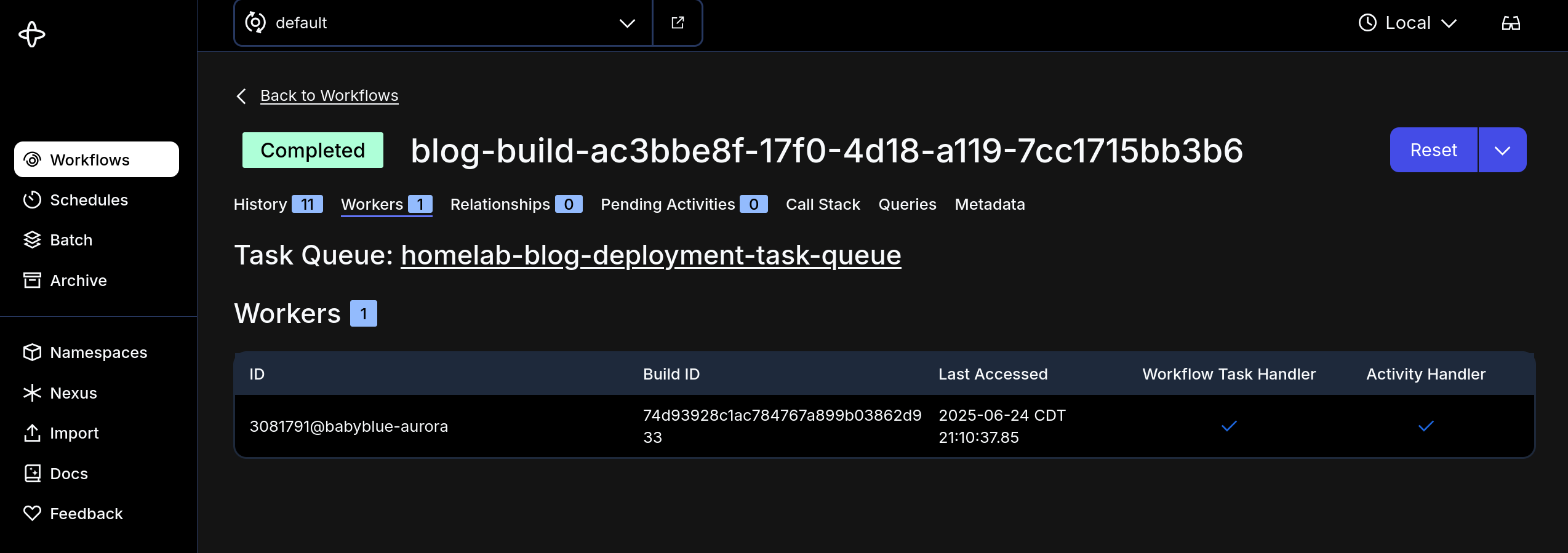
Nic Paynehttps://pype.devNextcloud PHP Opache Memory Consumptionhttps://pype.dev/nextcloud-php-opache-memory-consumption/2025-06-23T08:46:20Z2025-06-23T08:46:20ZToday I was combing through Nextcloud, just taking a gander at the apps, updates, etc.<h1 id="intro"><span class="heading-wear-glyph">Intro</span></h1>
<p>Today I was combing through Nextcloud, just taking a gander at the apps, updates, etc.</p>
<blockquote>
<p>The OPcache buffer is nearly full. To assure that all scripts can be hold in
cache, it is recommended to apply “opcache.memory_consumption” to your PHP
configuration with a value higher than “128”</p>
</blockquote>
<p>So I know <em>nothing</em> about <code>php</code> and I had no idea where to set this… Also I’m
running Nextcloud in a container so any updates will be blown away when the
container is removed (say next time I update Nextcloud)…</p>
<p>After a little duckduckgoing I came across <a href="https://www.reddit.com/r/NextCloud/comments/1gpxl5b/need_help_with_php_opcache_module_warning/">this reddit
post</a>
where a guy had the same issue…</p>
<p>The long and short of it is that on <em>single instance nextcloud deployments</em>
this php memory consumption value can be too low for Nextcloud to keep up with
the demand… You can see in the message they just recommend upping the value.</p>
<p>So I had to think about how to persist the change and have it take effect now
ideally without affecting any users too much… So here’s what I did - made the
change in 2 places:</p>
<h2 id="in-the-container"><span class="heading-wear-glyph">In the container</span> <a href="#in-the-container" class="heading-anchor">#</a></h2>
<p>I exec’d into the container and used this handy <code>sed</code> command <code>sed -i 's/^opcache\.memory_consumption\s*=\s*128$/opcache.memory_consumption=256/' /usr/local/etc/php/conf.d/opcache-recommended.ini</code> to update the value in the
running container - and I guess <code>php</code> maybe is loaded up dynamically or
something? but the warning did go away….</p>
<p>So how to persist this change when the filesystem is blown away when the
container is updated?</p>
<h2 id="in-the-config"><span class="heading-wear-glyph">In the config</span> <a href="#in-the-config" class="heading-anchor">#</a></h2>
<p>I set the env var <code>PHP_OPCACHE_MEMORY_CONSUMPTION</code> in the <code>docker-compose.yml</code>
file to 256 and voila… the change should persist…</p>
Nic Paynehttps://pype.devQuit issueing 200s for 500shttps://pype.dev/quit-issueing-200s-for-500s/2025-06-22T06:55:21Z2025-06-22T06:55:21Z<h1 id="stop-this-nonsense"><span class="heading-wear-glyph">Stop this nonsense</span></h1>
<figure>
<img src="https://cdn.statically.io/gh/pypeaday/images.pype.dev/main/blog-media/20250622115500_5bd3bc21.png" alt="20250622115500_5bd3bc21.png">
</figure>
Nic Paynehttps://pype.dev